max-mapper / max-mapper/menubar
Windows: the window opens at the wrong Y and Z position if icon is in tray menu
Nobody has claimed this yet.
- Dominant language
- TypeScript
- Stars
- 6.8k
- Forks
- 363
- PR merge metrics
- No merged PRs in 30d
Description
Description
It opens right at the bottom of the screen even if the tray icon is in the tray menu (I'm not sure if this is the correct name) and it opens behind the tray menu (z-axis).
Steps to Reproduce the Problem
- Launch the app.
- Drag the tray icon into the tray menu or if that's where the tray icon appears when launched, that's fine too.
- Click the icon.
Expected Behaviour
The window opens vertically above the icon (when the taskbar is at the bottom of the screen anyway) and on top (z-axis) of the tray menu.
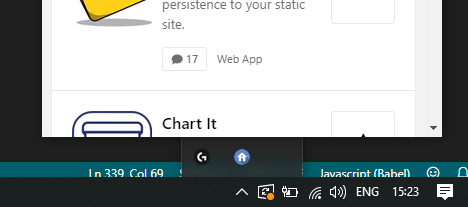
Actual Behaviour
The window is behind the tray menu (z-axis), and the bottom of the window is right up against the taskbar.
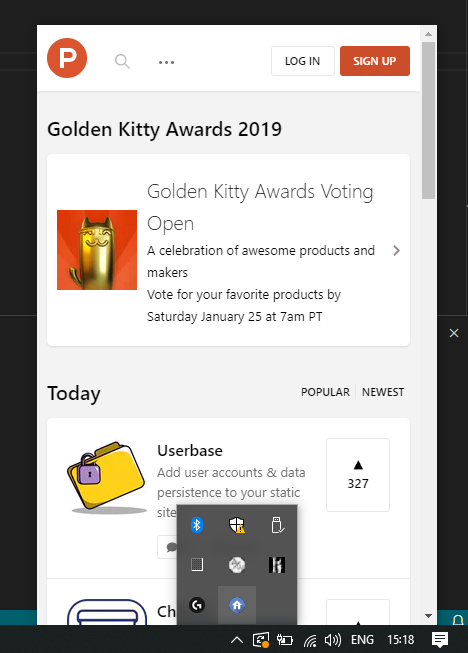
Specifications
- Menubar version: 7.2.0
- Platform: Windows 10 Pro (Insider Preview)
- Electron version: 7.1.9
Other information
I'm looking into fixing this now for our app. I have a proof of concept in which I:
- Set the window to be always on top.
- Manually hide it when the
focus-lostevent fires. - Comment out the .show call in menubar to prevent flicker.
- When the
after-showevent fires, I set the Y position based on where the tray is (i.e. tray bounds) and then show the window (viamenubar.window.show()).
I think there may be some other changes that I'm forgetting.
I'll try to get it to update the window position when the tray icon is dragged (there are some platform-specific events for this). Then I'll see how I can clean this up and move as much logic as possible into this library.
I'd love not to use alwaysOnTop so if you've any better ideas, let me know. window.moveTop() doesn't work.
Contributor guide
First steps
- Read the whole issue, then the project's contributing guide.
- Comment on the issue to say you are picking it up — it saves two people doing the same work.
- Fork the repository and make your change on a branch.
- Open a pull request that references the issue number.
Research direction
Start from the menubar window's show and positioning logic, including the after-show handling and tray bounds described in the issue. Reproduce on Windows with the icon inside the tray menu and inspect the focus-lost, show, and always-on-top behavior. Done means the window opens above the tray icon and in front of the tray menu without incorrect taskbar alignment.
Written by the indexing model from the issue text.
Assessment
- Tech stack
- electron, typescript
- Domain
- desktop
- Issue type
- Bug
- Difficulty
- 4/5
- Estimated time
- 3-5 days
- Activity status
- Stale
- Clarity
- Mostly clear
- Newbie friendliness
- 35/100