matryer / matryer/xbar-plugins
001-keyboard.1m.sh & 001-mouse.1m.sh on newer M1 mac
Nobody has claimed this yet.
- Dominant language
- Shell
- Stars
- 2.6k
- Forks
- 1.1k
- Avg merge
- 9d 15h
- Merged PRs (30d)
- 1
Description
These scripts didn't work for me on OSX Monterey with M1 but the commands used in https://github.com/aromig/scripts/tree/master/check_battery worked fine.
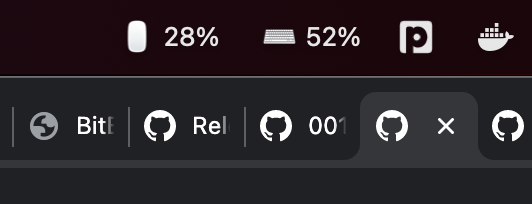
I altered my scripts so they work and look like the following. I just wanted to share here in case anyone else had this issue.
### 001-keyboard.1m.sh
```sh
#!/bin/sh
# Keybard Battery
# Mat Ryer
# matryer
PERCENTAGE=$(ioreg -c AppleDeviceManagementHIDEventService -r -l | grep -i keyboard -A 20 | grep BatteryPercent | cut -d = -f2 | cut -d ' ' -f2)
if [ "$PERCENTAGE" ]; then
echo "⌨️ $PERCENTAGE%"
#else
# echo "without bluetooth keyboard?"
fi
```
### 001-mouse.1m.sh
```sh
#!/bin/sh
# Mouse battery
# 1.0
# Alexandre Espinosa Menor
# alexandregz
# Show battery percentage for Bluetooth Mouse
# http://i.imgur.com/IqjZMJg.png
# works fine with Magic Mouse
PERCENTAGE=$(ioreg -c AppleDeviceManagementHIDEventService -r -l | grep -i mouse -A 20 | grep BatteryPercent | cut -d = -f2 | cut -d ' ' -f2)
if [ "$PERCENTAGE" ]; then
echo "🖱️ $PERCENTAGE%"
#else
# echo "without bluetooth mouse?"
fi
```
Contributor guide
First steps
- Read the whole issue, then the project's contributing guide.
- Comment on the issue to say you are picking it up — it saves two people doing the same work.
- Fork the repository and make your change on a branch.
- Open a pull request that references the issue number.
Research direction
Start with 001-keyboard.1m.sh and 001-mouse.1m.sh, then compare their battery lookup commands with the ioreg pipeline shown in the issue. Verify the updated scripts on an M1 Mac running Monterey and confirm that each plugin reports the connected device's battery percentage.
Written by the indexing model from the issue text.
Assessment
- Tech stack
- macos, shell
- Domain
- desktop
- Issue type
- Bug
- Difficulty
- 2/5
- Estimated time
- 1-3 hours
- Activity status
- Stale
- Clarity
- Clearly specified
- Newbie friendliness
- 45/100