matrix-org / matrix-org/matrix.org
Add screenshots to show off how bridges look and work
- Dominant language
- JavaScript
- Stars
- 616
- Forks
- 463
- Avg merge
- 2d 3h
- Merged PRs (30d)
- 19
Description
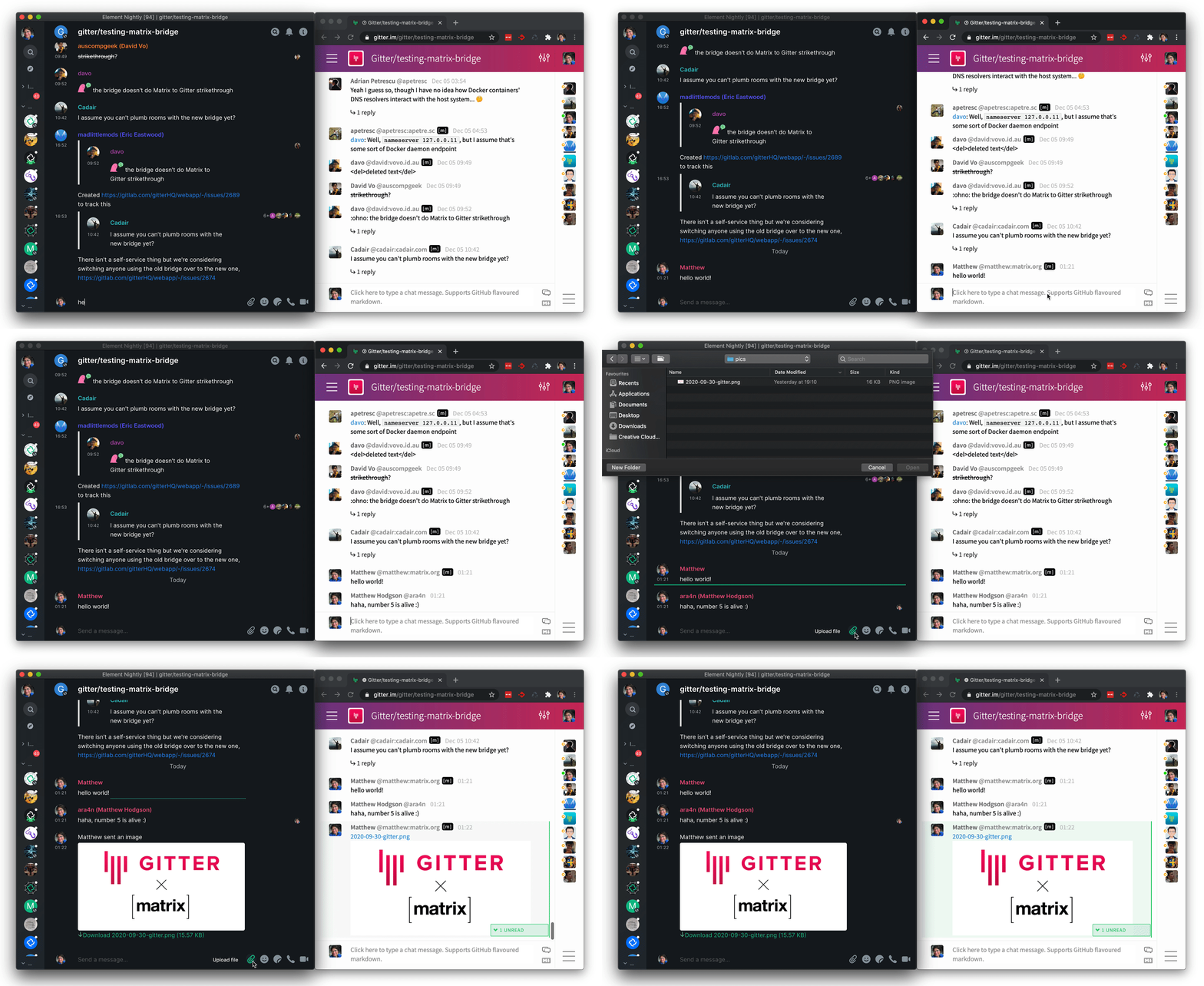
For bridges we show off on https://matrix.org/bridges/, we should add screenshots of what using the bridge actually does for you (in the project descriptions). For example, show the Gitter interface and how the messages look in Element on Matrix. The feature-set jargon doesn't help when someone isn't familiar and a picture can convey all of the same meaning instantly.
> 
>
> https://matrix.org/blog/2020/12/07/gitter-now-speaks-matrix
This issue was spurred on by the following YouTube comment:
> Can you do a video demoing how bridges actually appear and function to end users? Like it's nice the website tells me this bridge supports puppeting and whatnot but what does that actually look like from the matrix side when using it?
>
> If I'm bridging signal does that mean I can add new signal contacts through matrix or do I still need to go through the actual bridged apps to do things like that? What does it look like when I bridge a discord account that's in dozens of servers, do things get group in spaces or am I suddenly spammed by hundreds of channels?
>
> These are all answers I would like to know BEFORE installing a bridges but ATM installing a bridge seems to be the only ways to actually answer them. I can't find any videos/screenshots on it.
>
> *-- https://www.youtube.com/watch?v=z7tGU6vv6ZQ&lc=UgxVQhFAT9oDoSTmoPJ4AaABAg*
---
Also discussed at https://matrix.to/#/!UmtgDmQCkKlaIkLEyH:half-shot.uk/$16292133053566BeNNw:matrix.org?via=half-shot.uk&via=matrix.org&via=vector.modular.im
Contributor guide
Research direction
Start at the bridge project descriptions on https://matrix.org/bridges/ and review the existing Gitter example and linked demo. Add screenshots that show how bridged services appear and work for Matrix users, with enough context to clarify the feature-set jargon. Done means the relevant bridge descriptions include useful end-user visuals.
Written by the indexing model from the issue text.
Assessment
- Domain
- content, documentation
- Issue type
- Documentation
- Difficulty
- 3/5
- Estimated time
- 1-2 days
- Activity status
- Stale
- Clarity
- Mostly clear
- Newbie friendliness
- 42/100