material-components / material-components/material-components-android
[Dialog] Width of vertically arranged action buttons is not the same
Nobody has claimed this yet.
- Dominant language
- Java
- Stars
- 17.4k
- Forks
- 3.2k
- PR merge metrics
- No merged PRs in 30d
Description
**Description:**
- Open "DialogMainDemoFragment" demo (Material Catalog app)
- Press "Long Title, Message, Over-length Buttons" button
**Expected behavior:**
The buttons should be the same width.
**Actual behavior:**
The bottom button is slightly wider than the others:
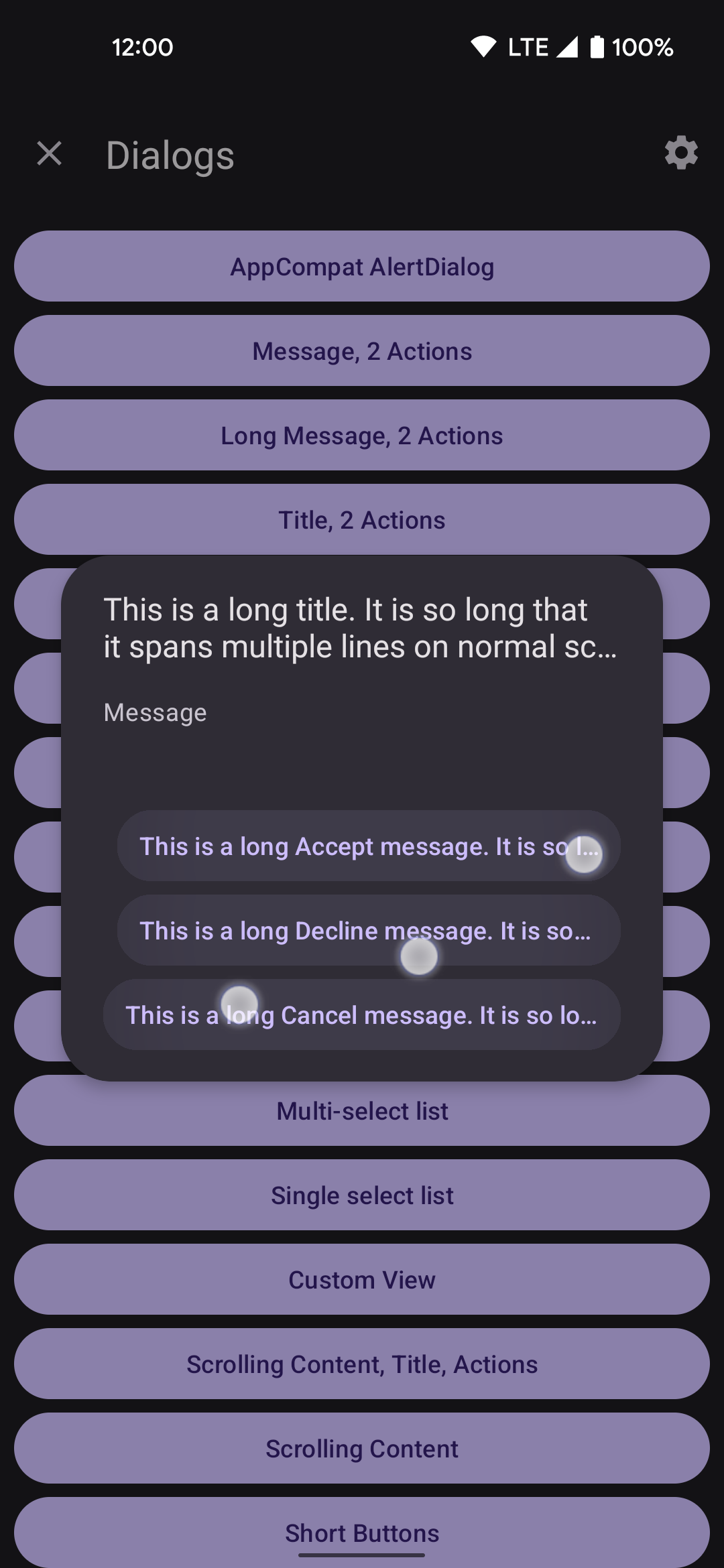
**Material Library version:** 1.7.0-alpha03
Contributor guide
First steps
- Read the whole issue, then the project's contributing guide.
- Comment on the issue to say you are picking it up — it saves two people doing the same work.
- Fork the repository and make your change on a branch.
- Open a pull request that references the issue number.
Research direction
Start by opening the DialogMainDemoFragment demo in the Material Catalog app and reproducing the issue with “Long Title, Message, Over-length Buttons.” Trace the dialog's vertically arranged action buttons and verify that the layout gives each button the same width; done means the demonstrated buttons align consistently.
Written by the indexing model from the issue text.
Assessment
- Tech stack
- android, java
- Domain
- mobile
- Issue type
- Bug
- Difficulty
- 3/5
- Estimated time
- 1-2 days
- Activity status
- Stale
- Clarity
- Mostly clear
- Newbie friendliness
- 35/100