material-components / material-components/material-components-android
[BadgeDrawable] Support new gravities, such as TOP, START, END and BOTTOM
Nobody has claimed this yet.
- Dominant language
- Java
- Stars
- 17.4k
- Forks
- 3.2k
- PR merge metrics
- No merged PRs in 30d
Description
The badge gravity consists of TOP_START, TOP_END, BOTTOM_START and BOTTOM_END currently. But consider a very simple layout, a width-wrap-content text button with an icon on top of the text.
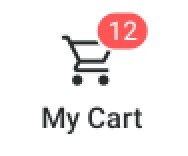
Usually we hope the badge is at the top_end of the icon. But the width of the button is different in different languages because the width of "My Cart" varies. If the badge gravity support TOP ( which means vertically on the top and horizontally in the middle), the badge can be easily positioned with the gravity TOP and some horizontal offset.
Contributor guide
First steps
- Read the whole issue, then the project's contributing guide.
- Comment on the issue to say you are picking it up — it saves two people doing the same work.
- Fork the repository and make your change on a branch.
- Open a pull request that references the issue number.
Research direction
Start with BadgeDrawable, the entry point named in the issue, and trace how TOP_START, TOP_END, BOTTOM_START, and BOTTOM_END are currently handled. Done means TOP, START, END, and BOTTOM can position the badge as requested for varying button widths while retaining horizontal offset support.
Written by the indexing model from the issue text.
Assessment
- Tech stack
- android, java
- Domain
- mobile
- Issue type
- Feature
- Difficulty
- 3/5
- Estimated time
- 1-2 days
- Activity status
- Stale
- Clarity
- Mostly clear
- Newbie friendliness
- 45/100