material-components / material-components/material-components-android
[MaterialTimePicker] It's impossible to select AM hours when time format is set to CLOCK_12
Nobody has claimed this yet.
- Dominant language
- Java
- Stars
- 17.4k
- Forks
- 3.2k
- PR merge metrics
- No merged PRs in 30d
Description
Description: Hey, this task is a duplicate for 1775 since it was closed before resolving.
I have an issue with the newest alpha03 release. It is impossible to select AM hours when time format is set to TimeFormat.CLOCK_12, because there is no toggle or anything that will allow me to do so. Please see the following screenshot:
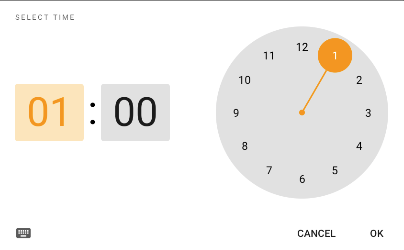
Expected behavior: I would expect to be allowed to specify if a picked time is AM or PM.
Source code:
Picker initialization:
    val materialPicker = MaterialTimePicker.Builder()
            .setHour(12)
            .setMinute(0)
            .setInputMode(MaterialTimePicker.INPUT_MODE_CLOCK)
            .setTimeFormat(TimeFormat.CLOCK_12H)
            .build()
        materialPicker.addOnPositiveButtonClickListener {
            onTimePicked(materialPicker.hour, materialPicker.minute)
        }
        materialPicker.show(parentFragmentManager, null)
Style for the activity:
<style name="DialogActivity" parent="Theme.MaterialComponents.Light.Dialog.Bridge">
    <item name="windowNoTitle">true</item>
    <item name="android:windowBackground">#ffffff</item>
    <item name="materialTimePickerTheme">
        @style/ThemeOverlay.MaterialComponents.Light
    </item>
</style>
Android API version: Android 10 (SDK 29), also tested on Android Emulator with Android 5.1.1 (SDK 22)
Material Library version: Material Android Library version 1.3.0-alpha03
Device: Samsung Tab A 10,1 2019 (Android 10, SDK 29)
Contributor guide
First steps
- Read the whole issue, then the project's contributing guide.
- Comment on the issue to say you are picking it up — it saves two people doing the same work.
- Fork the repository and make your change on a branch.
- Open a pull request that references the issue number.
Research direction
Start from the MaterialTimePicker entry point and reproduce the provided Builder configuration with CLOCK_12H and INPUT_MODE_CLOCK. Verify the picker behavior on the reported setup; done means the user can explicitly choose AM or PM and the selected hour and minute are returned correctly.
Written by the indexing model from the issue text.
Assessment
- Tech stack
- android, kotlin
- Domain
- mobile
- Issue type
- Bug
- Difficulty
- 3/5
- Estimated time
- 1-2 days
- Activity status
- Stale
- Clarity
- Mostly clear
- Newbie friendliness
- 42/100