material-components / material-components/material-components-android
[MaterialDatePicker] Select new date when a year is changed
Nobody has claimed this yet.
- Dominant language
- Java
- Stars
- 17.4k
- Forks
- 3.2k
- PR merge metrics
- No merged PRs in 30d
Description
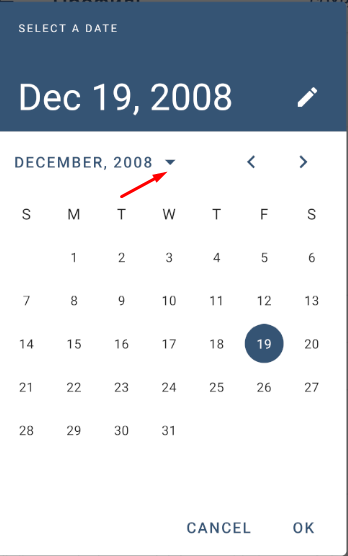
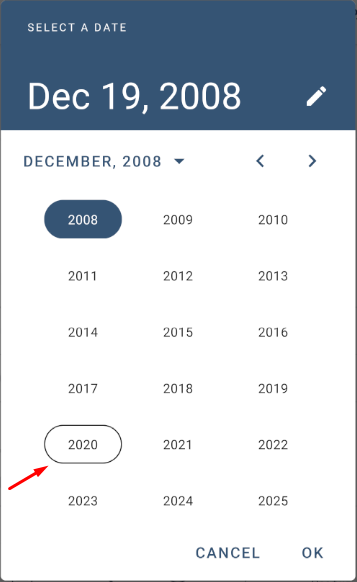
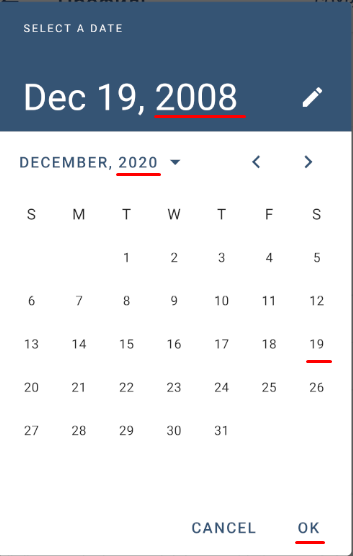
When we change a year in a `DatePicker`, it scrolls to another date, but it is not selected. When we later press "OK", the date doesn't change (strange that even "OK" is enabled). The user has to click a new date and then press "OK". So, he has to make an unneeded click.
I suppose, a new date (the same day and month, except 29 Febuary, and a new year) should be selected. If the user then presses "OK", it should be assigned. If he reconsideres and presses "Cancel", the date won't change.
In pictures below after the user selected 2020 year, a date 19.12.2020 should be selected automatically, and after "OK" it should be assigned to the date field.
Contributor guide
First steps
- Read the whole issue, then the project's contributing guide.
- Comment on the issue to say you are picking it up — it saves two people doing the same work.
- Fork the repository and make your change on a branch.
- Open a pull request that references the issue number.
Research direction
Start at the MaterialDatePicker year-selection flow and reproduce changing the year, then pressing OK without clicking another date. The fix is complete when the same day and month are selected automatically for the new year, with appropriate handling for February 29, and Cancel still leaves the original date unchanged.
Written by the indexing model from the issue text.
Assessment
- Tech stack
- android, java
- Domain
- mobile-dev
- Issue type
- Bug
- Difficulty
- 3/5
- Estimated time
- 1-2 days
- Activity status
- Stale
- Clarity
- Mostly clear
- Newbie friendliness
- 35/100