material-components / material-components/material-components-android
[TextInputLayout] Counter label is invisible if TextInputLayout height is anything but 'wrap_content'
Nobody has claimed this yet.
- Dominant language
- Java
- Stars
- 17.4k
- Forks
- 3.2k
- PR merge metrics
- No merged PRs in 30d
Description
**Description:** When enabling the "counter" helper text, the counter label itself isn't visible if the `TextInputLayout` has a static height; It's only visible if the `TextInputLayout` height is `wrap_content`.
**Expected behavior:** I expect that the counter label would be visible regardless of the height of the text field.
I'd be happy to try and dig in and fix this/submit a PR! Just want to clarify if this is expected behavior or not; I don't see much in the material spec. about large/multi-line text fields 🤷♂️
**Source code:** Below are some screenshots of a layout where I'm testing this.
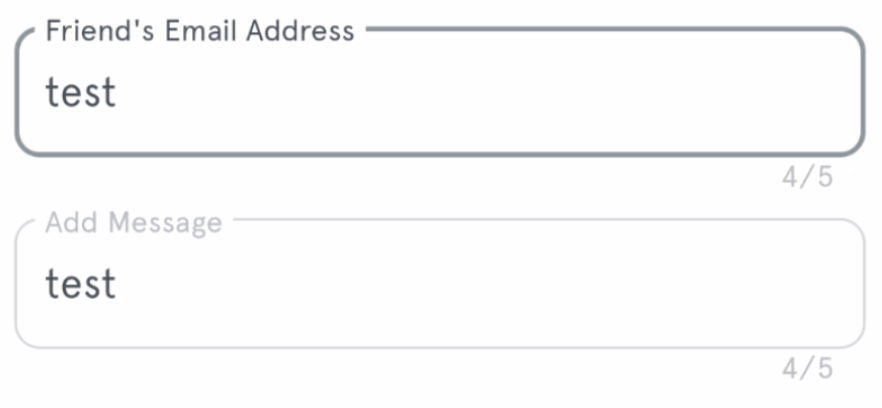
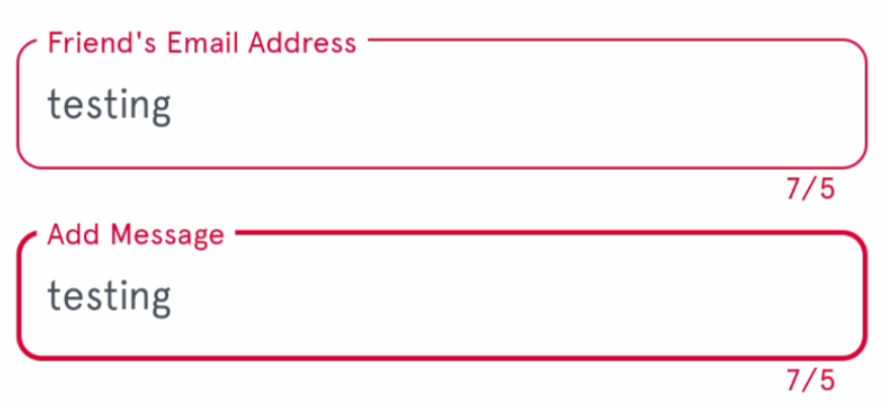
I have two `TextInputLayout` fields aligned vertically. The counter is enabled on both, and the max. counter length is set to 5. The top field ("Friends email address") has its height set to `wrap_content` in both examples. The bottom field ("Add message") has its height as `wrap_content` in the first example, and a static height (`90dp`) in the second example.
The counter seems to work in both cases (field color is the correct error color when the text length is > counter max. length); the counter label is just hidden (height of 0) in the bottom example.
**Example 1** (IDs, styles and other attributes omitted)
```
```
| | |
|---|---|
| |
| |
|
**Example 2** (IDs, styles and other attributes omitted)
```
```
| | |
|---|---|
| |
| |
|
**Android API version:** Android 10
**Material Library version:** Tested on `1.1.0` and `1.2.0-beta01`
**Device:** Samsung S9 (SM-G960U1)
To help us triage faster, please check to make sure you are using the [latest version](https://github.com/material-components/material-components-android/releases) of the library.
We also happily accept [pull requests](https://github.com/material-components/material-components-android/pulls).
Contributor guide
First steps
- Read the whole issue, then the project's contributing guide.
- Comment on the issue to say you are picking it up — it saves two people doing the same work.
- Fork the repository and make your change on a branch.
- Open a pull request that references the issue number.
Research direction
Start with the TextInputLayout counter behavior and reproduce the issue using the two XML layouts in the report, comparing wrap_content with a fixed 90dp height. Trace how the counter label is laid out and add a regression test for a fixed-height TextInputLayout. Done means the counter remains visible when the field height is fixed.
Written by the indexing model from the issue text.
Assessment
- Tech stack
- android, java
- Domain
- mobile
- Issue type
- Bug
- Difficulty
- 3/5
- Estimated time
- 1-2 days
- Activity status
- Stale
- Clarity
- Mostly clear
- Newbie friendliness
- 35/100