massgov / massgov/feature-requests
Change bullet styling to reflect hierarchy
Nobody has claimed this yet.
- Dominant language
- No language data
- Stars
- 12
- Forks
- 8
- PR merge metrics
- No merged PRs in 30d
Description
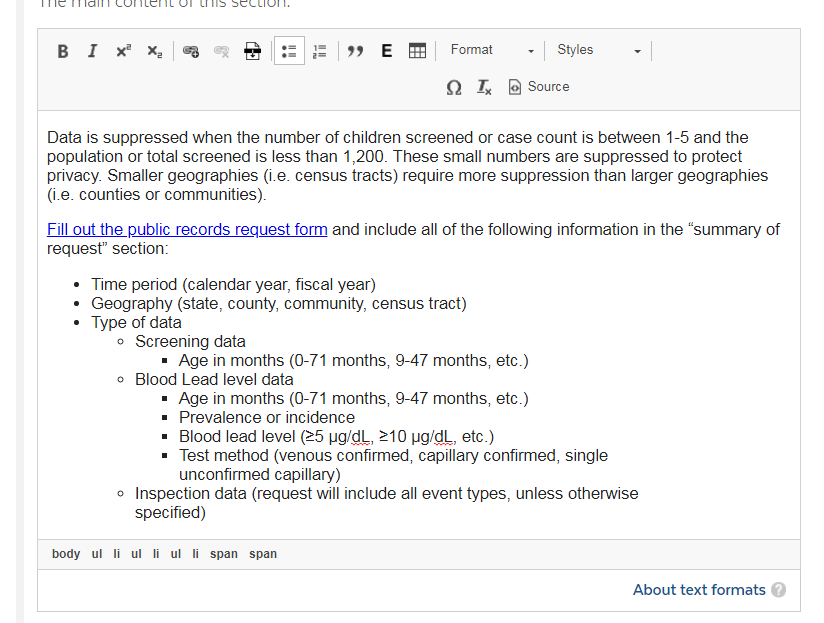
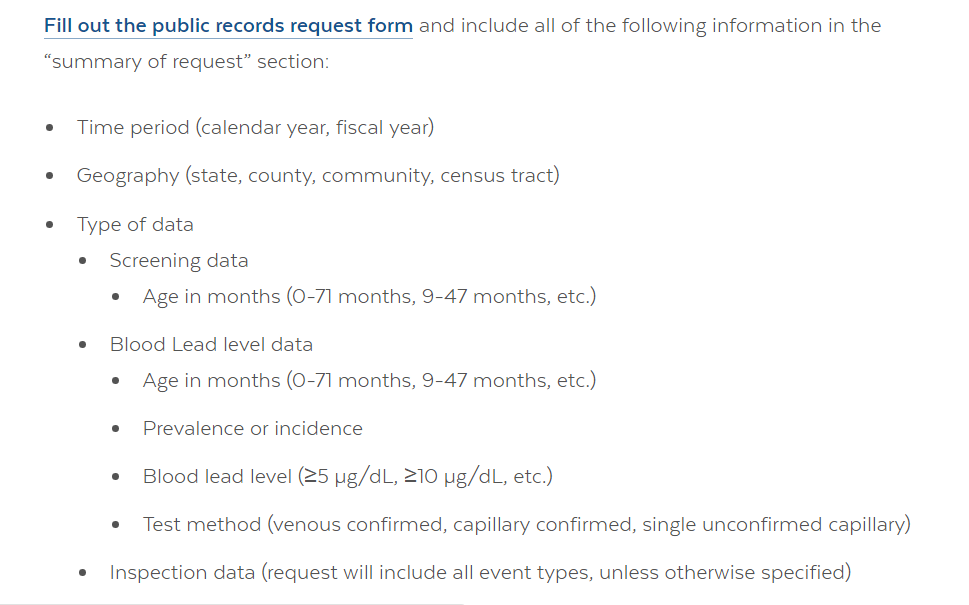
Currently bullets are styled the same in unordered lists regardless of level of hierarchy. They also appear differently within the rich text editor (where styling is applied) than on the front end. User story below, and screenshots are attached.
User story:
Regarding bulleted lists, the sub-bullets are all the same style, rather than differentiated (i.e. dark circle, open circle, square, etc). We worry it is not visually differentiated enough. I notice that the sub-bullets do change style in the rich text editor, but they reformat to the same marker on the published page (screenshots attached). Could we look into maybe adjusting this formatting?
See ServiceNow ticket # SCTASK0048817 and JIRA ticket # DP-9450 for further details.
Contributor guide
No contributing guide indexed for this repository
First steps
- Read the whole issue, then the project's contributing guide.
- Comment on the issue to say you are picking it up — it saves two people doing the same work.
- Fork the repository and make your change on a branch.
- Open a pull request that references the issue number.
Research direction
No repository files, tests, or entry points are identified. Start by reviewing the attached editor and published-page screenshots and the referenced ServiceNow and JIRA tickets, then locate where list styling is defined. Done means nested unordered-list levels are visibly differentiated and consistent between the editor and published page.
Written by the indexing model from the issue text.
Assessment
- Domain
- design, frontend
- Issue type
- Feature
- Difficulty
- 4/5
- Estimated time
- 3-5 days
- Activity status
- Stale
- Clarity
- Needs clarification
- Newbie friendliness
- 25/100