mapbox / mapbox/mapbox-navigation-android
Some questions about Speed Limit
Nobody has claimed this yet.
- Dominant language
- Kotlin
- Stars
- 651
- Forks
- 321
- PR merge metrics
- No merged PRs in 30d
Description
Feedback on some recent problems
I found the limit speed feature could work in your master branch. So I can’t wait to try and see if this feature is stable now.
I selected a route in Westfield, US from 124 Barchester Way to 416 Colonial Avenue that was got from Mapbox service and replace the default route, but I don’t know why I didn’t see the speed limit prompt as I wished. This aroused my curiosity, I spent some time doing some tests. In the end, there is no way to explain why the SpeedLimitView cannot be displayed. So I write this open issue, I hope you can give me some suggestions or help and next I'll show you my whole testing process.
- Obtain the corresponding route information according to the local JSON file
At first, I compared the file named 'sample_route_2_token_replacement' that you put in the raw directory. The route generated from this document can display the speed limit normally. I wrote a demo to show it on the mapview.
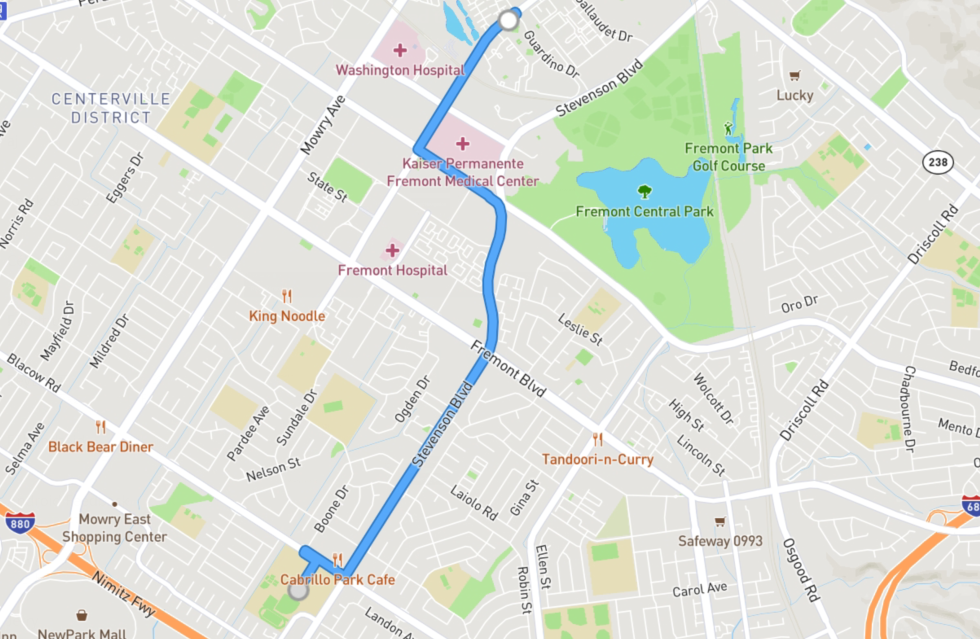
I could get the route option info from the JSON, including the coordinates, some request parameters of the route direction.
	"routeOptions": {
		"baseUrl": "https://api.mapbox.com",
		"user": "mapbox",
		"profile": "driving-traffic",
		"coordinates": [
			[
				-121.9716267,
				37.558815
			],
			[
				-121.9864957,
				37.5276826
			]
		],
		"alternatives": true,
		"language": "en",
		"continue_straight": false,
		"roundabout_exits": false,
		"geometries": "polyline6",
		"overview": "full",
		"steps": true,
		"annotations": "maxspeed,duration,congestion",
		"voice_instructions": true,
		"banner_instructions": true,
		"voice_units": "imperial",
		"access_token": "$tokenHere",
		"uuid": "dISvH4q1SoHAjBIhYAor3PjTnRKv4cqyQpKLmA6tUCiYcQ5t7xW6Iw=="
	}
Next, I used the coordinates to get the routes through the Mapbox service.
https://api.mapbox.com/directions/v5/mapbox/driving-traffic/-121.9716267,37.558815;-121.9864957,37.5276826?access_token=$myselftoken&steps=true&geometries=polyline6&overview=full&voice_instructions=true&voice_units=imperial&banner_instructions=true&roundabout_exits=false&enable_refresh=false&alternatives=true&continue_straight=false&language=en&annotations=maxspeed,duration,congestion
It returned two different routes and I display these two routes on the mapview as below:

The interesting thing is that these two routes are inconsistent with the above route and I used these two routes to navigate.
Unfortunately, I still didn’t see the speed limit prompt. The gray route on the right is more similar to the route in the top picture, so I attached the routeOptions of this route:
  "routeOptions": {
    "baseUrl": "https://api.mapbox.com",
    "user": "mapbox",
    "profile": "driving-traffic",
    "coordinates": [
      [
        -121.9716267,
        37.558815
      ],
      [
        -121.9864957,
        37.5276826
      ]
    ],
    "alternatives": true,
    "language": "en",
    "continue_straight": false,
    "roundabout_exits": false,
    "geometries": "polyline6",
    "overview": "full",
    "steps": true,
    "annotations": "congestion,duration,maxspeed",
    "voice_instructions": true,
    "banner_instructions": true,
    "voice_units": "imperial",
    "access_token": "$myselfToken",
    "uuid": "ckllrgxqa05d177uqaz3i864o"
  }
I sent two emails to Mapbox Support, they guys reminded me to pay attention to two parameters, overview=full and annotations=maxspeed. I checked my request parameters and the response data, Either of them returned maxspeed info.
I intercepted the annotations information of the gray route and attached it to this issue.
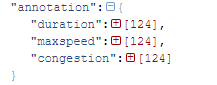
"maxspeed": [
{
"speed": 56,
"unit": "km/h"
},
{
"speed": 56,
"unit": "km/h"
},
{
"speed": 56,
"unit": "km/h"
},
{
"unknown": true
},
{
"speed": 56,
"unit": "km/h"
},
{
"speed": 56,
"unit": "km/h"
},
{
"speed": 56,
"unit": "km/h"
},
{
"speed": 56,
"unit": "km/h"
},
{
"speed": 56,
"unit": "km/h"
},
{
"speed": 56,
"unit": "km/h"
},
{
"speed": 56,
"unit": "km/h"
},
{
"speed": 56,
"unit": "km/h"
},
{
"speed": 56,
"unit": "km/h"
},
{
"speed": 56,
"unit": "km/h"
},
{
"speed": 56,
"unit": "km/h"
},
{
"speed": 56,
"unit": "km/h"
},
{
"speed": 56,
"unit": "km/h"
},
{
"speed": 56,
"unit": "km/h"
},
{
"speed": 56,
"unit": "km/h"
},
{
"speed": 56,
"unit": "km/h"
},
{
"speed": 56,
"unit": "km/h"
},
{
"speed": 56,
"unit": "km/h"
},
{
"speed": 56,
"unit": "km/h"
},
{
"speed": 56,
"unit": "km/h"
},
{
"speed": 56,
"unit": "km/h"
},
{
"speed": 56,
"unit": "km/h"
},
{
"speed": 56,
"unit": "km/h"
},
{
"speed": 56,
"unit": "km/h"
},
{
"speed": 56,
"unit": "km/h"
},
{
"speed": 56,
"unit": "km/h"
},
{
"speed": 56,
"unit": "km/h"
},
{
"speed": 56,
"unit": "km/h"
},
{
"speed": 56,
"unit": "km/h"
},
{
"speed": 56,
"unit": "km/h"
},
{
"speed": 56,
"unit": "km/h"
},
{
"speed": 56,
"unit": "km/h"
},
{
"speed": 56,
"unit": "km/h"
},
{
"speed": 56,
"unit": "km/h"
},
{
"speed": 56,
"unit": "km/h"
},
{
"speed": 56,
"unit": "km/h"
},
{
"speed": 56,
"unit": "km/h"
},
{
"speed": 56,
"unit": "km/h"
},
{
"speed": 56,
"unit": "km/h"
},
{
"speed": 56,
"unit": "km/h"
},
{
"speed": 56,
"unit": "km/h"
},
{
"speed": 56,
"unit": "km/h"
},
{
"speed": 56,
"unit": "km/h"
},
{
"speed": 56,
"unit": "km/h"
},
{
"speed": 56,
"unit": "km/h"
},
{
"speed": 56,
"unit": "km/h"
},
{
"speed": 56,
"unit": "km/h"
},
{
"speed": 56,
"unit": "km/h"
},
{
"speed": 56,
"unit": "km/h"
},
{
"unknown": true
},
{
"unknown": true
},
{
"unknown": true
},
{
"unknown": true
},
{
"unknown": true
},
{
"unknown": true
},
{
"unknown": true
},
{
"unknown": true
},
{
"unknown": true
},
{
"speed": 64,
"unit": "km/h"
},
{
"speed": 64,
"unit": "km/h"
},
{
"speed": 64,
"unit": "km/h"
},
{
"speed": 64,
"unit": "km/h"
},
{
"speed": 64,
"unit": "km/h"
},
{
"unknown": true
},
{
"unknown": true
},
{
"speed": 64,
"unit": "km/h"
},
{
"speed": 64,
"unit": "km/h"
},
{
"speed": 64,
"unit": "km/h"
},
{
"speed": 64,
"unit": "km/h"
},
{
"speed": 64,
"unit": "km/h"
},
{
"speed": 64,
"unit": "km/h"
},
{
"speed": 64,
"unit": "km/h"
},
{
"unknown": true
},
{
"unknown": true
},
{
"speed": 64,
"unit": "km/h"
},
{
"speed": 64,
"unit": "km/h"
},
{
"unknown": true
},
{
"speed": 64,
"unit": "km/h"
},
{
"speed": 64,
"unit": "km/h"
},
{
"speed": 64,
"unit": "km/h"
},
{
"unknown": true
},
{
"unknown": true
},
{
"unknown": true
},
{
"unknown": true
},
{
"speed": 64,
"unit": "km/h"
},
{
"speed": 64,
"unit": "km/h"
},
{
"speed": 64,
"unit": "km/h"
},
{
"speed": 64,
"unit": "km/h"
},
{
"speed": 64,
"unit": "km/h"
},
{
"unknown": true
},
{
"unknown": true
},
{
"speed": 64,
"unit": "km/h"
},
{
"speed": 64,
"unit": "km/h"
},
{
"speed": 64,
"unit": "km/h"
},
{
"speed": 64,
"unit": "km/h"
},
{
"speed": 64,
"unit": "km/h"
},
{
"speed": 64,
"unit": "km/h"
},
{
"speed": 64,
"unit": "km/h"
},
{
"speed": 64,
"unit": "km/h"
},
{
"speed": 64,
"unit": "km/h"
},
{
"speed": 64,
"unit": "km/h"
},
{
"unknown": true
},
{
"unknown": true
},
{
"speed": 64,
"unit": "km/h"
},
{
"speed": 64,
"unit": "km/h"
},
{
"speed": 64,
"unit": "km/h"
},
{
"speed": 64,
"unit": "km/h"
},
{
"speed": 64,
"unit": "km/h"
},
{
"speed": 64,
"unit": "km/h"
},
{
"speed": 64,
"unit": "km/h"
},
{
"unknown": true
},
{
"speed": 64,
"unit": "km/h"
},
{
"unknown": true
},
{
"unknown": true
},
{
"unknown": true
},
{
"unknown": true
},
{
"unknown": true
},
{
"unknown": true
},
{
"unknown": true
},
{
"unknown": true
}
]
I am very confused about this result. I don’t know whether the reason is my own problem or this feature is still under development.
Contributor guide
First steps
- Read the whole issue, then the project's contributing guide.
- Comment on the issue to say you are picking it up — it saves two people doing the same work.
- Fork the repository and make your change on a branch.
- Open a pull request that references the issue number.
Research direction
Start by reproducing the reported route in the Android navigation sample using the Mapbox Directions request parameters and the supplied maxspeed annotations. Trace why SpeedLimitView is not displayed, then verify the behavior with both the local sample_route_2_token_replacement data and the Westfield route.
Written by the indexing model from the issue text.
Assessment
- Tech stack
- kotlin
- Domain
- mobile-dev
- Issue type
- Bug
- Difficulty
- 4/5
- Estimated time
- 3-5 days
- Activity status
- Stale
- Clarity
- Needs clarification
- Newbie friendliness
- 25/100