mapbox / mapbox/mapbox-navigation-android
Not able to see contextual feedback screenshot when in landscape
Nobody has claimed this yet.
- Dominant language
- Kotlin
- Stars
- 651
- Forks
- 321
- PR merge metrics
- No merged PRs in 30d
Description
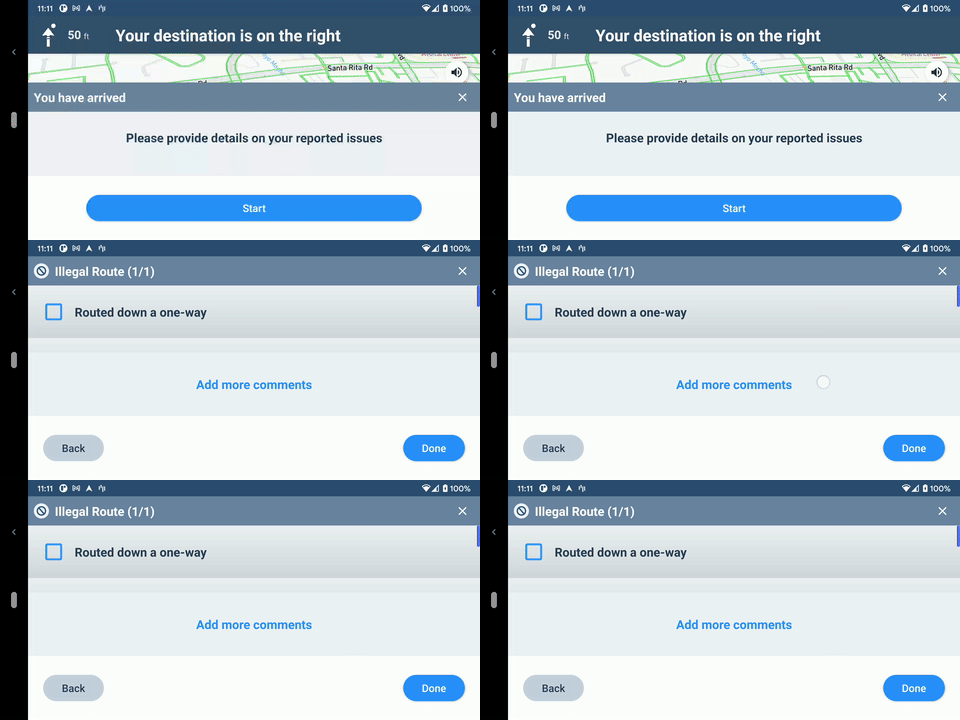
When in landscape mode and filling up the detailed feedback form, I'm not able to peek at the contextual screenshot. The bottom sheet currently requires a click on the image to fully collapse, which is possible in vertical most of the time, but in the landscape, the sheet is extended to full screen and covers the image completely.
We might want to look into different ways of collapsing the sheet, not an image click, but maybe a drag or a separate button.
Contributor guide
First steps
- Read the whole issue, then the project's contributing guide.
- Comment on the issue to say you are picking it up — it saves two people doing the same work.
- Fork the repository and make your change on a branch.
- Open a pull request that references the issue number.
Research direction
Start from the detailed feedback form and its landscape bottom sheet, using the reported screenshot to reproduce how the sheet covers the contextual image. Review the existing image-click collapse behavior and determine a usable landscape interaction, then verify that the screenshot can be viewed while completing feedback without obscuring the form.
Written by the indexing model from the issue text.
Assessment
- Tech stack
- android, kotlin
- Domain
- mobile
- Issue type
- Bug
- Difficulty
- 4/5
- Estimated time
- 3-5 days
- Activity status
- Stale
- Clarity
- Mostly clear
- Newbie friendliness
- 35/100