mapbox / mapbox/mapbox-navigation-android
Positioning of the guidance images
Nobody has claimed this yet.
- Dominant language
- Kotlin
- Stars
- 651
- Forks
- 321
- PR merge metrics
- No merged PRs in 30d
Description
The guidance images are positioned within the `InstructionView` layout, but there's no option to customize this and work together with other app UI elements. At least being able to set the gravity and/or padding for both portrait and landscape would be great.
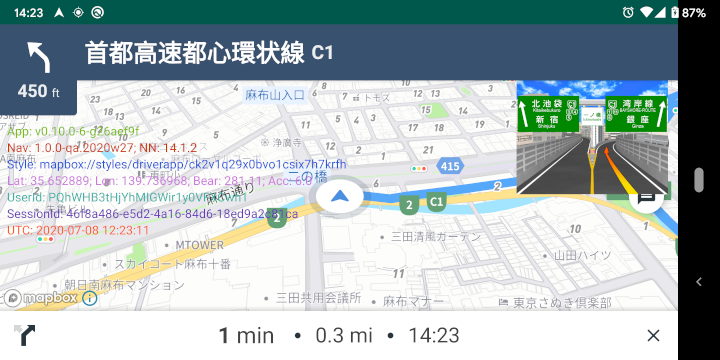
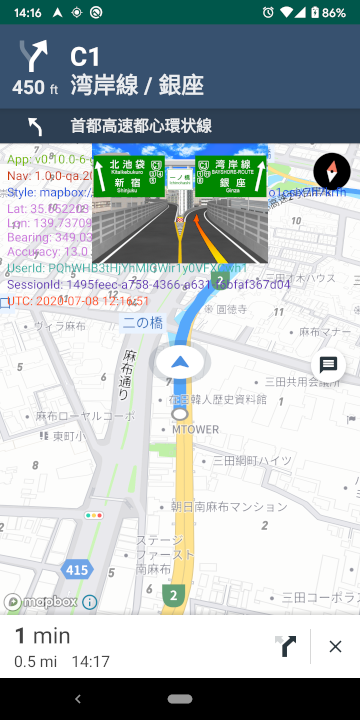
/cc @abhishek1508
Contributor guide
First steps
- Read the whole issue, then the project's contributing guide.
- Comment on the issue to say you are picking it up — it saves two people doing the same work.
- Fork the repository and make your change on a branch.
- Open a pull request that references the issue number.
Research direction
Start by locating the InstructionView layout and the code that positions its guidance images, then trace how portrait and landscape layouts are selected. The work is done when callers can configure gravity and/or padding for the guidance images in both orientations and the resulting placement works alongside other app UI elements.
Written by the indexing model from the issue text.
Assessment
- Tech stack
- kotlin
- Domain
- mobile
- Issue type
- Feature
- Difficulty
- 3/5
- Estimated time
- 1-2 days
- Activity status
- Stale
- Clarity
- Mostly clear
- Newbie friendliness
- 35/100