Text-anchor is not properly supported in collision circle placement
Nobody has claimed this yet.
- Dominant language
- TypeScript
- Stars
- 12.4k
- Forks
- 2.4k
- PR merge metrics
- No merged PRs in 30d
Description
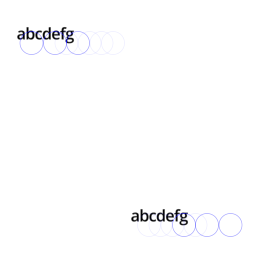
Collision circle placement logic treats all line labels as they would be always placed directly on a line. This conflicts with the "text-anchor" property which can be used to offset text relative to anchor position. Another issue is that the placement logic ignores the possibility of line labels being upside down. This becomes a problem when the renderer wants to flip a label that is using a non-centered Text-anchor.
**mapbox-gl-js version**: `1.9.0-dev`
### Steps to Trigger Behavior
This issue can be replicated with the following render test or by visiting `debug/textsize.html` page.
style.json
```json
{
"version": 8,
"metadata": {
"test": {
"collisionDebug": true,
"width": 512,
"height": 512
}
},
"center": [
0,
0
],
"zoom": 4,
"pitch": 0,
"bearing": 0,
"sources": {
"geojson": {
"type": "geojson",
"maxzoom": 1,
"data": {
"type": "FeatureCollection",
"features": [{
"type": "Feature",
"properties": {
"name": "abcdefg"
},
"geometry": {
"type": "LineString",
"coordinates": [
[ -5, 4 ], [ 5, 4 ]
]
}
},
{
"type": "Feature",
"properties": {
"name": "abcdefg"
},
"geometry": {
"type": "LineString",
"coordinates": [
[ 5, -4 ], [ -5, -4 ]
]
}
}]
}
}
},
"glyphs": "local://glyphs/{fontstack}/{range}.pbf",
"layers": [
{
"id": "background",
"type": "background",
"paint": {
"background-color": "white"
}
},
{
"id": "line",
"type": "symbol",
"source": "geojson",
"layout": {
"text-field": "{name}",
"text-font": [
"Open Sans Semibold",
"Arial Unicode MS Bold"
],
"symbol-placement": "line",
"symbol-spacing": 100,
"text-pitch-alignment": "map",
"text-anchor": "bottom-right"
}
}
]
}
```
Result of the render test:
Contributor guide
First steps
- Read the whole issue, then the project's contributing guide.
- Comment on the issue to say you are picking it up — it saves two people doing the same work.
- Fork the repository and make your change on a branch.
- Open a pull request that references the issue number.
Research direction
Start with the render test described in the issue or the debug/textsize.html page, using the supplied style.json to reproduce the collision circle placement. Trace the line-label placement logic and verify that collision circles account for text-anchor offsets and labels that may be flipped upside down.
Written by the indexing model from the issue text.
Assessment
- Tech stack
- typescript
- Domain
- frontend
- Issue type
- Bug
- Difficulty
- 4/5
- Estimated time
- 3-5 days
- Activity status
- Stale
- Clarity
- Mostly clear
- Newbie friendliness
- 45/100