Show/hide labels based on overlap with external elements
Nobody has claimed this yet.
- Dominant language
- TypeScript
- Stars
- 12.4k
- Forks
- 2.4k
- PR merge metrics
- No merged PRs in 30d
Description
## Motivation
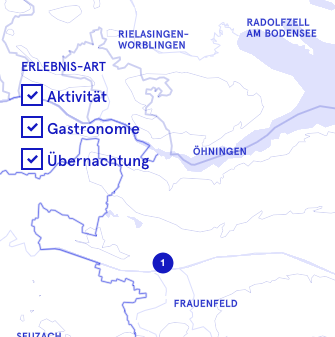
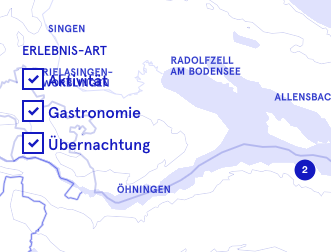
I have a map in a webapp (mapbox gl js, vue js) with a filter/legend over it. This filter/legend has a transparent background: this is a design decision. Generally this is fine, but sometimes the filter/legend obviously overlaps labels on the map. It would be nice if there was a way to detect whether there is a shape on the map and to hide labels in that area.
If there is already some way to manage this, I would be grateful if someone could tell me how.
images:
Works great
Not that great (overlap with text)
### Implementation
Showing/hiding labels could work many different ways: it would also be fine if I could tell mapbox, for Pixels in this range, don't show labels. Or for labels inside this geojson shape. Or in these bounds. I just want to shut off labels in one specific area of the map.
Thanks!
Contributor guide
First steps
- Read the whole issue, then the project's contributing guide.
- Comment on the issue to say you are picking it up — it saves two people doing the same work.
- Fork the repository and make your change on a branch.
- Open a pull request that references the issue number.
Research direction
The issue names no source files, tests, or entry points. Start by reproducing the transparent filter or legend overlapping map labels in a Mapbox GL JS and Vue JS app, then define whether pixel ranges, GeoJSON shapes, or bounds should control label visibility; done means labels can be suppressed reliably in one specified area.
Written by the indexing model from the issue text.
Assessment
- Tech stack
- javascript, typescript
- Domain
- frontend, web-dev
- Issue type
- Feature
- Difficulty
- 5/5
- Estimated time
- Over a week
- Activity status
- Stale
- Clarity
- Needs clarification
- Newbie friendliness
- 20/100