Unexpected background of sdf icon when icon-halo-width more than some critical value.
@ChrisLoer is already working on this.
Since Oct 18, 2018.
- Dominant language
- TypeScript
- Stars
- 12.4k
- Forks
- 2.4k
- PR merge metrics
- No merged PRs in 30d
Description
mapbox-gl-js version: 0.48.0
browser: chrome
Steps to Trigger Behavior
- Add sdf icon
- Set icon-halo-width to some big value
Link to Demonstration
http://jsbin.com/heqadegucu/edit?html,output
Expected Behavior
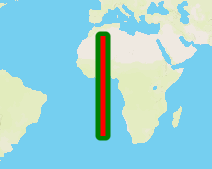
We should not see an unexpected background of image. (In this example icon-halo-width has a value less than critical)
Actual Behavior
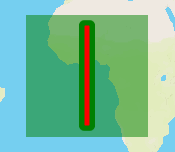
We can see an unexpected background of image.
Additional information
For some combination of values, everything is fine (e.g. icon-halo-width=2, icon-halo-blur=2, these are the same values as used in [icon-halo-blur/literal| https://github.com/mapbox/mapbox-gl-js/blob/8121e9db044533d7e44e0afc8c58e71b6d8ec260/test/integration/render-tests/icon-halo-blur/literal/style.json] test, also OK for 3/1, 3/2, 4/1 combinations of icon-halo-width, icon-halo-blur).
But for some combination of values of icon-halo-width/icon-halo-blur (e.g. 3/3, 4/2, 4/3, 4/4, 5/1, 6/0) there’s a semi-transparent fill for whole icon background. It seem to have different transparency depending on particular values, for some values the fill is almost invisible, for others it is hard to miss it even with the naked eye.
This seems like a bug, which makes icon halo unusable for some cases.
It could be reproduced using SDF icon (e.g. https://github.com/mapbox/mapbox-gl-js/blob/8121e9db044533d7e44e0afc8c58e71b6d8ec260/test/integration/image/line.sdf.png) or sprites (like in https://github.com/mapbox/mapbox-gl-js/blob/8121e9db044533d7e44e0afc8c58e71b6d8ec260/test/integration/render-tests/icon-halo-blur/literal/style.json test). The same effect happens in different browsers (Chrome, Firefox, Internet Explorer)
Contributor guide
First steps
- Read the whole issue, then the project's contributing guide.
- Comment on the issue to say you are picking it up — it saves two people doing the same work.
- Fork the repository and make your change on a branch.
- Open a pull request that references the issue number.
Assessment
This issue has not been assessed yet.