symbol-spacing not work as expected
Nobody has claimed this yet.
- Dominant language
- TypeScript
- Stars
- 12.4k
- Forks
- 2.4k
- PR merge metrics
- No merged PRs in 30d
Description
For symbols along roads, I set the `symbol-spacing` to `5000`, however the symbols seems still too close to each other as shown below:
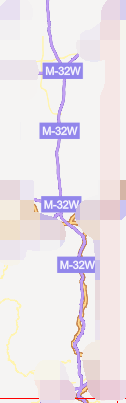
Note the `M-32-W` symbol, there are four repeated label in a single tile.
I am not sure if this is a bug?
BTW, the screenshot is taken under windows chrome 60 x64 with mapbox-gl-js 0.39.1
Contributor guide
First steps
- Read the whole issue, then the project's contributing guide.
- Comment on the issue to say you are picking it up — it saves two people doing the same work.
- Fork the repository and make your change on a branch.
- Open a pull request that references the issue number.
Research direction
Start by reproducing the road-symbol case with symbol-spacing set to 5000 in mapbox-gl-js 0.39.1, using the screenshot and environment details as the reference. Compare the resulting label spacing across the tile and define the expected behavior; done means the symbols are spaced consistently as intended.
Written by the indexing model from the issue text.
Assessment
- Tech stack
- typescript
- Domain
- frontend, web-dev
- Issue type
- Bug
- Difficulty
- 4/5
- Estimated time
- 3-5 days
- Activity status
- Stale
- Clarity
- Needs clarification
- Newbie friendliness
- 35/100