Why does raster-color expect raster-value to be divided by 258?
Nobody has claimed this yet.
- Dominant language
- TypeScript
- Stars
- 12.4k
- Forks
- 2.4k
- PR merge metrics
- No merged PRs in 30d
Description
mapbox-gl-js version: v3.4.0
I am trying to recolour pixels of an RGB raster which have a specific R value, and leave all other pixels transparent. (A highly related Stackoverflow thread.) I achieve this using raster-color, which:
Defines a color map by which to colorize a raster layer, parameterized by the
["raster-value"]expression and evaluated at 256 uniformly spaced steps over the range specified byraster-color-range.
For recolouring pixels which have R value r, the used colormap I believe I should map r to the target colour, and all other r values to rgba(0,0,0,0) (of course, only the last digit actually matters here, and R values are 8 bit unsigned integers). A visualisation of such a colormap:
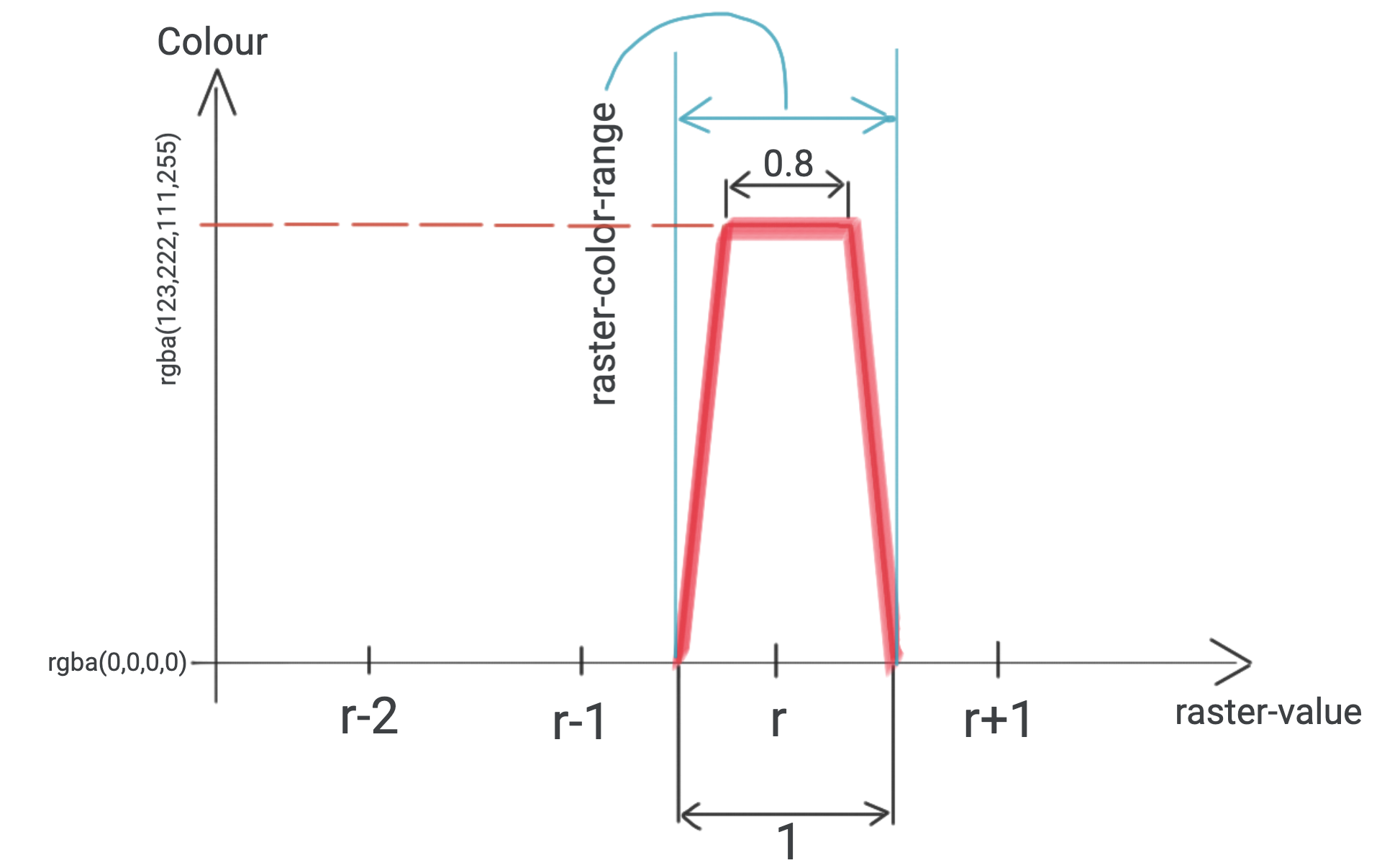
I created 256 WEBP images to test this approach. (I used this script.) Each have pixels with RGB=(r,0,0), and r is indicated in the filename. I choose raster-color-mix to be [1, 0, 0, 0], so that the r value equals raster-value everywhere. I try to add R151.webp:

to the Ecuadorian shores. (All pixels of R151.webp have RGB=(151,0,0)).
Based on the (raster) documentation, my initial attempt for constructing a workingpaint was:
paint: {
"raster-color": [
    "interpolate",
    ["linear"],
    ["raster-value"],
    (151 - 0.5),
    "rgba(0,0,0,0)",
    (151 - 0.4),
    "rgba(123,222,111,255)",
    (151 + 0.4),
    "rgba(123,222,111,255)",
    (151 + 0.5),
    "rgba(0,0,0,0)",
],
"raster-color-mix": [1, 0, 0, 0],
"raster-color-range": [
    (151 - 0.5),
    (151 + 0.5),
],
"raster-resampling": "nearest",
},
This did not work: the raster did not show up. I found that I have to divide every number in raster-color (and less importantly, raster-color-range) by 258, to make the square show up. Based on experiments, using any other integer than 258 results in R151.webp being completely transparent.
A demo of this observation, largely based on Add a raster image to a map layer:
<!DOCTYPE html>
<html>
  <head>
    <meta charset="utf-8" />
    <meta
      name="viewport"
      content="initial-scale=1,maximum-scale=1,user-scalable=no"
    />
    <link
      href="https://api.mapbox.com/mapbox-gl-js/v3.4.0/mapbox-gl.css"
      rel="stylesheet"
    />
    <script src="https://api.mapbox.com/mapbox-gl-js/v3.4.0/mapbox-gl.js"></script>
    <style>
      body {
        margin: 0;
        padding: 0;
      }
      #map {
        position: absolute;
        top: 0;
        bottom: 0;
        width: 100%;
      }
    </style>
  </head>
  <body>
    <div id="map"></div>
    <script>
      mapboxgl.accessToken =
        "pk.eyJ1IjoicGFsc3phYm8iLCJhIjoiY2xrNWY3cDhuMGpiajNwbzdlNzlscHc1eSJ9.Sppso1puTUCwR03aaWUHsQ";
      const map = new mapboxgl.Map({
        container: "map",
        maxZoom: 10,
        minZoom: 0,
        zoom: 6,
        center: [-82, 0],
        style: "mapbox://styles/mapbox/dark-v11",
      });
      const r = 151; // choose any integer between 0 and 255 both inclusive, and a square will show up
      const normalizer = 258; // choose any other integer, and no square will show up
      map.on("load", () => {
        map.addSource("image", {
          type: "image",
          url:
            "https://raw.githubusercontent.com/zabop/mapboxDebug/master/webps/R" +
            r +
            ".webp",
          coordinates: [
            [-83, 1],
            [-81, 1],
            [-81, -1],
            [-83, -1],
          ],
        });
        map.addLayer({
          id: "radar-layer",
          type: "raster",
          source: "image",
          paint: {
            "raster-color": [
              "interpolate",
              ["linear"],
              ["raster-value"],
              (r - 0.5) / normalizer,
              "rgba(0,0,0,0)",
              (r - 0.4) / normalizer,
              "rgba(123,222,111,255)",
              (r + 0.4) / normalizer,
              "rgba(123,222,111,255)",
              (r + 0.5) / normalizer,
              "rgba(0,0,0,0)",
            ],
            "raster-color-mix": [1, 0, 0, 0],
            "raster-color-range": [
              (r - 0.5) / normalizer,
              (r + 0.5) / normalizer,
            ],
            "raster-resampling": "nearest",
          },
        });
      });
    </script>
  </body>
</html>

To emphasize the 2 most important parts of the above code, I highlight them here. First, I define which r values I would like to recolour, and what normalizer I want to use as divisor in raster-color and raster-color-range:
const r = 151; // choose any integer between 0 and 255 both inclusive, and a square will show up
const normalizer = 258; // choose any other integer, and no square will show up
Then, the paint:
paint: {
"raster-color": [
    "interpolate",
    ["linear"],
    ["raster-value"],
    (r - 0.5) / normalizer,
    "rgba(0,0,0,0)",
    (r - 0.4) / normalizer,
    "rgba(123,222,111,255)",
    (r + 0.4) / normalizer,
    "rgba(123,222,111,255)",
    (r + 0.5) / normalizer,
    "rgba(0,0,0,0)",
],
"raster-color-mix": [1, 0, 0, 0],
"raster-color-range": [
    (r - 0.5) / normalizer,
    (r + 0.5) / normalizer,
],
"raster-resampling": "nearest",
},
Having to divide by 258 was surprising. After looking into Mapbox source code, I found COLOR_MIX_FACTOR:
export const COLOR_RAMP_RES = 256;
export const COLOR_MIX_FACTOR = (Math.pow(COLOR_RAMP_RES, 2) - 1) / (255 * COLOR_RAMP_RES * (COLOR_RAMP_RES + 3));
It evaluates to be 1 over 257.992217899, which is suspiciously close to 258. This is the only link I found between Mapbox source code and the number 258 (in other words, I couldn't explain why 258 is so significant).
I am planning on using raster-color to recolour rasters displaying categorical data, so it is vital that the recolouring is reliable: I would like to be able to recolour those and only those values which have a specific value in their R channel. This leads me to two questions:
Question 1
Why does raster-color expect raster-value to be divided by 258?
Question 2
Are there plans to change this in a future version, or can I reliably configure my raster layers using 258 as raster-value divisor and always use the latest Mapbox version?
Links to related documentation
I believe it would be helpful to explain these matters in the raster-color or raster-color-mix section. Or perhaps creating a new section for the concept of raster-value could also be very useful, as it is such an important issue for raster colours.
Contributor guide
First steps
- Read the whole issue, then the project's contributing guide.
- Comment on the issue to say you are picking it up — it saves two people doing the same work.
- Fork the repository and make your change on a branch.
- Open a pull request that references the issue number.
Research direction
Start with src/style/style_layer/raster_style_layer.js and the raster-color and raster-color-mix documentation sections named in the issue; compare their descriptions with the supplied v3.4.0 reproduction. The documentation work is done when it explains the raster-value normalization and whether relying on the divisor is supported across future versions.
Written by the indexing model from the issue text.
Assessment
- Tech stack
- typescript
- Domain
- documentation
- Issue type
- Documentation
- Difficulty
- 4/5
- Estimated time
- 3-5 days
- Activity status
- Stale
- Clarity
- Mostly clear
- Newbie friendliness
- 25/100