Adding a model using THREE InstancedMesh in mapboxgl, losing vertices after modifying and scaling
Nobody has claimed this yet.
- Dominant language
- TypeScript
- Stars
- 12.4k
- Forks
- 2.4k
- PR merge metrics
- No merged PRs in 30d
Description
### Description
After adding the mesh of the gltf model to THREE.InstancedMesh, I modified the scaling, and the rendered effect seems to have lost some vertices
### Reproduction steps
1. Adding custom layers using mapboxgl
2. Load the model using three gltfloader in the mapboxgl custom layer
3. Adding gltf mesh using THREE.InstancedMesh
### Code
```js
loader.load(
"https://threejs.org/examples/models/gltf/Flower/Flower.glb",
function (gltf) {
const p = projectToWorld(origin);
const model = gltf.scene;
const _stemMesh = model.getObjectByName("Stem");
const _blossomMesh = model.getObjectByName("Blossom");
const stemGeometry = _stemMesh.geometry.clone();
const blossomGeometry = _blossomMesh.geometry.clone();
const stemMaterial = _stemMesh.material;
const blossomMaterial = _blossomMesh.material;
const stemMesh = new THREE.InstancedMesh(
stemGeometry,
stemMaterial,
1
);
const blossomMesh = new THREE.InstancedMesh(
blossomGeometry,
blossomMaterial,
1
);
stemMesh.instanceMatrix.setUsage(THREE.DynamicDrawUsage);
blossomMesh.instanceMatrix.setUsage(THREE.DynamicDrawUsage);
const defaultTransform = new THREE.Matrix4()
.makeRotationX(Math.PI)
.multiply(new THREE.Matrix4().makeScale(1, 1, 1));
stemGeometry.applyMatrix4(defaultTransform);
blossomGeometry.applyMatrix4(defaultTransform);
stemMesh.instanceMatrix.needsUpdate = true;
blossomMesh.instanceMatrix.needsUpdate = true;
const dummy = new THREE.Object3D();
let pos = projectToWorld([118.61113, 32.06318, 0]);
for (let i = 0; i < 1; i++) {
dummy.position.copy(pos);
dummy.scale.set(10, 10, 10);
// dummy.scale.set(100, 100, 100);
dummy.updateMatrix();
stemMesh.setMatrixAt(i, dummy.matrix);
blossomMesh.setMatrixAt(i, dummy.matrix);
}
const group = new THREE.Group();
group.add(stemMesh);
group.add(blossomMesh);
world.add(group);
map.triggerRepaint(); }
);
```
### Live example
* [codepen](https://codepen.io/xiaxiangfeng/pen/KKJyvoV)
### Screenshots
normal
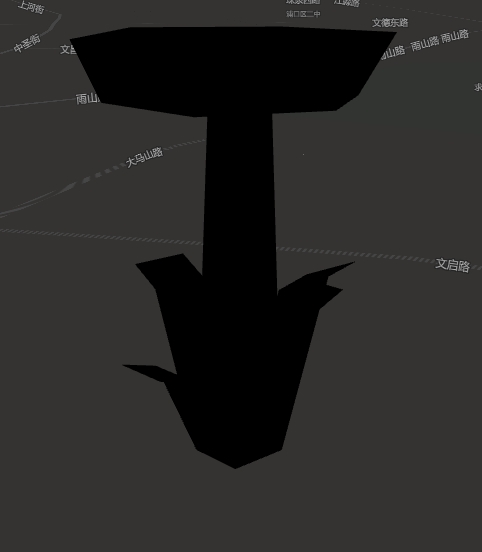
abnormal

### Version
all
Contributor guide
First steps
- Read the whole issue, then the project's contributing guide.
- Comment on the issue to say you are picking it up — it saves two people doing the same work.
- Fork the repository and make your change on a branch.
- Open a pull request that references the issue number.
Research direction
Start by reproducing the CodePen example with the mapboxgl custom layer, GLTFLoader, and THREE.InstancedMesh shown in the issue. Compare the normal and abnormal renders when changing the dummy scale from 10 to 100, then determine whether the behavior is actionable in mapbox-gl-js; the issue is complete only when the vertex loss has a verified cause and a scoped repository change or confirmed external dependency is identified.
Written by the indexing model from the issue text.
Assessment
- Tech stack
- javascript, three.js
- Domain
- computer-graphics, web-dev
- Issue type
- Bug
- Difficulty
- 4/5
- Estimated time
- 3-5 days
- Activity status
- Stale
- Clarity
- Needs clarification
- Newbie friendliness
- 20/100