Line-Gradient inconsistent at different zoom levels
Nobody has claimed this yet.
- Dominant language
- TypeScript
- Stars
- 12.4k
- Forks
- 2.4k
- PR merge metrics
- No merged PRs in 30d
Description
**mapbox-gl-js version**: v2.14.1
**browser**: Chrome 112, Firefox 112
### Steps to Trigger Behavior
1. I have taken the example for line gradient from the official docs here: https://docs.mapbox.com/mapbox-gl-js/example/line-gradient/
2. I have changed to use a longer / more complex path (a travel across europe). Loading it from my gist here for the example:
```
Create a gradient line using an expression
body {
margin: 0;
padding: 0;
}
#map {
position: absolute;
top: 0;
bottom: 0;
width: 100%;
}
mapboxgl.accessToken = <your-api-key>;
const map = new mapboxgl.Map({
container: 'map',
// Choose from Mapbox's core styles, or make your own style with Mapbox Studio
style: 'mapbox://styles/mapbox/light-v11',
center: [11.3372, 49.46892],
zoom: 12
});
fetch("https://gist.githubusercontent.com/user1408/5335987307ad92cf61722d2de3c6439f/raw/ef68e6a029b91cabffc6d2cfd21c364847852e55/longTravelEu.json")
.then(response => response.json())
.then(json => {
const geojson = {
'type': 'FeatureCollection',
'features': [
{
'type': 'Feature',
'properties': {},
'geometry': {
'coordinates': json.route,
'type': 'LineString'
}
}
]
};
map.on('load', () => {
// 'line-gradient' can only be used with GeoJSON sources
// and the source must have the 'lineMetrics' option set to true
map.addSource('line', {
type: 'geojson',
lineMetrics: true,
data: geojson
});
// the layer must be of type 'line'
map.addLayer({
type: 'line',
source: 'line',
id: 'line',
paint: {
'line-color': 'red',
'line-width': 14,
// 'line-gradient' must be specified using an expression
// with the special 'line-progress' property
'line-gradient': [
'interpolate',
['linear'],
['line-progress'],
0,
'blue',
0.1,
'royalblue',
0.3,
'cyan',
0.5,
'lime',
0.7,
'yellow',
1,
'red'
]
},
layout: {
'line-cap': 'round',
'line-join': 'round'
}
});
});
})
.catch(err => console.error(err));
```
### Link to Demonstration
https://codepen.io/user1408-the-styleful/pen/Jjmpmyy
### Expected Behavior
Line-gradient that
* is consistent at all zoom levels
* is smooth
### Actual Behavior
The gradient changes drastically at different zoom levels:
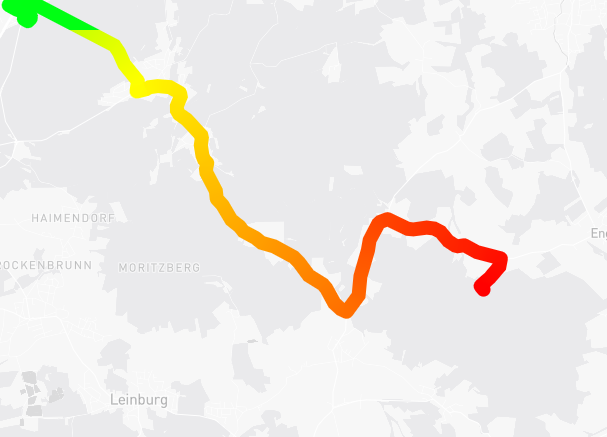
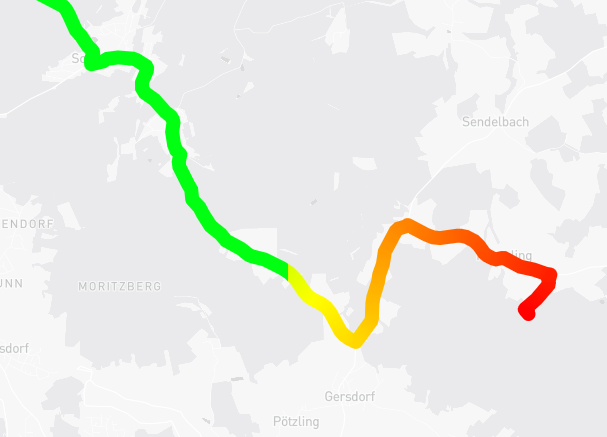
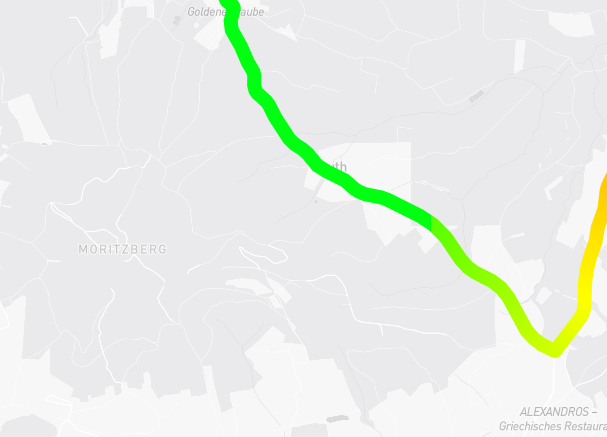
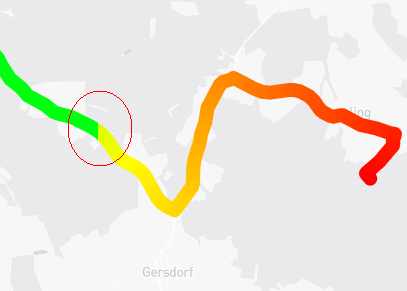
The color on the line changes w/o smooth gradient at certain positions:
Contributor guide
First steps
- Read the whole issue, then the project's contributing guide.
- Comment on the issue to say you are picking it up — it saves two people doing the same work.
- Fork the repository and make your change on a branch.
- Open a pull request that references the issue number.
Research direction
Start by running the linked CodePen reproduction with the official line-gradient example and the longer route, then compare the gradient at different zoom levels. Trace the line-gradient rendering path in mapbox-gl-js and verify the result against the reported expectation: a smooth, consistent gradient at all zoom levels.
Written by the indexing model from the issue text.
Assessment
- Tech stack
- javascript, typescript
- Domain
- computer-graphics, frontend, web-dev
- Issue type
- Bug
- Difficulty
- 4/5
- Estimated time
- 3-5 days
- Activity status
- Stale
- Clarity
- Mostly clear
- Newbie friendliness
- 28/100