CustomLayer with globe projection seems wrong
Nobody has claimed this yet.
- Dominant language
- TypeScript
- Stars
- 12.4k
- Forks
- 2.4k
- PR merge metrics
- No merged PRs in 30d
Description
**mapbox-gl-js version**: 2.13.0
**browser**:
### Steps to Trigger Behavior
1. In the example of [Add a custom style layer](https://docs.mapbox.com/mapbox-gl-js/example/custom-style-layer/), change the projection to `globe`
### Link to Demonstration
https://codesandbox.io/s/custom-layer-globe-v4iv2p?file=/index.html
### Expected Behavior
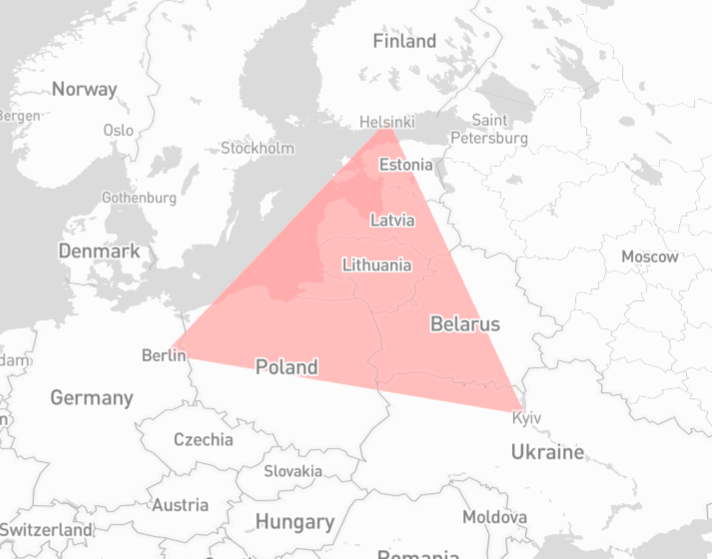
### Actual Behavior
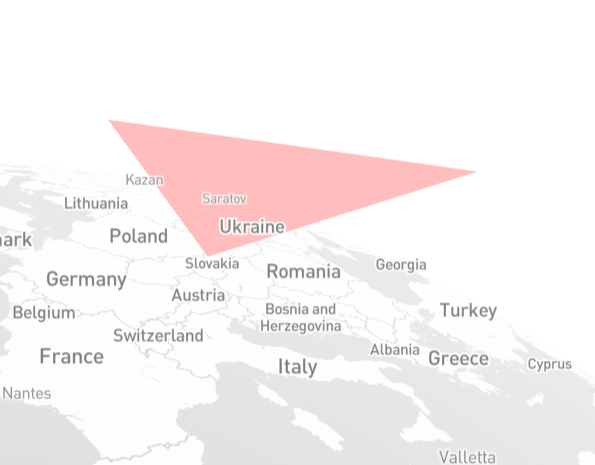
Contributor guide
First steps
- Read the whole issue, then the project's contributing guide.
- Comment on the issue to say you are picking it up — it saves two people doing the same work.
- Fork the repository and make your change on a branch.
- Open a pull request that references the issue number.
Research direction
Start by running the linked CodeSandbox and the Add a custom style layer example with the projection changed to globe, then compare the expected and actual images. Trace the custom layer and globe projection entry points used by the example; done means the custom layer renders like the expected result under globe projection.
Written by the indexing model from the issue text.
Assessment
- Tech stack
- typescript
- Domain
- computer-graphics, web-dev
- Issue type
- Bug
- Difficulty
- 4/5
- Estimated time
- 3-5 days
- Activity status
- Stale
- Clarity
- Mostly clear
- Newbie friendliness
- 35/100