A fill extrusion layer doesn't follow color opacity when using rgba for fill-extrusion-color paint property?
Nobody has claimed this yet.
- Dominant language
- TypeScript
- Stars
- 12.4k
- Forks
- 2.4k
- PR merge metrics
- No merged PRs in 30d
Description
**mapbox-gl-js version**:
v1.12.0
**browser**:
Mozilla/5.0 (X11; Linux x86_64) AppleWebKit/537.36 (KHTML, like Gecko) Chrome/81.0.4044.138 Safari/537.36
https://www.whatsmybrowser.org/b/QZK8A
### Steps to Trigger Behavior
Example that shows behavior:
1. Visit: https://jsbin.com/feyulic/edit?html,outputl
2. When the "county-extruded" layer is not visible initially by setting fill-extrusion-opacity: 0, the map displays as expected. The three counties matched in the getColor() function are correctly filled red, green, and blue. The unmatched counties are colored with 'rgba(204, 204, 204, 0)'. Because the rgba alpha opacity is set to 0 on the unmatched counties, they correctly do not fill. The lightblue background color on #map-container shows through as expected.
.
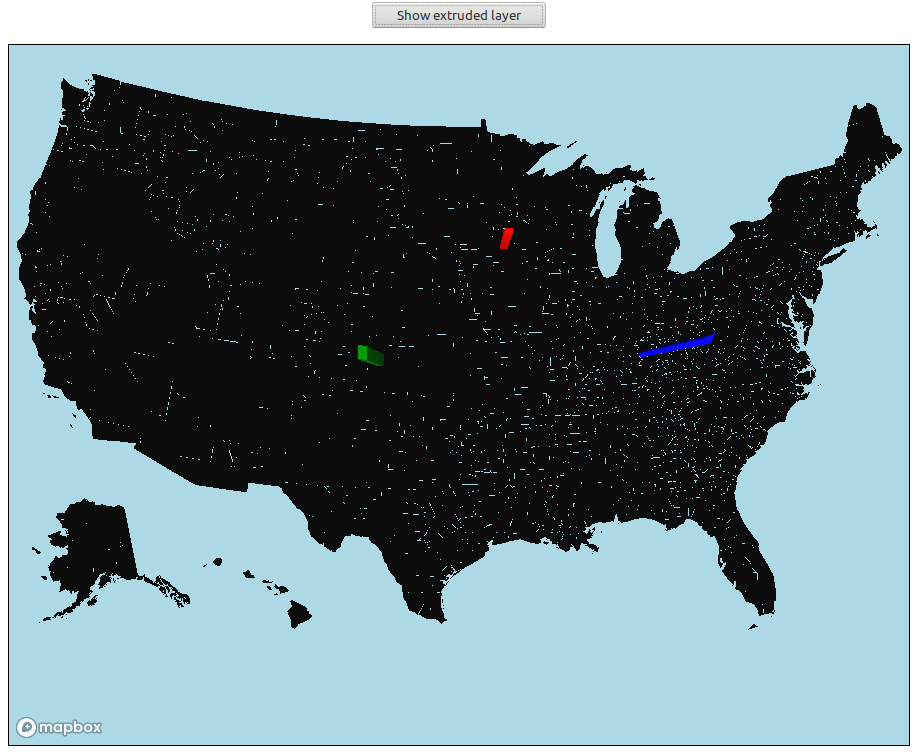
3. When the 'Show extruded layer' button is clicked and the county-extruded layer is shown by setting fill-extrusion-opacity to 1, the "other" counties don't seem to follow the 0 opacity for fill-extrusion-color. They appear colored in black.
.
This may be related. https://github.com/mapbox/mapbox-gl-style-spec/issues/556
I am experimenting with dynamically styling a vector layer. Setting color of a fill type layer looked promising, but when I extended the idea to a fill-extrusion layer, I ran into this issue.
### Expected Behavior
fill-extrusion-color should follow the alpha channel as fill-color does.
### Actual Behavior
fill-extrusion-color fills black if the alpha channel is 0
Contributor guide
First steps
- Read the whole issue, then the project's contributing guide.
- Comment on the issue to say you are picking it up — it saves two people doing the same work.
- Fork the repository and make your change on a branch.
- Open a pull request that references the issue number.
Research direction
Start with the JSBin reproduction linked in the issue and compare the fill and fill-extrusion rendering paths when fill-extrusion-opacity is changed from 0 to 1. The fix is complete when an rgba fill-extrusion-color with alpha 0 remains transparent instead of rendering as black, while the reported colored counties still render correctly.
Written by the indexing model from the issue text.
Assessment
- Tech stack
- javascript, typescript
- Domain
- computer-graphics, frontend
- Issue type
- Bug
- Difficulty
- 4/5
- Estimated time
- 3-5 days
- Activity status
- Stale
- Clarity
- Clearly specified
- Newbie friendliness
- 35/100