Set canvas to window size
Nobody has claimed this yet.
- Dominant language
- Python
- Stars
- 869
- Forks
- 106
- PR merge metrics
- No merged PRs in 30d
Description
## Use case
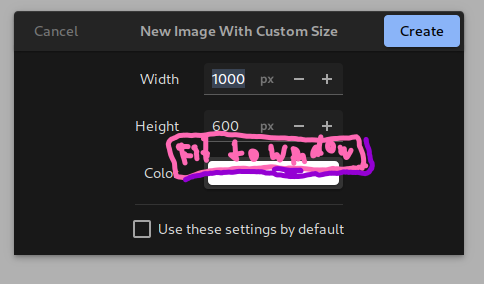
The canvas resizing feature lets me manually type in the size of the canvas in pixels. It would be useful to have a function/button to set this to the available window space, i.e. the size of the window minus all the toolbars. This would allow me to immediately use the most of my screen space for drawing.
## Suggested solution
A button next to the width/height fields to "Fit to window".
### Possible drawbacks
This might not be useful to some users, who are often resizing or moving the window, so the button should not be too intrusive. Also, the size would be different depending on the number of open files/tabs.
### Possible alternatives
Manually setting the correct size and then setting these as the default value.
Contributor guide
First steps
- Read the whole issue, then the project's contributing guide.
- Comment on the issue to say you are picking it up — it saves two people doing the same work.
- Fork the repository and make your change on a branch.
- Open a pull request that references the issue number.
Research direction
Start by locating the canvas width and height controls and the code that lays out the toolbars around the drawing area. Trace how manual canvas resizing is handled, then add a minimally intrusive “Fit to window” action that accounts for the available space; verify that it sets the canvas dimensions correctly.
Written by the indexing model from the issue text.
Assessment
- Tech stack
- python
- Domain
- desktop
- Issue type
- Feature
- Difficulty
- 3/5
- Estimated time
- 1-2 days
- Activity status
- Stale
- Clarity
- Mostly clear
- Newbie friendliness
- 42/100