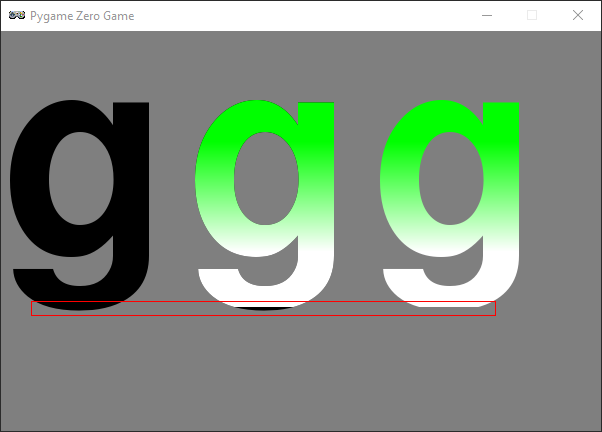
Using screen.draw.text() with a color gradient causes clipping on characters with decenders
- Dominant language
- Python
- Stars
- 611
- Forks
- 211
- PR merge metrics
- No merged PRs in 30d
Description
Using `screen.draw.text()` with a color gradient (`gcolor` argument) will clip characters having decenders (i.e. 'g', 'j', 'p', 'q', 'y').
The following code reproduces the issue using the 'g' character.
```
WIDTH = 600
HEIGHT = 400
def draw():
screen.fill('gray50')
screen.draw.text('gg',
(0,0),
color='black',
fontsize=400)
# Position the first gradient 'g' so it is covering the second black 'g'.
# This will show that the bottom is missing on the gradient 'g'.
screen.draw.text('gg',
(185,0),
color='green',
fontsize=400,
gcolor='white')
# Enclose the bottom of the text with a red rectangle to highlight
# the area being clipped.
screen.draw.rect(Rect((30, 270), (465, 15)), color='red')
```
Running the above code gives the following output.
System details:
- os: windows 10
- python: 3.7.2 (64bit) and 3.5.0 (64bit)
- pygame: 1.9.4
- pgzero: 1.2 (also reproduced on master branch at ef963beaa22db89cb011695e96587bb268cbec2a)
- numpy: 1.15.4
Contributor guide
No contributing guide indexed for this repository
Research direction
Run the supplied reproduction with screen.draw.text() and the gcolor argument to confirm the clipping. Then trace the screen.draw.text() gradient-rendering path; the issue is done when descenders such as “g” render fully without clipping in the reproduction.
Written by the indexing model from the issue text.
Assessment
- Tech stack
- python
- Domain
- computer-graphics, game-dev
- Issue type
- Bug
- Difficulty
- 3/5
- Estimated time
- 1-2 days
- Activity status
- Stale
- Clarity
- Mostly clear
- Newbie friendliness
- 45/100