Add empty text to Exp Participant Detail page
Nobody has claimed this yet.
- Dominant language
- Python
- Stars
- 12
- Forks
- 21
- Avg merge
- 5d 19h
- Merged PRs (30d)
- 5
Description
Description
Experimenter Participant detail page is missing a 'No participants found' message (or similar empty text).
How to reproduce
On the Experimenter Participant detail page (https://lookit.mit.edu/exp/participants/) search for a non-existent participant, e.g. random string.
Expected behavior
A search with no results should display a 'No participants found.' message, to be consistent with the style and behavior across the rest of the site.
Screenshots
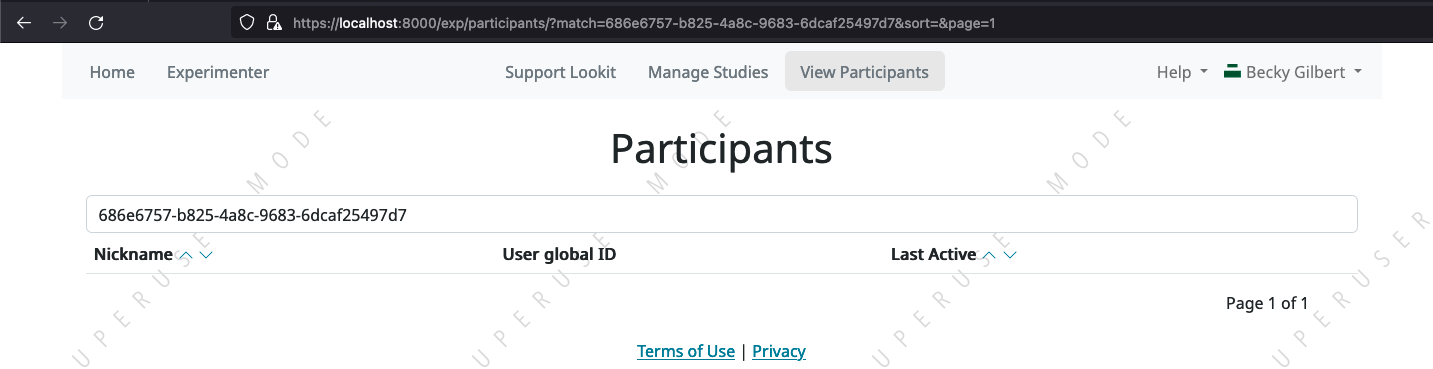
Environment (OS, browser, branch, etc.):
Locally on develop, on staging, and on production.
Contributor guide
First steps
- Read the whole issue, then the project's contributing guide.
- Comment on the issue to say you are picking it up — it saves two people doing the same work.
- Fork the repository and make your change on a branch.
- Open a pull request that references the issue number.
Research direction
Open the Experimenter Participant detail page at https://lookit.mit.edu/exp/participants/ and reproduce the issue by searching for a non-existent participant. Find the page's empty-results handling and make the no-results state display a message such as “No participants found.” Done means the message appears for searches with no matches and remains consistent with the rest of the site.
Written by the indexing model from the issue text.
Assessment
- Domain
- frontend
- Issue type
- Bug
- Difficulty
- 2/5
- Estimated time
- 1-3 hours
- Activity status
- Stale
- Clarity
- Clearly specified
- Newbie friendliness
- 45/100