org-mode property syntax can make app unusable (Mac + iOS)
Nobody has claimed this yet.
- Dominant language
- Clojure
- Stars
- 45k
- Forks
- 2.8k
- Avg merge
- 1d 22h
- Merged PRs (30d)
- 105
Description
### What happened?
Following the documentation on https://docs.logseq.com/#/page/term%2Fproperties I tried using to define properties in a template.
First I want to note that the implementation is wrong, the org-mode syntax is `#+PROPERTY: property_name property_value` NOT `#+PROPERTY_NAME: property_value`, see https://orgmode.org/manual/Property-Syntax.html
This causes several errors:
- The property name and value is invisible.
- Two bullet points get rendered on the same line:
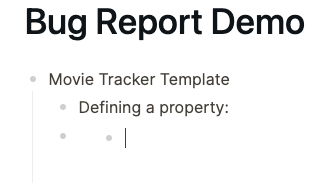
- You can't click on the area after the first bullet point, you have to navigate via cursor from above (from below doesn't work either)
- Text entered after the second bullet point is deleted.
- UI disappears after clicking on second bullet point, no navigation possible:

It doesn't appear to crash (on desktop), you can close the window and open a new one. But the error also occurs on the iOS app.
### Reproduce the Bug
1. Make sure file format is set to org.
2. Try to create properties on block level, for example in a template:
3.

4. Hit enter and you will experience the behaviour described above.
### Expected Behavior
Working properties like in markdown mode.
If you do use the :PROPERTIES: syntax (example below) everything works fine, but it is a bit tedious.
```
:PROPERTIES:
:property_name: value
:END:
```
### Screenshots
_No response_
### Desktop Platform Information
Mac OS Ventura 13.0
Logseq Version 0.8.10 (0.8.10)
### Mobile Platform Information
iPhone 12 mini, iOS 16.0
### Additional Context
_No response_
Contributor guide
First steps
- Read the whole issue, then the project's contributing guide.
- Comment on the issue to say you are picking it up — it saves two people doing the same work.
- Fork the repository and make your change on a branch.
- Open a pull request that references the issue number.
Research direction
No source file or test is named in the issue. Reproduce the behavior with the org file format and the documented #+PROPERTY syntax on desktop and iOS, then trace the editor path that handles those lines; done means properties render correctly and entering text or navigating between bullets no longer breaks the UI.
Written by the indexing model from the issue text.
Assessment
- Tech stack
- clojure
- Domain
- desktop-dev, frontend, mobile-dev
- Issue type
- Bug
- Difficulty
- 4/5
- Estimated time
- 3-5 days
- Activity status
- Stale
- Clarity
- Mostly clear
- Newbie friendliness
- 30/100