Inverse Transform + Transform does not produce correct points
Nobody has claimed this yet.
- Dominant language
- Python
- Stars
- 8.3k
- Forks
- 871
- Avg merge
- 1d 13h
- Merged PRs (30d)
- 5
Description
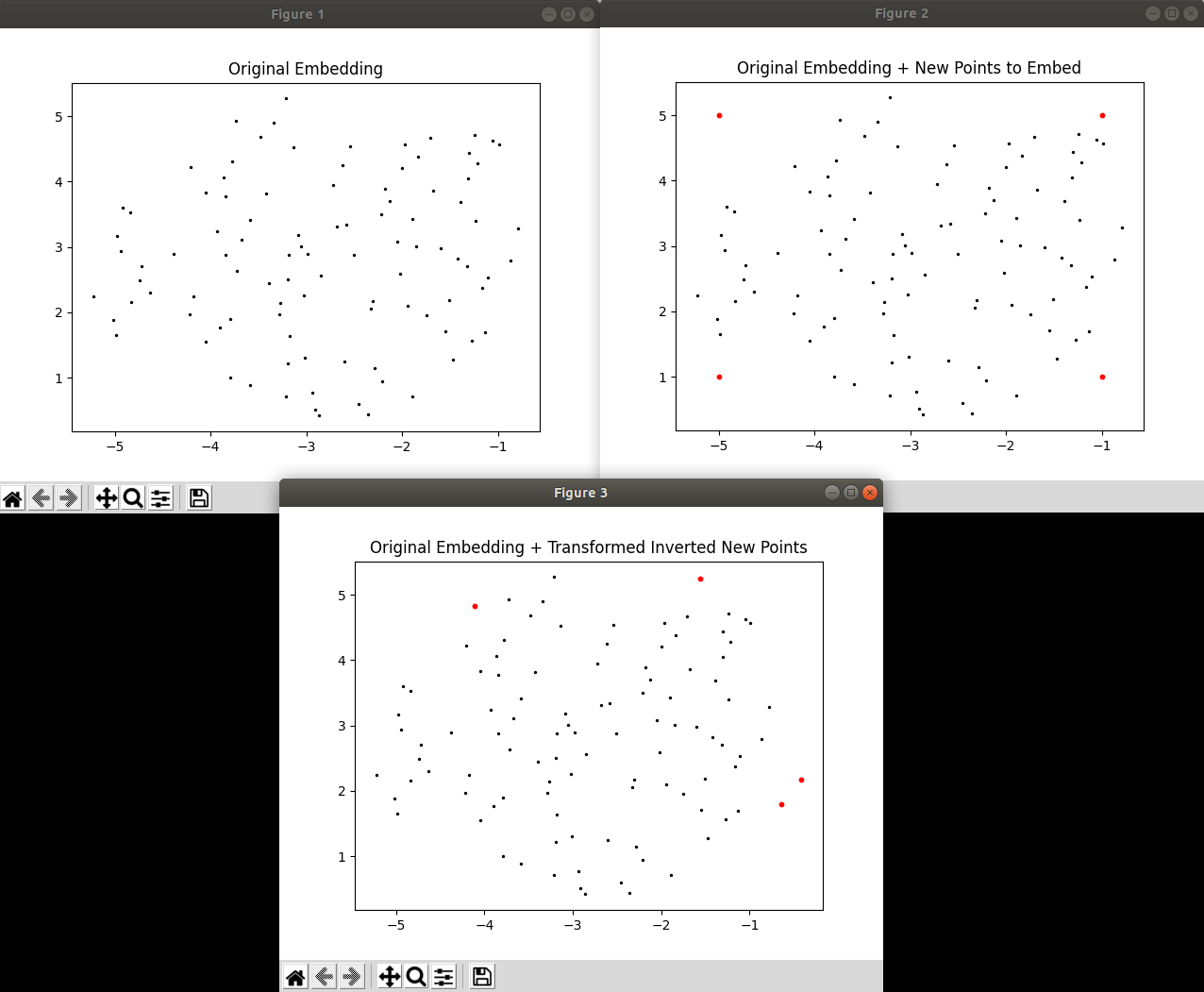
I noticed that when using inverse_transform(), points in the high-dimensional space that are inverted from points in the low-dimensional space do not go back to their expected positions in the low-dimensional space when run through transform() again. I've provided a very simple script below, where I generate some fake data and made an embedding out of it, then I create some arbitrary points which lie within the embedding. I then invert those arbitrary points to what they would look like in the high-dimensional space and then immediately transform them back using the same fitted UMAP model I just used. I've attached a screenshot of the result I see on my end: as you can see, the arbitrary points in red do NOT return to their initial set positions. You can uncomment the plt.show() at the end of the file if you want to see the plots for yourself.
I'm not sure if I'm using inverse_transform() wrong or if there's a bug in the function? The only thing of note that I'm doing is that I'm setting random_state, but it doesn't seem intuitive that that would affect the inverse transform. This may also be connected to https://github.com/lmcinnes/umap/issues/515.
import numpy as np
import matplotlib.pyplot as plt
import umap

# Set random seed so you can see the exact same data I do
np.random.seed(42)

# Generate random data for initial embedding
original_data = np.random.random(size = (100,50))

# Transform and plot embedding
transformer = umap.UMAP(n_neighbors=10, min_dist=0.1, random_state=42).fit(original_data)
original_embeddings = transformer.transform(original_data)
plt.figure()
plt.scatter(original_embeddings[:,0], original_embeddings[:,1], s=2, c = 'black')
plt.title('Original Embedding')

# Create a few new points in the embedding that we'll want to invert, and plot them
new_embeddings = np.zeros(shape = (4,2))
new_embeddings[0,0] = -5
new_embeddings[0,1] = 1
new_embeddings[1,0] = -1
new_embeddings[1,1] = 1
new_embeddings[2,0] = -5
new_embeddings[2,1] = 5
new_embeddings[3,0] = -1
new_embeddings[3,1] = 5
plt.figure()
plt.scatter(original_embeddings[:,0], original_embeddings[:,1], s=2, c = 'black')
plt.scatter(new_embeddings[:,0], new_embeddings[:,1], s=10, c = 'red')
plt.title('Original Embedding + New Points to Embed')

# Invert new points and then transform them using the same parent they were just inverted from
inv_new_embeddings = transformer.inverse_transform(new_embeddings)
transformed_inv_new_embeddings = transformer.transform(inv_new_embeddings)
plt.figure()
plt.scatter(original_embeddings[:,0], original_embeddings[:,1], s=2, c = 'black')
plt.scatter(transformed_inv_new_embeddings[:,0], transformed_inv_new_embeddings[:,1], s=10, c = 'red')
plt.title('Original Embedding + Transformed Inverted New Points')

# Uncomment me if you want to see plots
plt.show()
Contributor guide
First steps
- Read the whole issue, then the project's contributing guide.
- Comment on the issue to say you are picking it up — it saves two people doing the same work.
- Fork the repository and make your change on a branch.
- Open a pull request that references the issue number.
Research direction
Run the provided Python script with the fitted UMAP model and compare new_embeddings with transformed_inv_new_embeddings. Start at the inverse_transform() and transform() entry points, then determine whether their round trip is expected to preserve the points; done means the behavior is corrected or clearly documented with a regression test for this reproduction.
Written by the indexing model from the issue text.
Assessment
- Tech stack
- matplotlib, numpy, python
- Domain
- machine-learning
- Issue type
- Bug
- Difficulty
- 4/5
- Estimated time
- 3-5 days
- Activity status
- Stale
- Clarity
- Mostly clear
- Newbie friendliness
- 35/100