Describe when to use repeat() more clearly
Nobody has claimed this yet.
- Dominant language
- TypeScript
- Stars
- 142
- Forks
- 230
- PR merge metrics
- No merged PRs in 30d
Description
Description
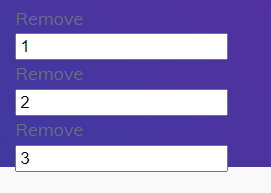
if click 1, then remove 1. 2 and 3 also same, and it is clear.
but. if i change some value and try to remove. then. removed it from below.
i don't know it is bug of lit or html or something..
of course it can be solve by another way with additional code but i think it is not natural.
https://github.com/lit/lit-element/issues/807
https://stackoverflow.com/a/59381119/12365658
Steps to Reproduce
- Write this code
- change value.
- click remove event.
import { LitElement, html } from 'lit';
import { customElement, property } from 'lit/decorators.js';

@customElement('test-container')
export class TestContainer extends LitElement {
  testItems = [
    {innerId: 1, value: 1},
    {innerId: 2, value: 2},
    {innerId: 3, value: 3}
  ]

  render(){

    const items = []
    for(const item of this.testItems){
      items.push(this.renderItem(item.innerId, item.value));
    }

    return html`<div>${items}</div>`;
  }

  renderItem(id: number, value: number){
    return html`<test-item @remove=${this.clickRemoveItem} innerId=${id} value=${value}></test-item>`
  }

  clickRemoveItem(e: any){
    const remove_id = e.detail.innerId;
    for(let i=0; i < this.testItems.length; i++) {
      if(this.testItems[i].innerId == remove_id) {
        this.testItems.splice(i, 1);
        break;
      }
    }
    this.requestUpdate();
  }
}

@customElement('test-item')
export class TestItemContainer extends LitElement{

  @property()
  innerId = "";

  @property()
  value = "";

  clickRemove(){
    this.dispatchEvent(new CustomEvent("remove", {detail: {innerId: this.innerId}, bubbles: true, composed: true}))
  }

  render(){
    const countries_template:any = [];

    return html`
      <div @click=${this.clickRemove}>Remove</div>
      <input type="text" value=${this.value}>
    `
  }
}
- See this output...
Live Reproduction Link
https://stackblitz.com/edit/lit-html
Expected Results
Actual Results
Browsers Affected
- Chrome
- Firefox
- Edge
- Safari 11
- Safari 10
- IE 11
Contributor guide
First steps
- Read the whole issue, then the project's contributing guide.
- Comment on the issue to say you are picking it up — it saves two people doing the same work.
- Fork the repository and make your change on a branch.
- Open a pull request that references the issue number.
Research direction
Start with the TypeScript reproduction in the issue and the linked StackBlitz example, then review the linked lit-element issue and Stack Overflow answer. The issue does not name a documentation file or provide expected and actual results; it would be done when the appropriate repeat() guidance and its intended behavior are clearly documented.
Written by the indexing model from the issue text.
Assessment
- Tech stack
- typescript
- Domain
- documentation
- Issue type
- Documentation
- Difficulty
- 5/5
- Estimated time
- Over a week
- Activity status
- Stale
- Clarity
- Needs clarification
- Newbie friendliness
- 25/100