PDF Highlighted text
Nobody has claimed this yet.
- Dominant language
- C
- Stars
- 283
- Forks
- 82
- PR merge metrics
- No merged PRs in 30d
Description
 * Xreader version (3.02)
 * Distribution - (Linux Mint 20.X with Mate UI.)
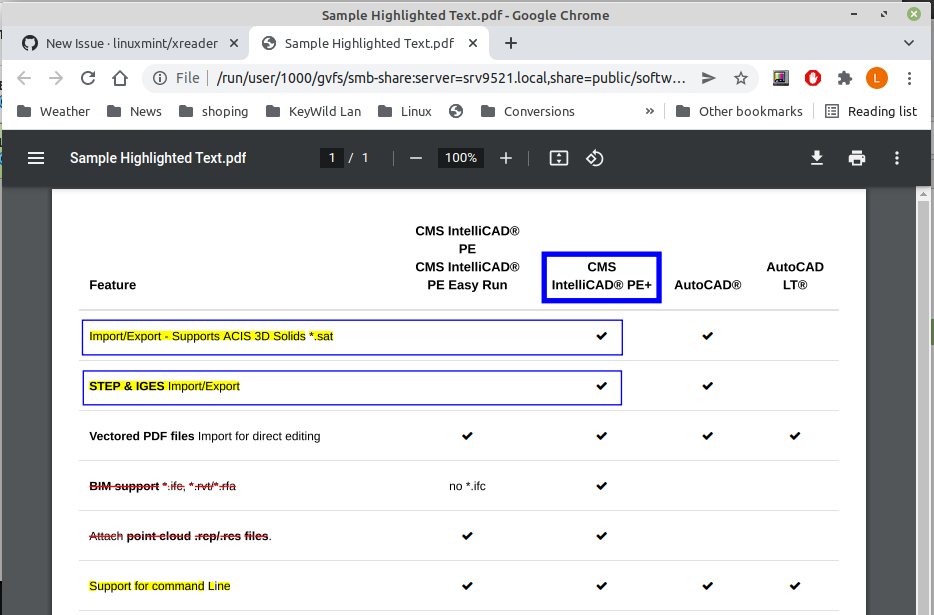
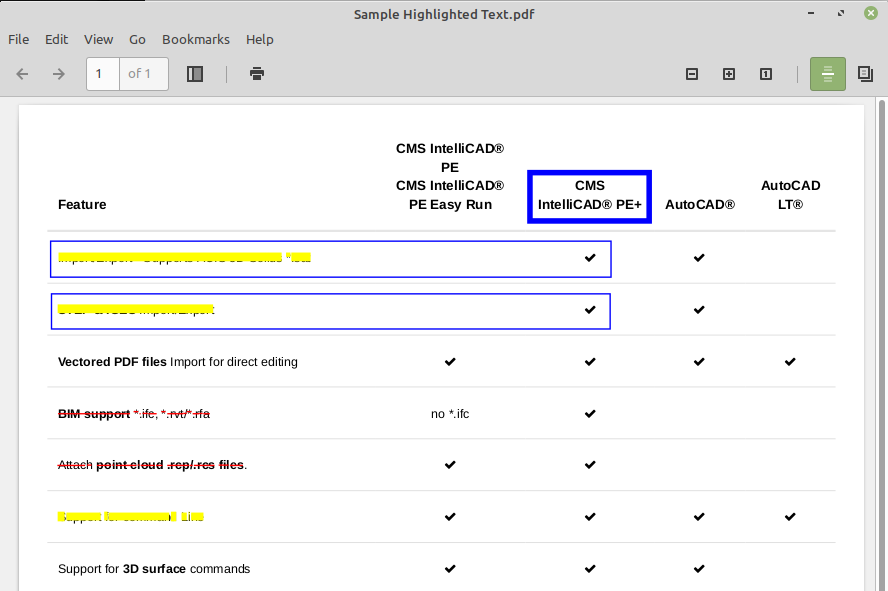
Some PDF files have 'highlighted' text. I do not know if that is the correct/proper nomenclature. It displays correctly in Google Chrome but in Xreader the 'highlight' appear as a yellow rectangle obliterating the text under it.
Steps to reproduce
Open the attached file PDF in Xreader.
Expected behavior
See attached screen grabs.
Highlighted Text in Google Chrome
Highlighted Text in Xreader
Sample PDF File
Contributor guide
No contributing guide indexed for this repository
First steps
- Read the whole issue, then the project's contributing guide.
- Comment on the issue to say you are picking it up — it saves two people doing the same work.
- Fork the repository and make your change on a branch.
- Open a pull request that references the issue number.
Research direction
Start by opening the attached Sample Highlighted Text.pdf in Xreader and compare its rendering with the provided Chrome and Xreader screenshots. Trace the PDF highlight rendering path in the C code; done means the highlighted text remains readable instead of being covered by a solid yellow rectangle, while preserving the expected highlight appearance.
Written by the indexing model from the issue text.
Assessment
- Tech stack
- c
- Domain
- desktop
- Issue type
- Bug
- Difficulty
- 4/5
- Estimated time
- 3-5 days
- Activity status
- Stale
- Clarity
- Mostly clear
- Newbie friendliness
- 42/100