Printing an A4 document with A5 paper size creates an A4 document on one PC, but not on another
Nobody has claimed this yet.
- Dominant language
- C
- Stars
- 283
- Forks
- 82
- PR merge metrics
- No merged PRs in 30d
Description
 * Xreader version - 3.0.2
 * Distribution - Mint 20.2
Issue
Printing an A4 document to a A5 pdf works correctly on one PC, but on another, the resulting pdf is in A4 size (same version of Mint, same version of Xreader).
On PC1:
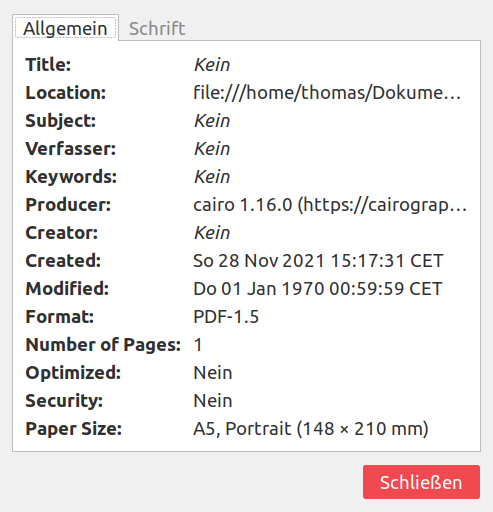
On PC2:
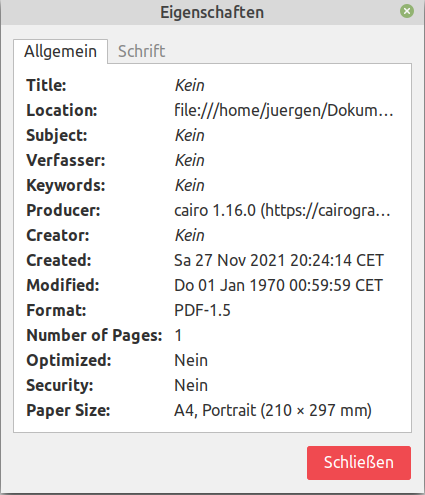
Steps to reproduce
- Open the test file (but any other A4 pdf file should also work).
- Go to 'File' > 'Print'
- Choose 'Print to file' as printer
- Go to 'Configure page'. For 'Paper Size', choose 'A5'.
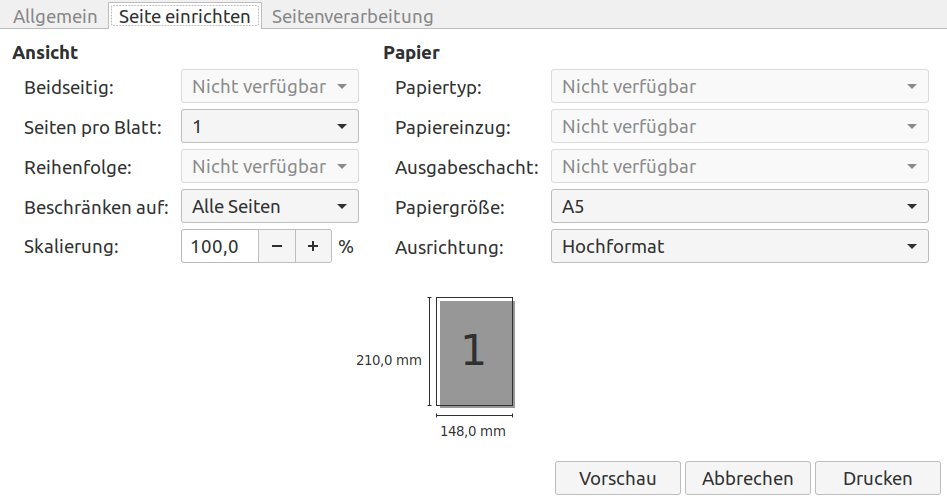
- Click 'Print'.
- Open the resulting file in xreader.
- Go to 'File' > 'Properties'.
- Check the value of 'Paper Size'.
Expected behaviour
Printing to A5 size should create a document with A5 size.
The behavior on different PCs with the same software (versions) should be the same.
Contributor guide
No contributing guide indexed for this repository
First steps
- Read the whole issue, then the project's contributing guide.
- Comment on the issue to say you are picking it up — it saves two people doing the same work.
- Fork the repository and make your change on a branch.
- Open a pull request that references the issue number.
Research direction
Reproduce with the linked test.pdf through File > Print, selecting Print to file and A5 under Configure page, then compare the resulting PDF's Paper Size in File > Properties on both PCs. Done means identifying and correcting the condition that causes the same Xreader and Mint versions to produce A4 instead of A5 output.
Written by the indexing model from the issue text.
Assessment
- Tech stack
- c
- Domain
- desktop
- Issue type
- Bug
- Difficulty
- 4/5
- Estimated time
- 3-5 days
- Activity status
- Stale
- Clarity
- Mostly clear
- Newbie friendliness
- 35/100