linuxmint / linuxmint/cinnamon
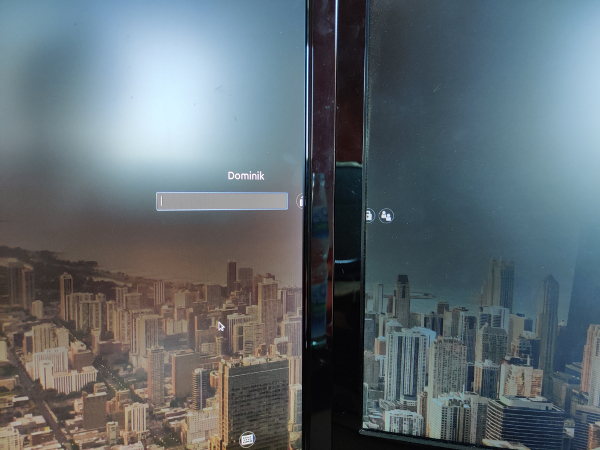
User login window not centered (dual monitors) after monitor energy saving mode
Nobody has claimed this yet.
- Dominant language
- JavaScript
- Stars
- 5.6k
- Forks
- 915
- Avg merge
- 5d 22h
- Merged PRs (30d)
- 3
Description
 * Linux Mint 19.3 Cinnamon version 4.4.8
 * 64 bit
 * Kernel 4.15.0-91-generic
 * NVIDIA GeForce RTX 2060 (nvidia-driver-440)
Issue
See picture. User login window is not centered on main screen after dual monitors went in energy saving mode / screen saver got activated. The issue doesn't happen if I lock manual with CTRL + ALT + L.
Steps to reproduce
I am not sure if it's the the screen saver (15 minutes idle) or power management of monitors (10 minutes idle) which causes the issue, but if I come back after some time, the login UI is between both monitors.
Expected behaviour
Login UI centered on main monitor, not between dual monitors.
Other information
I saw this issue a long time ago already, with different kernels and nvidia drivers.
Contributor guide
No contributing guide indexed for this repository
First steps
- Read the whole issue, then the project's contributing guide.
- Comment on the issue to say you are picking it up — it saves two people doing the same work.
- Fork the repository and make your change on a branch.
- Open a pull request that references the issue number.
Research direction
Start by reproducing the login-window placement after dual monitors enter energy-saving mode or the screen saver activates, and compare it with a manual CTRL+ALT+L lock. Trace the login UI's monitor selection and centering behavior; done means the window is centered on the main monitor in both cases.
Written by the indexing model from the issue text.
Assessment
- Tech stack
- javascript
- Domain
- desktop
- Issue type
- Bug
- Difficulty
- 4/5
- Estimated time
- 3-5 days
- Activity status
- Stale
- Clarity
- Mostly clear
- Newbie friendliness
- 35/100