linuxmint / linuxmint/cinnamon
Gnome Screenshot - screenshots have grey/black top corners
Nobody has claimed this yet.
- Dominant language
- JavaScript
- Stars
- 5.6k
- Forks
- 915
- Avg merge
- 5d 22h
- Merged PRs (30d)
- 3
Description
 * Cinnamon version 5.8.4
 * Mint 21.2
[graphic.txt](https://github.com/linuxmint/cinnamon/files/9909355/graphic.txt)
 * 64 bit
Issue
I'm using Gnome Screenshot (Capture d'écran 41.0):
On windows screenshots, there's a black/grey border on each top corner:
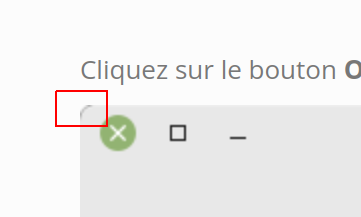
You can see that when you insert the screenshot into a white webpage or if you open the screenshot with GIMP and zoom in the top corners.
Contributor guide
No contributing guide indexed for this repository
First steps
- Read the whole issue, then the project's contributing guide.
- Comment on the issue to say you are picking it up — it saves two people doing the same work.
- Fork the repository and make your change on a branch.
- Open a pull request that references the issue number.
Research direction
Start by reviewing the attached graphic configuration and reproducing the issue with Gnome Screenshot 41.0 on Cinnamon 5.8.4 and Mint 21.2. Compare window screenshots against a white background and inspect the top corners at high zoom; done means screenshots no longer contain the grey or black corner borders.
Written by the indexing model from the issue text.
Assessment
- Tech stack
- linux
- Domain
- computer-graphics, desktop
- Issue type
- Bug
- Difficulty
- 4/5
- Estimated time
- 3-5 days
- Activity status
- Quiet
- Clarity
- Needs clarification
- Newbie friendliness
- 35/100