linuxmint / linuxmint/cinnamon
fractional scaling not working when setting on individual monitors
Nobody has claimed this yet.
- Dominant language
- JavaScript
- Stars
- 5.6k
- Forks
- 915
- Avg merge
- 5d 22h
- Merged PRs (30d)
- 3
Description
I am using a docking station connected to two external displays with a HiDPI laptop screen. Getting fractional scaling to work was a bit of hit and miss in LM 20, however it has now broken again in 21.
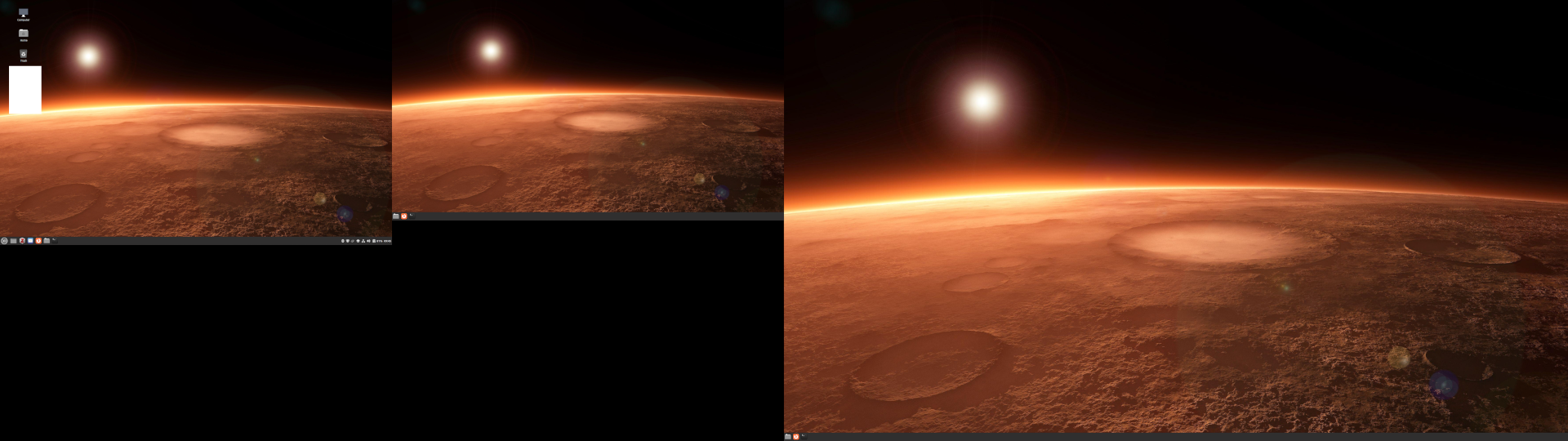
The setting should be 100% for the two external monitors and 200% for the laptop screen. When I do this, the layout seems to be correct, see screenshot one, however it forces the external monitors to overflow badly, i.e. I am only shown the top left quadrant blown up by a factor of 2 on each external monitor, while the laptop screen scales correctly.
If I set everything to 100% (Screenshot 2), the external monitors are set correctly, however the laptop screen is now unscaled so too small (as expected).
I have tried this with the Nvidia and the nouveau open source drivers, the behaviour is the same.
Cinnamon 5.4.12
xsession-errors.txt

Contributor guide
No contributing guide indexed for this repository
First steps
- Read the whole issue, then the project's contributing guide.
- Comment on the issue to say you are picking it up — it saves two people doing the same work.
- Fork the repository and make your change on a branch.
- Open a pull request that references the issue number.
Research direction
Start by reviewing the attached xsession-errors.txt and both screenshots, then reproduce the setup with two external displays and a HiDPI laptop screen using Cinnamon 5.4.12. Done means the external monitors remain at 100% without quadrant overflow while the laptop screen remains correctly scaled at 200%.
Written by the indexing model from the issue text.
Assessment
- Tech stack
- javascript
- Domain
- desktop, operating-systems
- Issue type
- Bug
- Difficulty
- 4/5
- Estimated time
- 3-5 days
- Activity status
- Stale
- Clarity
- Mostly clear
- Newbie friendliness
- 35/100