Dashboard/UI should treat no-value rows as below-zero in sorting
Nobody has claimed this yet.
- Dominant language
- Go
- Stars
- 11.5k
- Forks
- 1.4k
- Avg merge
- 3d 22h
- Merged PRs (30d)
- 53
Description
## Feature Request
### What problem are you trying to solve?
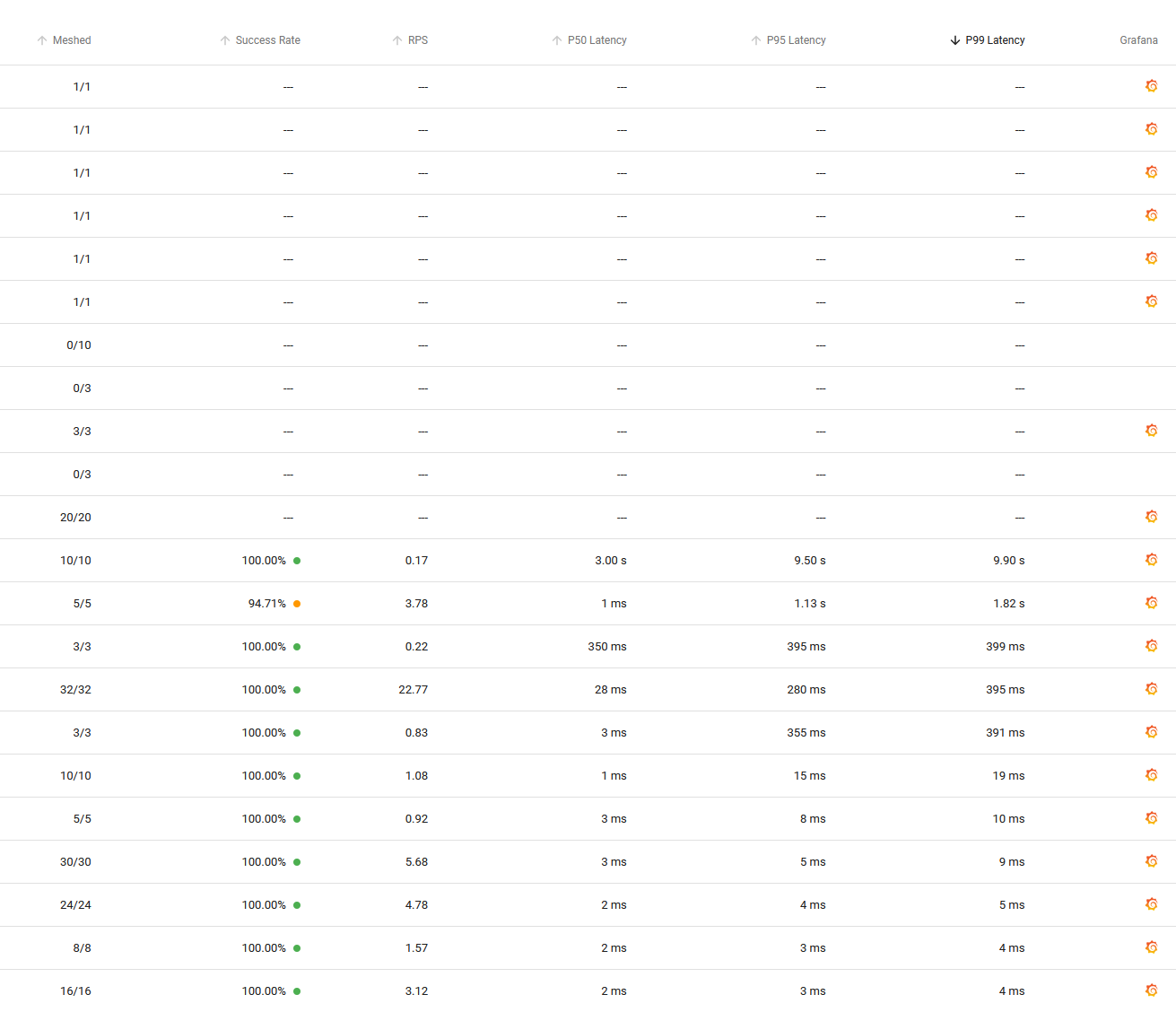
Currently when sorting in the http metrics view by i.e. largest P99 latency, rows which have no value for this metric are placed above the highest value row. This makes it sometimes hard to see the actual highest value since you have to scroll down until you reach the actual highest value. See the attached screenshot for an example:
### How should the problem be solved?
Treat these rows as below-0 values in the sorting and place them at the very bottom of the page when sorting for highest value in any given column.
### Any alternatives you've considered?
There is no alternative ;-)
### How would users interact with this feature?
Don't scroll, get information right away ;-)
Contributor guide
First steps
- Read the whole issue, then the project's contributing guide.
- Comment on the issue to say you are picking it up — it saves two people doing the same work.
- Fork the repository and make your change on a branch.
- Open a pull request that references the issue number.
Research direction
Start by locating the Dashboard/UI code for the HTTP metrics view and its column-sorting behavior, then check whether sorting tests cover rows with no metric value. Done means descending sorts place no-value rows below all valued rows for every applicable column, with tests confirming the behavior.
Written by the indexing model from the issue text.
Assessment
- Domain
- frontend
- Issue type
- Feature
- Difficulty
- 3/5
- Estimated time
- 1-2 days
- Activity status
- Stale
- Clarity
- Mostly clear
- Newbie friendliness
- 35/100