scroll list can't scroll in flex column with a top button
Nobody has claimed this yet.
- Dominant language
- Rust
- Stars
- 9.7k
- Forks
- 565
- PR merge metrics
- No merged PRs in 30d
Description
I want to scroll the list, thats my codes
```rust
use druid::im::Vector;
use druid::widget::{Button, Flex, Label, List, Scroll};
use druid::{AppLauncher, Data, Lens, Widget, WidgetExt, WindowDesc};
pub fn run() {
let main_window = WindowDesc::new(ui_builder()).title("Clipboards");
let contents = (1..100).map(|i| format!("text 测试 {}", i)).collect();
let clipboards = Clipboards { contents };
AppLauncher::with_window(main_window)
.log_to_console()
.launch(clipboards)
.unwrap()
}
#[derive(Debug, Clone, Data, Lens)]
pub struct Clipboards {
contents: Vector,
}
fn ui_builder() -> impl Widget {
let button_text = Label::new("button").with_text_size(20.0);
let button = Button::from_label(button_text)
.on_click(|_ctx, _: &mut Clipboards, _env| println!("top click"));
let list = List::new(|| {
Label::dynamic(|content: &String, _env| content.to_string())
.with_text_size(20.0)
.on_click(|_ctx, content, _env| {
println!("click {}", content);
})
})
.with_spacing(20.0)
.center()
.expand_width()
.scroll()
.vertical()
.lens(Clipboards::contents);
/*Flex::column()
.with_child(button)
.with_default_spacer()
.with_child(list)*/
list
}
```
it can scroll
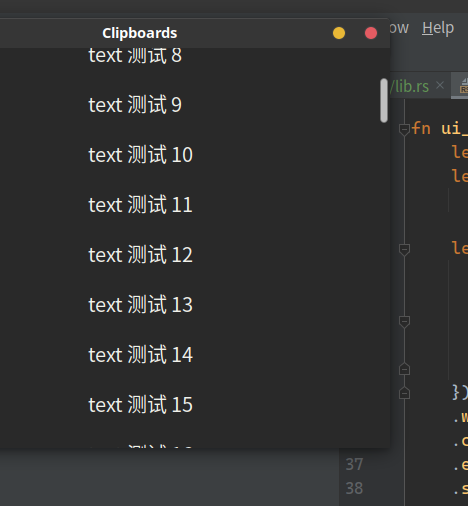
and now I want to add a button on the top
```rust
use druid::im::Vector;
use druid::widget::{Button, Flex, Label, List, Scroll};
use druid::{AppLauncher, Data, Lens, Widget, WidgetExt, WindowDesc};
pub fn run() {
let main_window = WindowDesc::new(ui_builder()).title("Clipboards");
let contents = (1..100).map(|i| format!("text 测试 {}", i)).collect();
let clipboards = Clipboards { contents };
AppLauncher::with_window(main_window)
.log_to_console()
.launch(clipboards)
.unwrap()
}
#[derive(Debug, Clone, Data, Lens)]
pub struct Clipboards {
contents: Vector,
}
fn ui_builder() -> impl Widget {
let button_text = Label::new("button").with_text_size(20.0);
let button = Button::from_label(button_text)
.on_click(|_ctx, _: &mut Clipboards, _env| println!("top click"));
let list = List::new(|| {
Label::dynamic(|content: &String, _env| content.to_string())
.with_text_size(20.0)
.on_click(|_ctx, content, _env| {
println!("click {}", content);
})
})
.with_spacing(20.0)
.center()
.expand_width()
.scroll()
.vertical()
.lens(Clipboards::contents);
Flex::column()
.with_child(button)
.with_default_spacer()
.with_child(list)
}
```
but now the list can't scroll and the scroll bar is miss
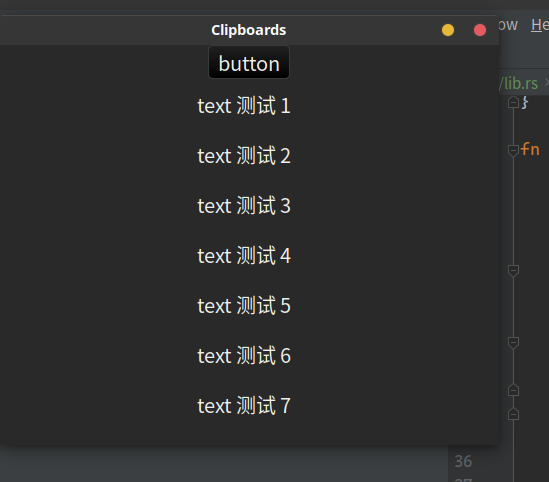
how should I do to add the button on the top and keep the list scrollable?
Contributor guide
First steps
- Read the whole issue, then the project's contributing guide.
- Comment on the issue to say you are picking it up — it saves two people doing the same work.
- Fork the repository and make your change on a branch.
- Open a pull request that references the issue number.
Research direction
Start from the ui_builder function and run the two examples, comparing the standalone Scroll with the List placed in Flex::column alongside the button. Read the layout behavior of the Flex and Scroll composition shown in the issue; done means the top button remains visible while the list has a working scrollbar and can scroll through all items.
Written by the indexing model from the issue text.
Assessment
- Tech stack
- rust
- Domain
- desktop
- Issue type
- Bug
- Difficulty
- 3/5
- Estimated time
- 1-2 days
- Activity status
- Stale
- Clarity
- Mostly clear
- Newbie friendliness
- 45/100