liip / liip/extend-block-example-wp-plugin
Block validation fails
Nobody has claimed this yet.
- Dominant language
- JavaScript
- Stars
- 50
- Forks
- 17
- PR merge metrics
- No merged PRs in 30d
Description
Hello,
Thank you for this example, it has helped allot on extending multiple gutenberg blocks and adding more options to them.
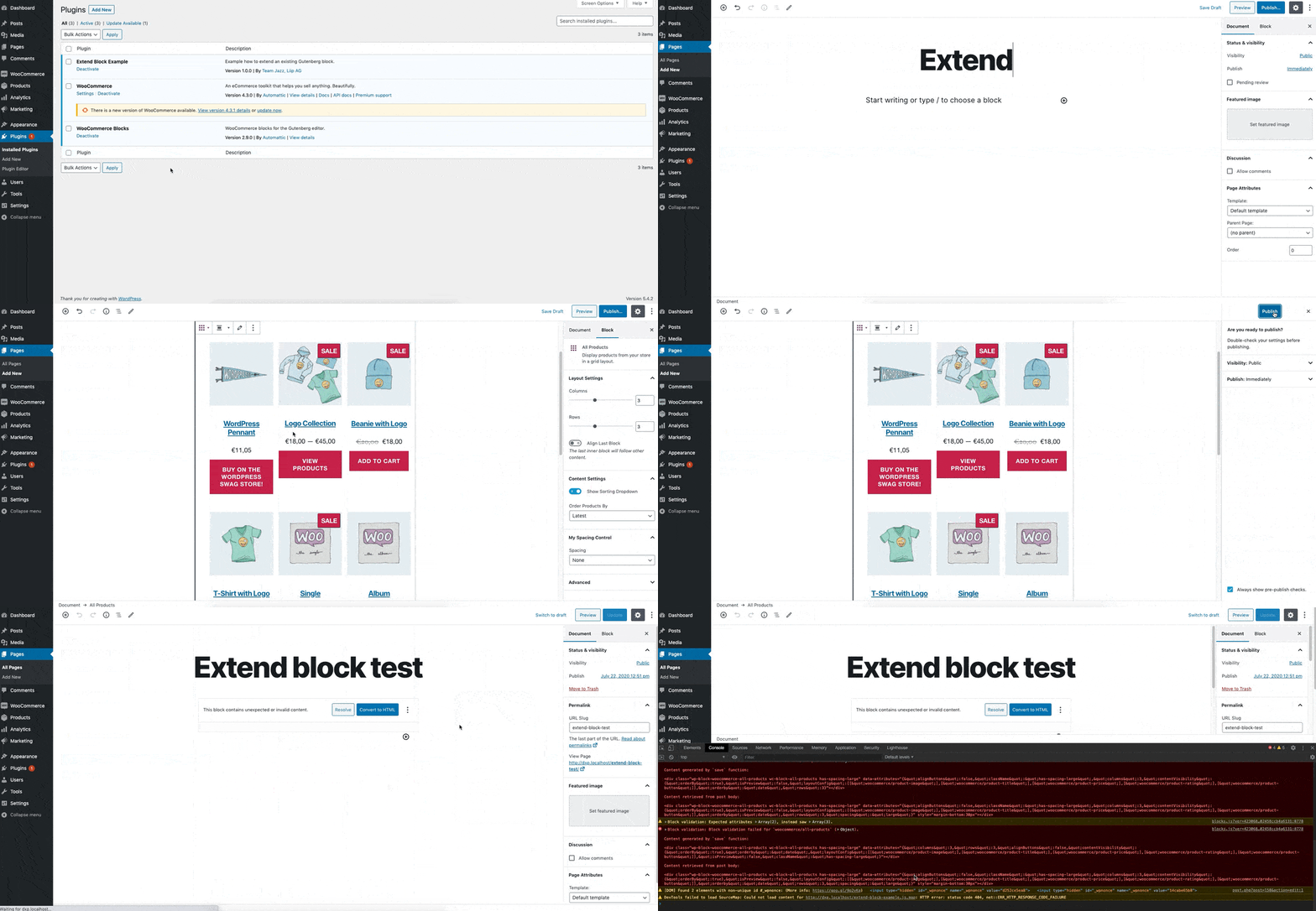
I’m facing issue with block validation on certain blocks after removing the tests for the core/image block, for example on woocommerce/all-products block added with WooCommerce Blocks as seen in the video attached.
The error generated in the console are:
blocks.js?ver=423068d7079f57cf9f02458ccb4a6131:8778 Block validation: Expected attributes Array(2), instead saw Array(3).
log @ blocks.js?ver=423068d7079f57cf9f02458ccb4a6131:8778
blocks.js?ver=423068d7079f57cf9f02458ccb4a6131:8778 Block validation: Block validation failed for `woocommerce/all-products` (Object).
Content generated by `save` function:
<div class="wp-block-woocommerce-all-products wc-block-all-products has-spacing-large" data-attributes="{"alignButtons":false,"className":"has-spacing-large","columns":3,"contentVisibility":{"orderBy":true},"isPreview":false,"layoutConfig":[["woocommerce/product-image"],["woocommerce/product-title"],["woocommerce/product-price"],["woocommerce/product-rating"],["woocommerce/product-button"]],"orderby":"date","rows":3}"></div>
Content retrieved from post body:
<div class="wp-block-woocommerce-all-products wc-block-all-products has-spacing-large" data-attributes="{"alignButtons":false,"className":"has-spacing-large","columns":3,"contentVisibility":{"orderBy":true},"isPreview":false,"layoutConfig":[["woocommerce/product-image"],["woocommerce/product-title"],["woocommerce/product-price"],["woocommerce/product-rating"],["woocommerce/product-button"]],"orderby":"date","rows":3,"spacing":"large"}" style="margin-bottom:30px"></div>
Plugin is exactly the same, only difference is commenting out the test for the single core/image block inside the spacing-control.js
import assign from 'lodash.assign';

const { createHigherOrderComponent } = wp.compose;
const { Fragment } = wp.element;
const { InspectorControls } = wp.blockEditor;
const { PanelBody, SelectControl } = wp.components;
const { addFilter } = wp.hooks;
const { __ } = wp.i18n;

// Enable spacing control on the following blocks
const enableSpacingControlOnBlocks = [
	'core/image',
];

// Available spacing control options
const spacingControlOptions = [
	{
		label: __( 'None' ),
		value: '',
	},
	{
		label: __( 'Small' ),
		value: 'small',
	},
	{
		label: __( 'Medium' ),
		value: 'medium',
	},
	{
		label: __( 'Large' ),
		value: 'large',
	},
];

/**
 * Add spacing control attribute to block.
 *
 * @param {object} settings Current block settings.
 * @param {string} name Name of block.
 *
 * @returns {object} Modified block settings.
 */
const addSpacingControlAttribute = ( settings, name ) => {
	// Do nothing if it's another block than our defined ones.
	/* if ( ! enableSpacingControlOnBlocks.includes( name ) ) {
		return settings;
	} */

	// Use Lodash's assign to gracefully handle if attributes are undefined
	settings.attributes = assign( settings.attributes, {
		spacing: {
			type: 'string',
			default: spacingControlOptions[ 0 ].value,
		},
	} );

	return settings;
};

addFilter( 'blocks.registerBlockType', 'extend-block-example/attribute/spacing', addSpacingControlAttribute );

/**
 * Create HOC to add spacing control to inspector controls of block.
 */
const withSpacingControl = createHigherOrderComponent( ( BlockEdit ) => {
	return ( props ) => {
		// Do nothing if it's another block than our defined ones.
		/* if ( ! enableSpacingControlOnBlocks.includes( props.name ) ) {
			return (
				<BlockEdit { ...props } />
			);
		} */

		const { spacing } = props.attributes;

		// add has-spacing-xy class to block
		if ( spacing ) {
			props.attributes.className = `has-spacing-${ spacing }`;
		}

		return (
			<Fragment>
				<BlockEdit { ...props } />
				<InspectorControls>
					<PanelBody
						title={ __( 'My Spacing Control' ) }
						initialOpen={ true }
					>
						<SelectControl
							label={ __( 'Spacing' ) }
							value={ spacing }
							options={ spacingControlOptions }
							onChange={ ( selectedSpacingOption ) => {
								props.setAttributes( {
									spacing: selectedSpacingOption,
								} );
							} }
						/>
					</PanelBody>
				</InspectorControls>
			</Fragment>
		);
	};
}, 'withSpacingControl' );

addFilter( 'editor.BlockEdit', 'extend-block-example/with-spacing-control', withSpacingControl );

/**
 * Add margin style attribute to save element of block.
 *
 * @param {object} saveElementProps Props of save element.
 * @param {Object} blockType Block type information.
 * @param {Object} attributes Attributes of block.
 *
 * @returns {object} Modified props of save element.
 */
const addSpacingExtraProps = ( saveElementProps, blockType, attributes ) => {
	// Do nothing if it's another block than our defined ones.
	/* if ( ! enableSpacingControlOnBlocks.includes( blockType.name ) ) {
		return saveElementProps;
	} */

	const margins = {
		small: '5px',
		medium: '15px',
		large: '30px',
	};

	if ( attributes.spacing in margins ) {
		// Use Lodash's assign to gracefully handle if attributes are undefined
		assign( saveElementProps, { style: { 'margin-bottom': margins[ attributes.spacing ] } } );
	}

	return saveElementProps;
};

addFilter( 'blocks.getSaveContent.extraProps', 'extend-block-example/get-save-content/extra-props', addSpacingExtraProps );
Any advices on how to tweak this plugin to fix validation issues ?

Contributor guide
No contributing guide indexed for this repository
First steps
- Read the whole issue, then the project's contributing guide.
- Comment on the issue to say you are picking it up — it saves two people doing the same work.
- Fork the repository and make your change on a branch.
- Open a pull request that references the issue number.
Research direction
Start with spacing-control.js and the blocks.registerBlockType, editor.BlockEdit, and blocks.getSaveContent.extraProps filters shown in the issue. Reproduce the validation failure with woocommerce/all-products while the core/image restriction is commented out, then compare the saved and retrieved attributes. Done means the plugin no longer adds unexpected attributes or markup that causes block validation to fail.
Written by the indexing model from the issue text.
Assessment
- Tech stack
- javascript
- Domain
- frontend
- Issue type
- Bug
- Difficulty
- 4/5
- Estimated time
- 3-5 days
- Activity status
- Stale
- Clarity
- Needs clarification
- Newbie friendliness
- 35/100