D3D11 will not match the displays refresh rate when using VRR
Nobody has claimed this yet.
- Dominant language
- C
- Stars
- 14.1k
- Forks
- 2.2k
- Avg merge
- 7h 35m
- Merged PRs (30d)
- 51
Description
RetroArch 1.11.1 and the latest nightly build will not use my displays 120Hz refresh rate when using D3D11 + VRR/G-Sync, instead RA will use a refresh rate that is around 110 - 115Hz... Because it occasionally changes when i re-launch RA, so some times it's 110Hz, other times it's 115Hz, or somewhere inbetween.
All the other video drivers will correctly use 120Hz when using VRR/G-Sync.
This D3D11 problem also has the side effect of fixing the mouse lag that i reported in #13867, because i've found that when VRR/G-Sync is enabled within RA, and the 'Vertical Refresh Rate' setting is set to any number below the refresh rate of the display, it will completely eradicate the mouse lag. So i'm not sure if this is actually done on purpose to fix the lag? Although i doubt it, because it would make sense to do this for all drivers, not just D3D11.
As shown below, RetroArch and my TV (top right corner info) will both confirm that it's not using 120Hz, even though RA is set to use 120Hz (or 119.880Hz to be exact)...
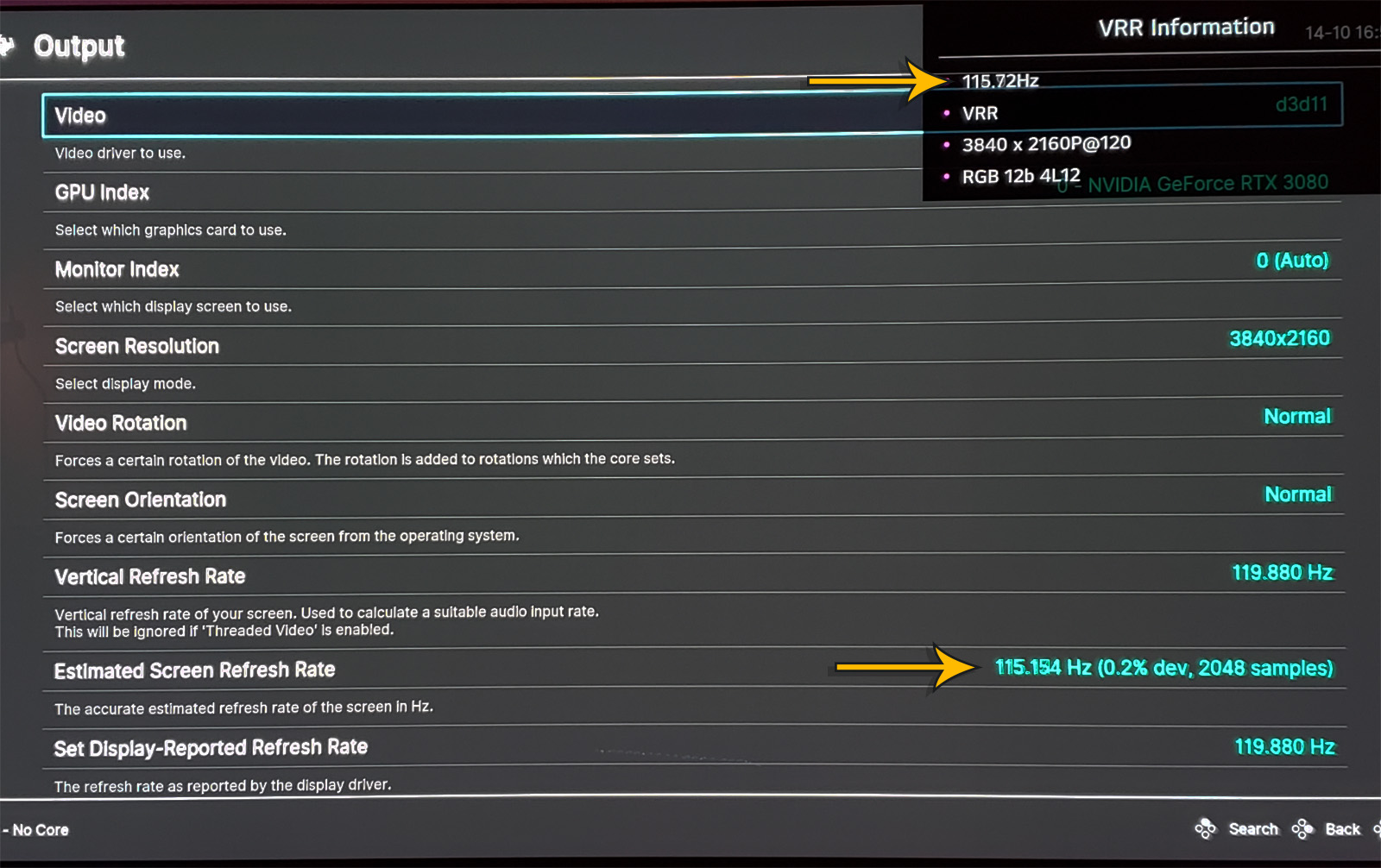
To replicate this you'd probably need a Nvidia GPU + G-Sync display (although maybe it also happens with AMD FreeSync):
- Set the driver to D3D11.
- Go to Settings > Video > Output > Set Display-Reported Refresh Rate.
- Go to Settings > Video > Synchronization > Sync to Exact Content Framerate.
- Close and re-open RA in full screen, then check the refresh rate.
OS is Windows 10
Latest 522.25 Nvidia drivers
Contributor guide
First steps
- Read the whole issue, then the project's contributing guide.
- Comment on the issue to say you are picking it up — it saves two people doing the same work.
- Fork the repository and make your change on a branch.
- Open a pull request that references the issue number.
Research direction
Start by reproducing the issue with the D3D11 driver on Windows 10 using the listed VRR/G-Sync settings and full-screen restart steps. Trace the D3D11 display refresh-rate handling and compare it with the other video drivers. Done means the display uses the configured 120Hz or 119.880Hz rate while VRR is enabled.
Written by the indexing model from the issue text.
Assessment
- Tech stack
- c
- Domain
- desktop
- Issue type
- Bug
- Difficulty
- 4/5
- Estimated time
- 3-5 days
- Activity status
- Stale
- Clarity
- Mostly clear
- Newbie friendliness
- 38/100