v1.11.0 stops recognizing PS button and Touchpad click in Dualshock 4 MacOS X 12.5
Nobody has claimed this yet.
- Dominant language
- C
- Stars
- 14.1k
- Forks
- 2.2k
- Avg merge
- 7h 35m
- Merged PRs (30d)
- 51
Description
Description
The new version released (v1.11.0) doesn't recognizes the PS button and touchpad click in Dualshock 4 Wireless Controller.
Just download the v1.10.3 and you will confirm that PS button will be recognized.
Expected behavior
In Settings > Input > Hotkeys > Hotkey enable, when the PS button or touchpad click in Dualshock 4 controller is pressed, the button will be recognized.
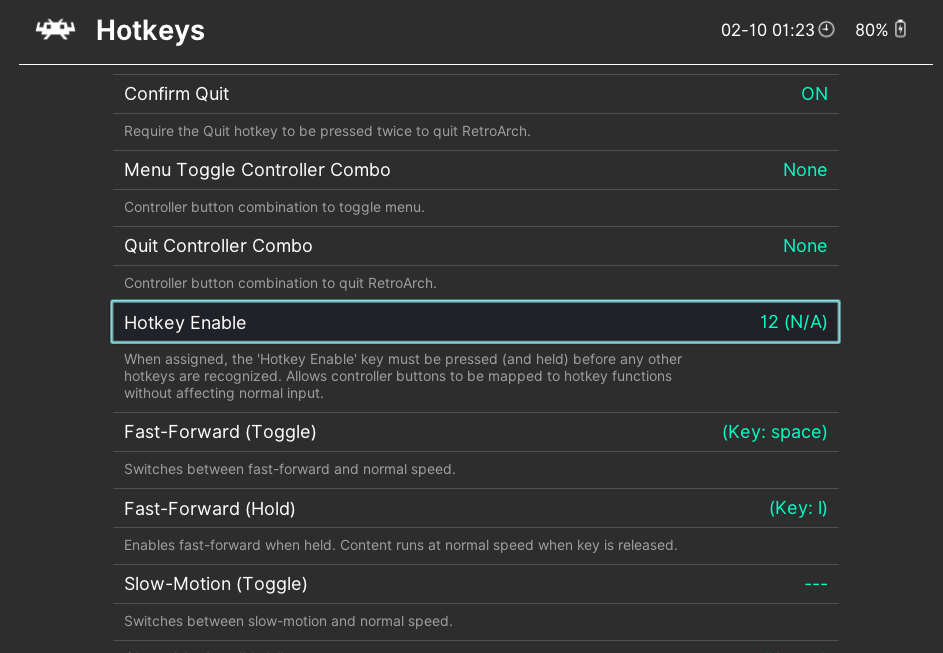
Actual behavior
In Settings > Input > Hotkeys > Hotkey enable, when the PS button or touchpad click in Dualshock 4 controller is pressed, the button is not recognized.
Steps to reproduce the bug
- Open the Settings > Input > Hotkeys > Hotkey enable
- Press the PS button in Dualshock 4 controller
Bisect Results
In v1.10.3 this works very well. In the last release v.1.11.0 this doesn't works anymore.
Version/Commit
v.1.11.0
- RetroArch: [version/commit]
Environment information
- OS: MacOS 12.5
Contributor guide
First steps
- Read the whole issue, then the project's contributing guide.
- Comment on the issue to say you are picking it up — it saves two people doing the same work.
- Fork the repository and make your change on a branch.
- Open a pull request that references the issue number.
Research direction
Reproduce the regression in Settings > Input > Hotkeys > Hotkey enable using a DualShock 4 on macOS 12.5, comparing v1.10.3 with v1.11.0. Trace the input hotkey handling and identify why the PS button and touchpad click are no longer recognized; done means both controls are detected again in v1.11.0.
Written by the indexing model from the issue text.
Assessment
- Tech stack
- c, macos
- Domain
- desktop
- Issue type
- Bug
- Difficulty
- 3/5
- Estimated time
- 1-2 days
- Activity status
- Stale
- Clarity
- Mostly clear
- Newbie friendliness
- 32/100