[Playlists] Aggregate "Runtime" and "Last Played" data not being shown without an assigned core
Nobody has claimed this yet.
- Dominant language
- C
- Stars
- 14.1k
- Forks
- 2.2k
- Avg merge
- 7h 35m
- Merged PRs (30d)
- 51
Description
Description
This is a minor annoyance that happens with all menu drivers and has existed forever.
Users can currently choose which type of runtime metadata can be saved and displayed for every playlist entry, by going into Settings -> Playlists and adjusting the following toggles:
- "Save Runtime Log (Per Core)" and/or "Save Runtime Log (Aggregate)" to either ON or OFF, depending on one's preference;
- "Playlist Sub-Label Runtime" set to either "Per Core" or "Aggregate".
However, as of the current code, even if one chooses to only show the "Aggregate" (not core-specific) runtime information, any playlist entry that does not have an assigned core will have empty metadata.
See here for an example of what is shown through the Ozone UI. This is a piece of content that has been run before many times and has aggregate runtime saved for it.
After resetting the assigned core from the Quick Menu, this is what shows up:
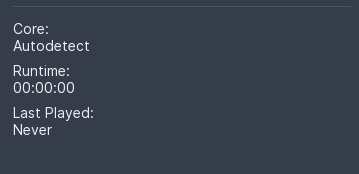
Setting the core association again through the Quick Menu will allow the aggregate metadata to appear again:

Expected behavior
When choosing to save and display aggregate (not core-specific) runtime data, all related metadata should be detected and displayed for the corresponding playlist entry, even if a core has not been assigned or has been reset through the Quick Menu.
Actual behavior
Aggregate runtime metadata is not being displayed, thus resulting in empty data, unless the selected playlist entry has a core assigned to it.
Version/Commit
- RetroArch: 1.10.3 / 72b4cf914e6481b013afd57af5777efd3c7a0fa8
Environment information
- OS: Windows 11
- Compiler: MSYS2/Mingw64
Contributor guide
First steps
- Read the whole issue, then the project's contributing guide.
- Comment on the issue to say you are picking it up — it saves two people doing the same work.
- Fork the repository and make your change on a branch.
- Open a pull request that references the issue number.
Research direction
Reproduce the issue in the Ozone UI with aggregate runtime enabled and no core assigned, then compare the playlist entry before and after assigning a core. Trace the playlist metadata lookup from that entry and verify that aggregate runtime and last-played data are still shown without a core; no source file or test is named in the report.
Written by the indexing model from the issue text.
Assessment
- Tech stack
- c
- Domain
- frontend
- Issue type
- Bug
- Difficulty
- 3/5
- Estimated time
- 1-2 days
- Activity status
- Stale
- Clarity
- Mostly clear
- Newbie friendliness
- 45/100