Installing retroarch in "c:\Program Files" makes "Load Core" window to display "Directory not found" and importing files wont work
Nobody has claimed this yet.
- Dominant language
- C
- Stars
- 14.1k
- Forks
- 2.2k
- Avg merge
- 7h 35m
- Merged PRs (30d)
- 51
Description
Description
As described in the bug title. Import content not finding any ROMs.
Steps to reproduce the bug
- Install Retroarch in c:\Program Files\RetroArch-Win64
- Go to "online updater", "core downloader", select "Arcade Mame (Current)"
- Go to "Import content", the navigate to the folder where the ROMs are
- Files get scanned, but all remains as before the scanning
- If I go to Load Core, it displays "Directory not found", see pic below
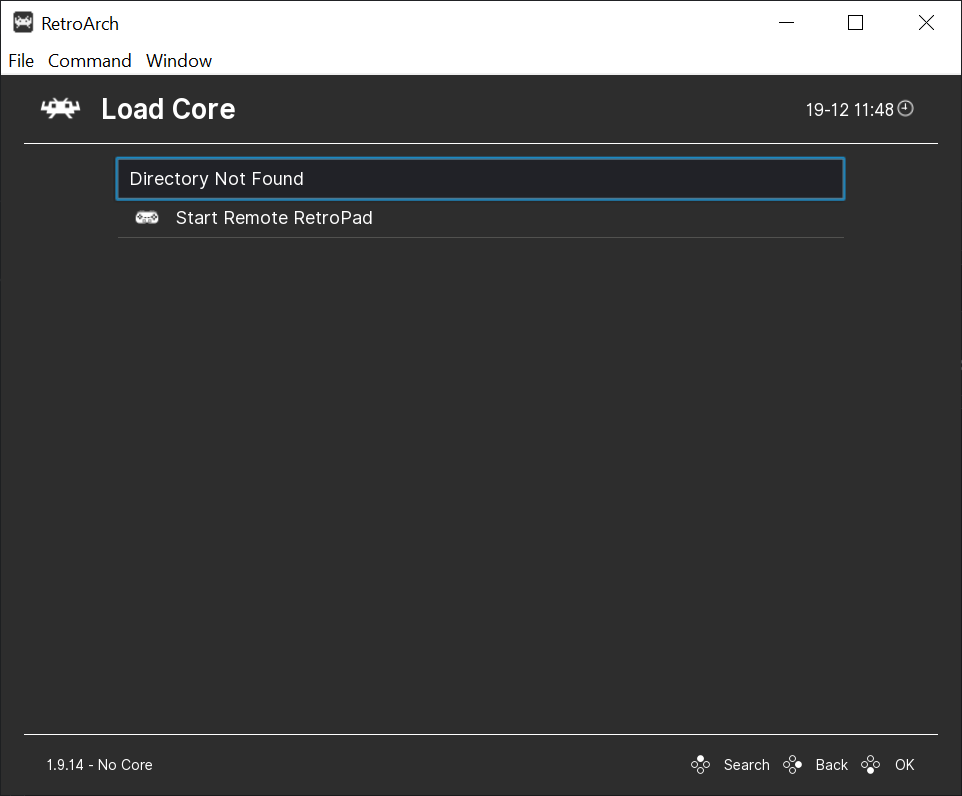
- RetroArch: [version/commit]
1.9.14
Environment information
Win64, windows 10 home
Note
As a general note, I find retroarch very tricky to use, at least if things fail, they should explain why they fail, that way we can file better bugs or find a fix ourselves. Thanks for this project anyway!
Contributor guide
First steps
- Read the whole issue, then the project's contributing guide.
- Comment on the issue to say you are picking it up — it saves two people doing the same work.
- Fork the repository and make your change on a branch.
- Open a pull request that references the issue number.
Research direction
Start by reproducing the issue on Windows 10 with RetroArch 1.9.14 installed under c:\Program Files\RetroArch-Win64, then trace the Import content and Load Core flows described in the report. Compare behavior with an installation outside Program Files and identify the path or permission handling involved; done means core loading and ROM importing work from the protected installation.
Written by the indexing model from the issue text.
Assessment
- Tech stack
- c
- Domain
- desktop, frontend
- Issue type
- Bug
- Difficulty
- 4/5
- Estimated time
- 3-5 days
- Activity status
- Quiet
- Clarity
- Needs clarification
- Newbie friendliness
- 35/100