Can't run mainline version on windows vista
Nobody has claimed this yet.
- Dominant language
- C
- Stars
- 14.1k
- Forks
- 2.2k
- Avg merge
- 7h 35m
- Merged PRs (30d)
- 51
Description
First and foremost consider this:
- Only RetroArch bugs should be filed here. Not core bugs or game bugs
- This is not a forum or a help section, this is strictly developer oriented
Description
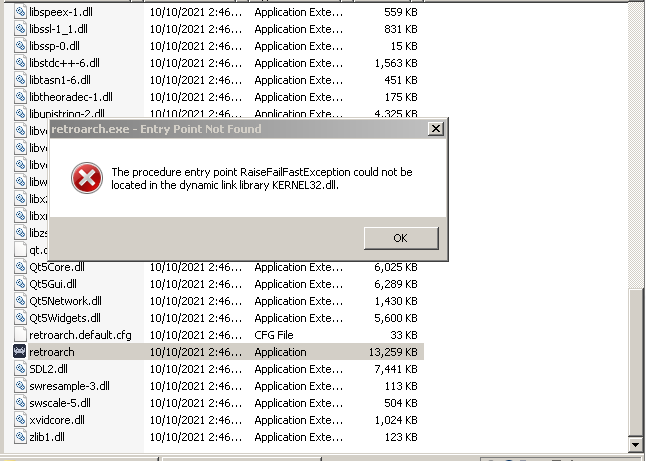
Can't run mainline version on windows vista,it shows
The Procedure entry point RaiseFailFastException could not be located in the dynamic link library kernel.dll
Expected behavior
Run normally
[What you expected to happen]
Actual behavior
The Procedure entry point RaiseFailFastException could not be located in the dynamic link library kernel.dll
[What is actually happening]
Steps to reproduce the bug
- [First step] Download mainline version from this url:https://buildbot.libretro.com/nightly/windows/x86/RetroArch.7z
- [Second step]Unzip it and run retroarch.exe
- [and so on...]Show error message
Problem signature:
Problem Event Name: APPCRASH
Application Name: retroarch.exe
Application Version: 0.0.0.0
Application Timestamp: 00000000
Fault Module Name: KERNEL32.dll!RaiseFailFastException
Fault Module Version: 6.0.6002.18005
Fault Module Timestamp: 49e03821
Exception Code: c0000139
Exception Offset: 00009eed
OS Version: 6.0.6002.2.2.0.256.16
Locale ID: 1033
Additional Information 1: 9d13
Additional Information 2: 1abee00edb3fc1158f9ad6f44f0f6be8
Additional Information 3: 9d13
Additional Information 4: 1abee00edb3fc1158f9ad6f44f0f6be8
Bisect Results
[Try to bisect and tell us when this started happening]
Maybe it started before retroarch 1.7.5
Version/Commit
You can find this information under Information/System Information
- RetroArch: [version/commit]
1.9.11
Environment information
- OS: [The operating system you're running] Windows Vista
- Compiler: [In case you are running local builds] Download from official.
Contributor guide
First steps
- Read the whole issue, then the project's contributing guide.
- Comment on the issue to say you are picking it up — it saves two people doing the same work.
- Fork the repository and make your change on a branch.
- Open a pull request that references the issue number.
Research direction
Start by reproducing the failure with the official Windows x86 RetroArch.7z build and retroarch.exe on Windows Vista, then inspect the Windows-specific build and startup path. Done means establishing whether the mainline executable can launch on Vista without the RaiseFailFastException error, or documenting that Vista is unsupported.
Written by the indexing model from the issue text.
Assessment
- Tech stack
- c
- Domain
- desktop-dev, operating-systems
- Issue type
- Bug
- Difficulty
- 4/5
- Estimated time
- 3-5 days
- Activity status
- Stale
- Clarity
- Needs clarification
- Newbie friendliness
- 20/100