RetroArch consistently opens on the leftmost display, disregarding the "Monitor Index" setting
Nobody has claimed this yet.
- Dominant language
- C
- Stars
- 14.1k
- Forks
- 2.2k
- Avg merge
- 7h 35m
- Merged PRs (30d)
- 51
Description
Description
Launching RetroArch will result in it opening up on the leftmost display, disregarding any setting (from RetroArch or the OS). Games will always launch on the leftmost display, disregarding any setting, and even if the RetroArch window has been previously dragged to another display.
Here is a picture of my display settings. As you can see, my primary display is the number 1, in horizontal layout.
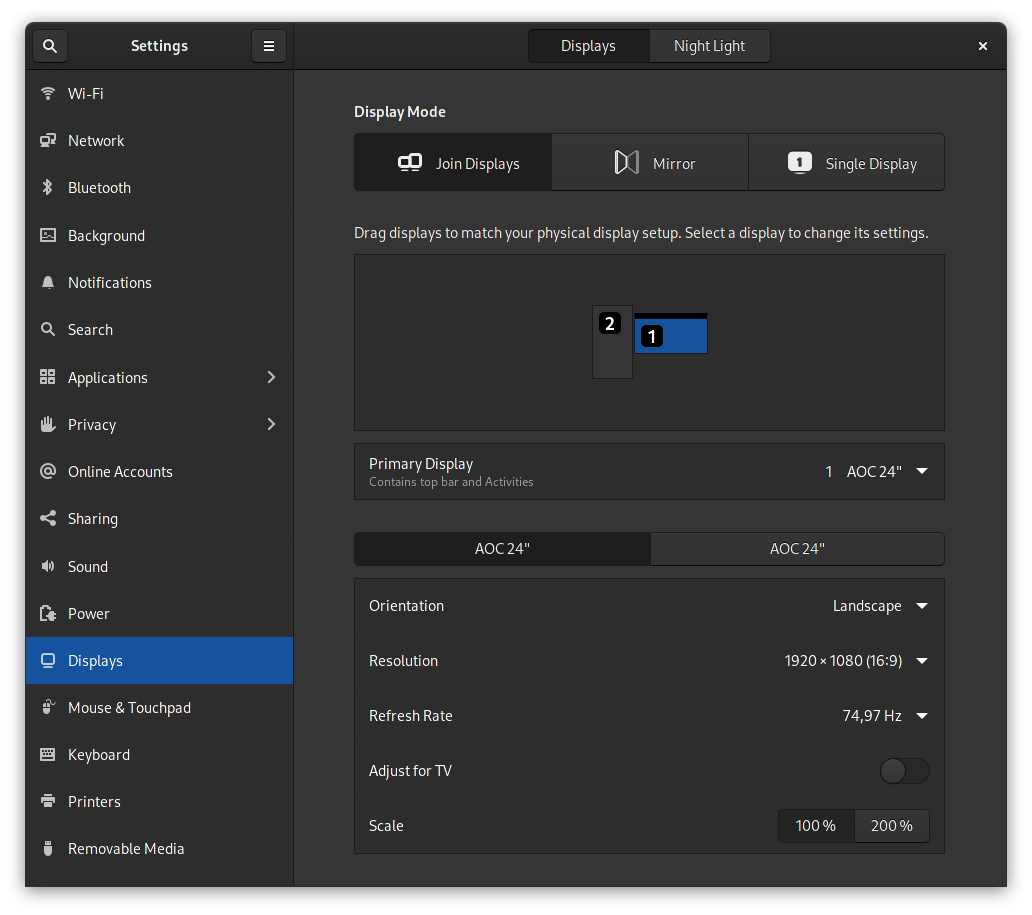
RetroArch will consistently open on display 2, disregarding the following settings:
- Setting up a display as primary in GNOME settings does not do anything on RetroArch (other programs work fine).
- Choosing a display number in
Settings -> Video -> Output -> Monitor Indexis ignored by RetroArch: the RetroArch window will flicker once, and reappear on the leftmost display. - Playing with windowed/fullscreen modes, or forcing a specific resolution don't fix the issue.
- Switching the layout of my monitors in GNOME settings so that my right monitor becomes my left monitor and vice-versa, results in RetroArch now appearing on my primary display (still disregarding any OS/RA settings).
Expected behavior
RetroArch should launch on the primary display when "Monitor Index" is set to "0".
Games should open on the primary display when "Monitor Index" is set to "0".
RetroArch should open on the display set by "Monitor Index".
Games should open on the display set by "Monitor Index".
Actual behavior
RetroArch and games will always open on the leftmost display.
Steps to reproduce the bug
- Choose on what display should RetroArch open (in the OS and RA settings)
- Open RetroArch, or launch a game via RetroArch
- Have the window default to the leftmost display anyway
Bisect Results
I have just recently got a secondary display, so I can't confirm this has happened before 1.9.6. But #6271 seems to indicate it's a long-running issue, though said issue is not very specific in its description, so it could be unrelated.
Version/Commit
- RetroArch: 1.9.6 (installed via the official Arch Linux repos)
Environment information
- OS: Arch Linux with GNOME 40 (system up-to-date, on kernel
5.12.15-arch1-1as of today)
Contributor guide
First steps
- Read the whole issue, then the project's contributing guide.
- Comment on the issue to say you are picking it up — it saves two people doing the same work.
- Fork the repository and make your change on a branch.
- Open a pull request that references the issue number.
Research direction
Start by reproducing the issue with two displays on Arch Linux and GNOME, checking the Settings → Video → Output → Monitor Index path while launching RetroArch and a game. Trace the display selection during window and game launch; done means both honor the configured monitor and the primary-display behavior described in the expected results.
Written by the indexing model from the issue text.
Assessment
- Tech stack
- c, linux
- Domain
- desktop, operating-systems
- Issue type
- Bug
- Difficulty
- 4/5
- Estimated time
- 3-5 days
- Activity status
- Stale
- Clarity
- Mostly clear
- Newbie friendliness
- 35/100