With desktop menu playlist, adding a .zip with a single file inside automatically assumes you want to load that file.
Nobody has claimed this yet.
- Dominant language
- C
- Stars
- 14.1k
- Forks
- 2.2k
- Avg merge
- 7h 35m
- Merged PRs (30d)
- 51
Description
Description
While using the desktop menu, if you want to add to a playlist a .zip with a single file inside, the entry will be modify because it expects you want to load that file inside. It makes sense but it can be really annoying with some cores.
Here's a video I posted on Discord few days ago of me demonstrating how it can mess with Flycast for example: https://cdn.discordapp.com/attachments/434713532341288961/710536650199007242/2020-05-14_18-48-26_edit.mp4
And here's what's going on:
I want to add cvs2.zip to a playlist, the file itself is only ~2KB (it's an arcade game that uses a CHD) and has a single file inside (317-5078-com.pic).
When you add it, the entry is automatically edited to load /path/to/rom/cvs2.zip#317-5078-com.pic. And because of that, Flycast will try to load the .pic file inside instead of the whole .zip and will fail...
If you edit the entry to remove #317-5078-com.pic it doesn't work, RetroArch will re-add it automatically.
As a simple workaround I add a dummy file inside the .zip, with this the file is no longer alone and RetroArch adds the .zip properly.
My suggestion would be maybe add a "Load as a zip file" box to check or something like that when adding an entry? Something like this:
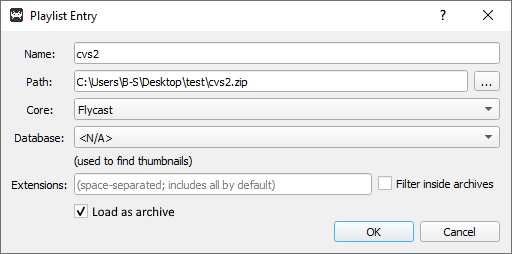
Steps to reproduce the bug
- Start desktop menu and in a playlist add any rom zipped with a single file in it.
- Once it's added, edit the entry and you'll see
rom.zip#rom.extension. - Delete
#rom.extensionfrom the "Path" field and press "OK". - Edit the entry again, the
#rom.extensionshould be back...
Version/Commit
- RetroArch: 1.8.7 / 582f967fb0
Environment information
- OS: Windows 10
Contributor guide
First steps
- Read the whole issue, then the project's contributing guide.
- Comment on the issue to say you are picking it up — it saves two people doing the same work.
- Fork the repository and make your change on a branch.
- Open a pull request that references the issue number.
Research direction
Start with the desktop menu's playlist add and edit flow described in the reproduction steps, tracing where a single-file .zip becomes a path with a #member suffix. Reproduce with a zip containing one file, then verify that adding it preserves the zip path and that editing and reopening the entry does not restore the suffix.
Written by the indexing model from the issue text.
Assessment
- Tech stack
- c
- Domain
- desktop
- Issue type
- Bug
- Difficulty
- 3/5
- Estimated time
- 1-2 days
- Activity status
- Stale
- Clarity
- Mostly clear
- Newbie friendliness
- 35/100