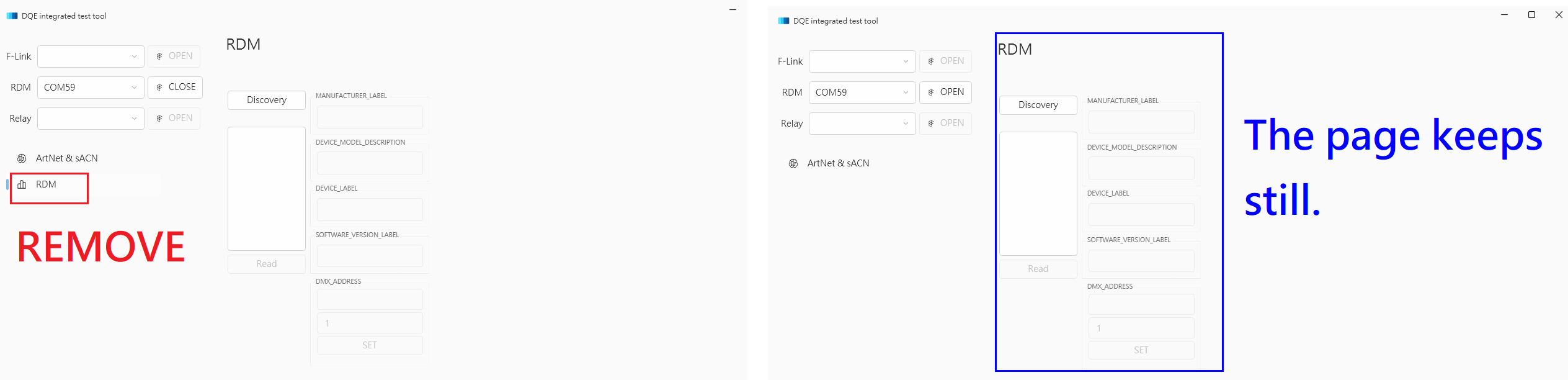
Once the navigation item has been removed, view page is still right there in the RootFrame.
Nobody has claimed this yet.
- Dominant language
- C#
- Stars
- 9.6k
- Forks
- 1k
- PR merge metrics
- No merged PRs in 30d
Description
Describe the bug
I made a simple button to add/remove navigation items.
When I remove a item from NavigationItems, that item is quickly removed from the RootNavigation on the left panel.
But the linked page is still showed in RootFrame on the right panel.
To Reproduce
    [RelayCommand]
    private void OpenFLinkFunc()
    {

            foreach (NavigationItem item in NavigationItems)
            {
                if (item.PageTag == "Data")
                {
                    NavigationItems.Remove(item);
                    break;
                }
            }
    }
Expected behavior
According to the focus of Navigation, the linked page should display right page on the right panel.
Screenshots
OS version
Windows 10 19043.2251
.NET version
.NET 6.0
WPF-UI NuGet version
2.0.3
Additional context
No response
Contributor guide
First steps
- Read the whole issue, then the project's contributing guide.
- Comment on the issue to say you are picking it up — it saves two people doing the same work.
- Fork the repository and make your change on a branch.
- Open a pull request that references the issue number.
Research direction
Start by reproducing the issue with the provided NavigationItems removal example on WPF UI 2.0.3, then trace how RootNavigation selection relates to the page displayed in RootFrame. The fix is complete when removing the selected navigation item leaves RootFrame showing the appropriate page instead of the removed item's page.
Written by the indexing model from the issue text.
Assessment
- Tech stack
- csharp
- Domain
- desktop
- Issue type
- Bug
- Difficulty
- 3/5
- Estimated time
- 1-2 days
- Activity status
- Stale
- Clarity
- Mostly clear
- Newbie friendliness
- 42/100