Add Acrylic backdrop to context menus
Open
Nobody has claimed this yet.
enhancement
- Dominant language
- C#
- Stars
- 9.6k
- Forks
- 1k
- PR merge metrics
- No merged PRs in 30d
Description
Is your feature request related to a problem? Please describe
In Windows 11, the context menu have an acrylic effect.
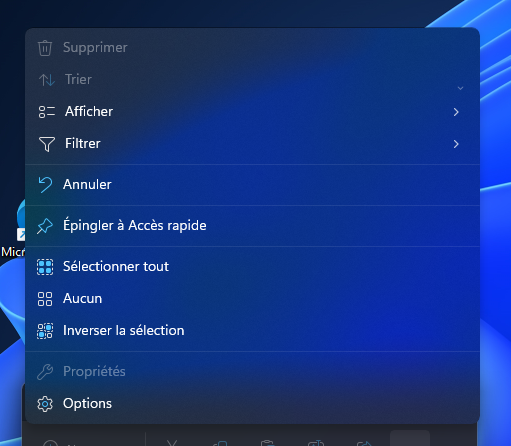
But in WPF UI, context menus have only a solid color

Describe the solution you'd like
Add the Acrylic backdrop to context menus.
Describe alternatives you've considered
Use the AcrylicBrush from FluentWPF, but i don't want to have 2 fluent design libraries in my program.
Additional context
No response
Contributor guide
First steps
- Read the whole issue, then the project's contributing guide.
- Comment on the issue to say you are picking it up — it saves two people doing the same work.
- Fork the repository and make your change on a branch.
- Open a pull request that references the issue number.
Research direction
Start by locating the context-menu theme resources and any existing Acrylic-related implementation in the WPF UI codebase. Compare the current context-menu appearance with the Windows 11 reference shown in the issue, then verify that context menus render with the requested Acrylic backdrop without relying on FluentWPF.
Written by the indexing model from the issue text.
Assessment
- Tech stack
- csharp
- Domain
- design, desktop
- Issue type
- Feature
- Difficulty
- 4/5
- Estimated time
- 3-5 days
- Activity status
- Stale
- Clarity
- Mostly clear
- Newbie friendliness
- 32/100