Dialog Title FontSize and Icon parameters
Nobody has claimed this yet.
- Dominant language
- C#
- Stars
- 9.6k
- Forks
- 1k
- PR merge metrics
- No merged PRs in 30d
Description
Is your feature request related to a problem? Please describe
Make several new parameters for dialog:
Title FontSize
Icon
IconFilled
IconForegorund
Describe the solution you'd like
- Title FontSize:
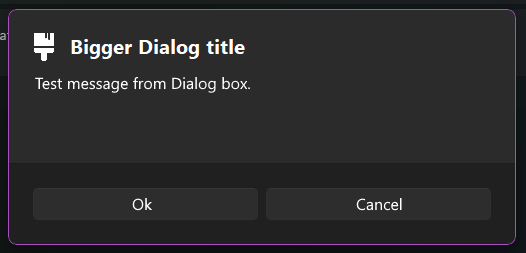
Right now, the dialog title is the same as the actual message of the dialog.
Since the actuall Windows 11 has much bigger title size compared to the message i thought it would be cool to add such features in WPF-UI
- Icon:
I think It'll be cool to be able to set icons for dialogs.
For example if its just an info dialog, there will be a white exclamation mark, etc.
Describe alternatives you've considered
I have tried manually settings the Content of the dialog but it parented it to a scroll panel and it looked ugly.
Additional context
Bigger title + icon example:
Contributor guide
First steps
- Read the whole issue, then the project's contributing guide.
- Comment on the issue to say you are picking it up — it saves two people doing the same work.
- Fork the repository and make your change on a branch.
- Open a pull request that references the issue number.
Research direction
Start by locating the dialog control and its current title and content implementation. Review how dialog properties are exposed and rendered, then define the expected behavior for title font size, icon, filled icon styling, and icon foreground; done means all four parameters work consistently without the manual content workaround.
Written by the indexing model from the issue text.
Assessment
- Tech stack
- csharp
- Domain
- desktop
- Issue type
- Feature
- Difficulty
- 4/5
- Estimated time
- 3-5 days
- Activity status
- Stale
- Clarity
- Mostly clear
- Newbie friendliness
- 35/100