leecade / leecade/react-native-swiper
Swiper Image Disappears on IOS when Icon Pressed
Nobody has claimed this yet.
- Dominant language
- JavaScript
- Stars
- 10.5k
- Forks
- 2.3k
- PR merge metrics
- No merged PRs in 30d
Description
Which OS ?
IOS
Version
Which versions are you using:
-
react-native-swiper v?
^1.5.13 -
react-native v0.?.?
0.53.0 -
react-native-elements v
^1.0.0-beta5
Expected behaviour
Image Should Not Disappear when heart icon is clicked
Should be able to swipe images
Actual behaviour
View/ Image nested within disappears on clicking heart icon
Can see pagination style (dot). But it does not move on swiping swiper region (when the images disappeared).
My Code
import React, { Component } from 'react';

import {
    Text,
    View,
    Image,
    Platform
} from 'react-native';

import {
    Icon
} from "react-native-elements";

import styles from 'app/styles/styles.js';
import textStyles from 'app/styles/textStyles.js';

import sett from "app/config/others.js";

import Swiper from 'react-native-swiper';

import {connect} from "react-redux";
import { removeSelectedSavedDeals, saveThisDeal } from "app/actions/savedDealsAction.js";

class ImageSwiper extends Component {
    constructor(props) {
        super(props);
        this.state = {visiableSwiper: false};
    }

    componentDidMount(){
        this.reRenderImageSwiper();
    }

    reRenderImageSwiper=()=>{
        //to fix react-native-swiper in android bug
        if (Platform.OS === 'android' || Platform.OS === 'ios') {
            setTimeout(() => {
                this.setState({ visiableSwiper: true })
            }, 0)
        }
    }

    render(){
        if(this.state.visiableSwiper){
            return(
                <View style={styles.dealDetailImageContainer}>
                    <Swiper
                    width="100%"
                    height='100%'
                    paginationStyle={{bottom: 0}}>
                        <View>
                            <Image
                                source={{uri: 'https://img.grouponcdn.com/deal/5ftJ6ynJzP1uZSzRiroR/1D-2048x1229/v1/t440x300.jpg'}}
                                style={styles.dealDetailImage}/>
                        </View>
                        <View>
                        <Image
                                source={{uri: "https://img.grouponcdn.com/iam/7ACobgMVbvLMwveg34B8/mb-2048x1242/v1/t440x300.jpg"}}
                                style={styles.dealDetailImage}/>
                        </View>
                    </Swiper>
                </View>
            );
        }
        else{
            return (<View></View>)
        }
    }
};

class DealDetailComponent1 extends Component{

    constructor(props) {
        super(props);
        this.state = {
            isSaved: false,
            currentDeal: {}
        }
    }

    checkIfDealIsSaved=()=>{
        var isSaved = this.props.savedDealsListDataSource.some(item => item._id === this.props.navigation.getParam("dealDetails")._id)
        if(isSaved){
            this.setState({
                isSaved: true
            })
        }
        return isSaved;

    }

    componentDidMount(){
        this.checkIfDealIsSaved();
    }

    saveThisDeal = () => {
        console.log("Save This Deal");
        this.props.saveThisDeal(this.props.navigation.getParam("dealDetails"));
        this.setState({
            isSaved:!this.state.isSaved
        })
    }


    removeSavedDeals = () => {
        console.log("Remove This Deal");
        this.props.removeSelectedSavedDeals([this.props.navigation.getParam("dealDetails")._id], this.props.savedDealsListDataSource);
        this.setState({
            isSaved:!this.state.isSaved
        })
    }

    render(){
            return (
                <View>
                    <ImageSwiper/>
                    <View style={styles.dealDetailComponentContainer}>
                        <View style={styles.dealDetailPageBusinessNameAndHeartContainer}>
                            <View>
                                <Text style={textStyles.text1}>Pizza Hut</Text>
                                <Text style={textStyles.text2}>Corona, New York</Text>
                            </View>
                            <View style={styles.dealDetailPageHeartContainer}>
                                <Icon
                                    name={this.state.isSaved ? "heart" : "heart-o"}
                                    type='font-awesome'
                                    color="red"
                                    size={22}
                                    onPress={() => this.state.isSaved ? this.removeSavedDeals() : this.saveThisDeal()}
                                />
                            </View>
                        </View>
                    </View>
                </View>
            );
    }
}

const mapStateToProps = (state) => {
    return {
        savedDealsListDataSource: state.savedDealsReducer.savedDealsListDataSource
    }
   }

export default connect(mapStateToProps, {removeSelectedSavedDeals, saveThisDeal})(DealDetailComponent1)
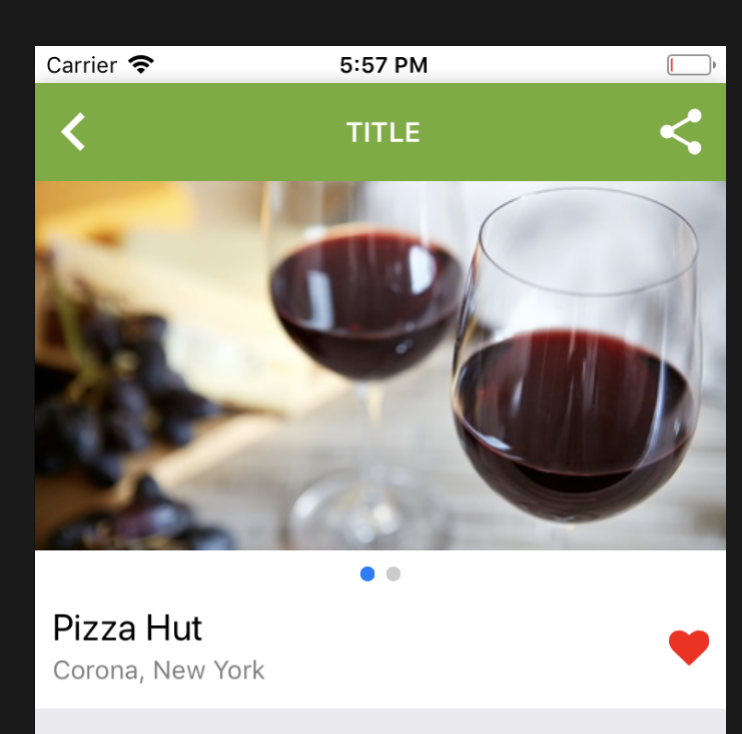
After Clicking on the Heart Icon

Contributor guide
No contributing guide indexed for this repository
First steps
- Read the whole issue, then the project's contributing guide.
- Comment on the issue to say you are picking it up — it saves two people doing the same work.
- Fork the repository and make your change on a branch.
- Open a pull request that references the issue number.
Research direction
Use the provided ImageSwiper and DealDetailComponent1 reproduction with react-native-swiper ^1.5.13 on iOS and React Native 0.53.0. First reproduce pressing the heart icon and then swiping the image region; compare the Swiper's rendered state before and after the save or remove action. Done means the images remain visible and swipable after the heart is pressed.
Written by the indexing model from the issue text.
Assessment
- Tech stack
- javascript, react-native
- Domain
- mobile
- Issue type
- Bug
- Difficulty
- 3/5
- Estimated time
- 1-2 days
- Activity status
- Stale
- Clarity
- Mostly clear
- Newbie friendliness
- 35/100