leecade / leecade/react-native-swiper
How to make Swipper Component not pushes content up when keyboard is shown ?
Nobody has claimed this yet.
- Dominant language
- JavaScript
- Stars
- 10.5k
- Forks
- 2.3k
- PR merge metrics
- No merged PRs in 30d
Description
Which OS ?
OSX - High Sierra
Version
Which versions are you using:
- react-native-swiper v1.5.13
- react-native v0.50.3
- platform: Android, IOS working fine
Expected behaviour
My custom button avoid view should be right on top of the keyboard
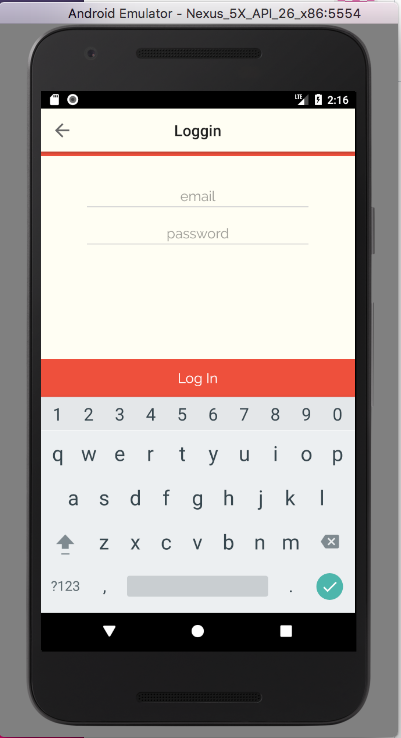
That was my Login screen it has no problem at all because of no Swipper Component. Problem occur at SignUp screen, but without my custom avoid view, the button will automatically align right on top of keyboard, so my guess it is the Swipper's work. I put my custom avoid view here because on IOS, the button will be hidden away by keyboard.
Actual behaviour
My custom avoid view button was on twice height of where it should be, which is right on top of the keyboard
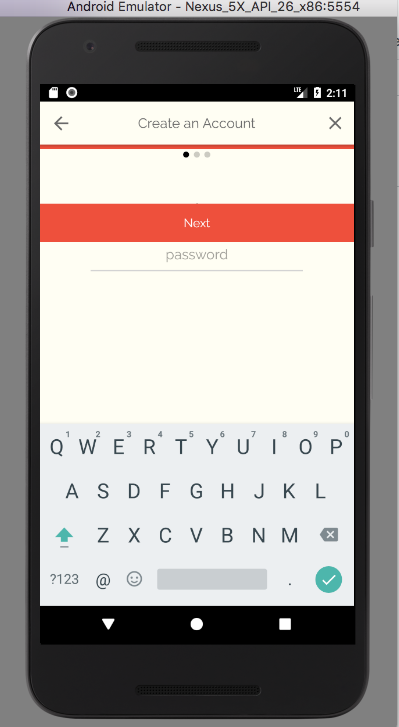
That was signup screen
How to reproduce it
When I wrapper my button with my custom avoid view button instead of normal View component.
code:
<View>

    <Swipper>
        ...
    </Swipper>

    // this custom avoid view just simple event to detect keyboard hide/show, and use animation to align keyboard
    <MyCustomAvoidView>
        button...
    </MyCustomAvoidView>

</View>
Contributor guide
No contributing guide indexed for this repository
First steps
- Read the whole issue, then the project's contributing guide.
- Comment on the issue to say you are picking it up — it saves two people doing the same work.
- Fork the repository and make your change on a branch.
- Open a pull request that references the issue number.
Research direction
Start by reproducing the provided wrapper with react-native-swiper v1.5.13 and React Native v0.50.3 on iOS, comparing the Swiper screen with the working Login screen. Check how the custom avoid view and Swiper respond when the keyboard appears. Done means the button stays directly above the keyboard instead of being shifted to twice its expected height.
Written by the indexing model from the issue text.
Assessment
- Tech stack
- javascript, react-native
- Domain
- mobile
- Issue type
- Bug
- Difficulty
- 4/5
- Estimated time
- 3-5 days
- Activity status
- Stale
- Clarity
- Needs clarification
- Newbie friendliness
- 30/100