learningequality / learningequality/studio
Studio should warn when an unplayable video is uploaded, i.e. one without H.264 encoding
Nobody has claimed this yet.
- Dominant language
- Python
- Stars
- 191
- Forks
- 307
- Avg merge
- 5d 6h
- Merged PRs (30d)
- 10
Description
Summary
The picture of a video uploaded by a content curation server user does not appear in the "preview" tab on the content curation server, or when imported into Kolibri. The video plays well when downloaded. Upon further review, it appears that the codec does not have H.264 encoding. It would be great if an alert could be generated when the content is imported, so that the user knows that the video will not render properly.
Cateogry
ENHANCEMENT
Usage Details
Please give details in how were you using the Content Curation Server.
- Browser: Chrome
- Channel: b3556676589f4c408142da1d0f06cebc
- Topic/Content Item: Look in the top folder and then the top folder for the folder named: "Lesson One - Dealing with Numbers" - first and second video (note that the folder also contains KA video content so be sure to look at the first and second videos).
How to reproduce
- View video in cc server "preview" window and in Kolibri
- Download video from Kolibri to see the original video
Screenshots
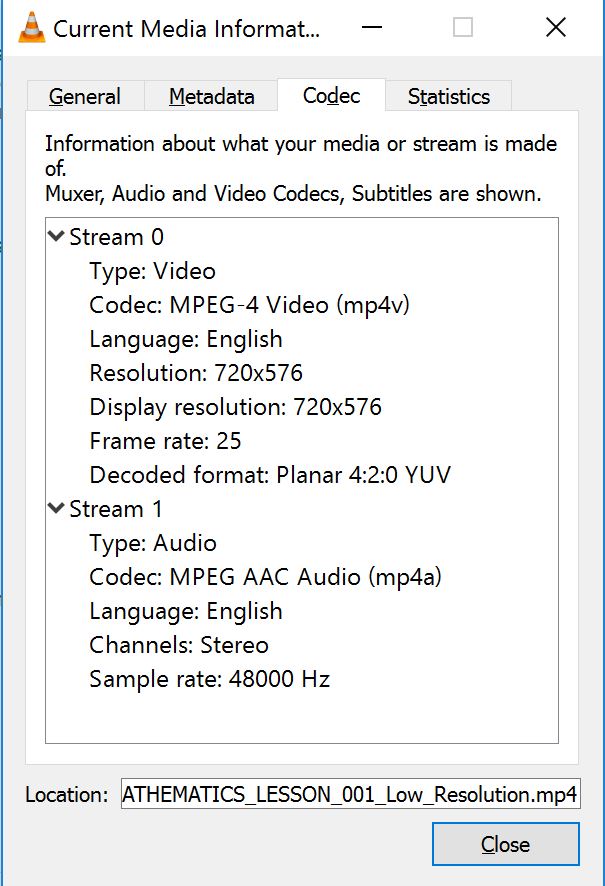
Real-life consequences (anything community should be aware of, for instance how it affects end users)
I don't have a sense of how common it is to lack this encoding from user generated content. It seems to me to be problematic if it cannot be supported, but if that is the case, it would be helpful for a warning to pop up and potentially a recommendation on how to properly encode the video so that it renders properly. It would be disappointing if locally created content (such as the videos mentioned in the channel above) could not be viewable by users.
Contributor guide
First steps
- Read the whole issue, then the project's contributing guide.
- Comment on the issue to say you are picking it up — it saves two people doing the same work.
- Fork the repository and make your change on a branch.
- Open a pull request that references the issue number.
Research direction
No files, tests, or entry points are identified in the issue. Start by reproducing the preview and Kolibri behavior with a video lacking H.264 encoding, then trace the content import flow to identify where codec validation and user-facing alerts belong; done means the import warns affected users and explains the rendering limitation.
Written by the indexing model from the issue text.
Assessment
- Domain
- content
- Issue type
- Feature
- Difficulty
- 4/5
- Estimated time
- 3-5 days
- Activity status
- Stale
- Clarity
- Needs clarification
- Newbie friendliness
- 35/100