learningequality / learningequality/studio
Content Library - A starred channel doesn't disappear from view when unstarred
Open
Nobody has claimed this yet.
- Dominant language
- Python
- Stars
- 191
- Forks
- 307
- Avg merge
- 5d 6h
- Merged PRs (30d)
- 10
Description
Observed behavior
If the Starred filter is applied and I click the star icon to remove a starred channel, the unstarred channel doesn't disappear from the list.
Expected behavior
A starred channel should disappear from view when unstarred
Additional information
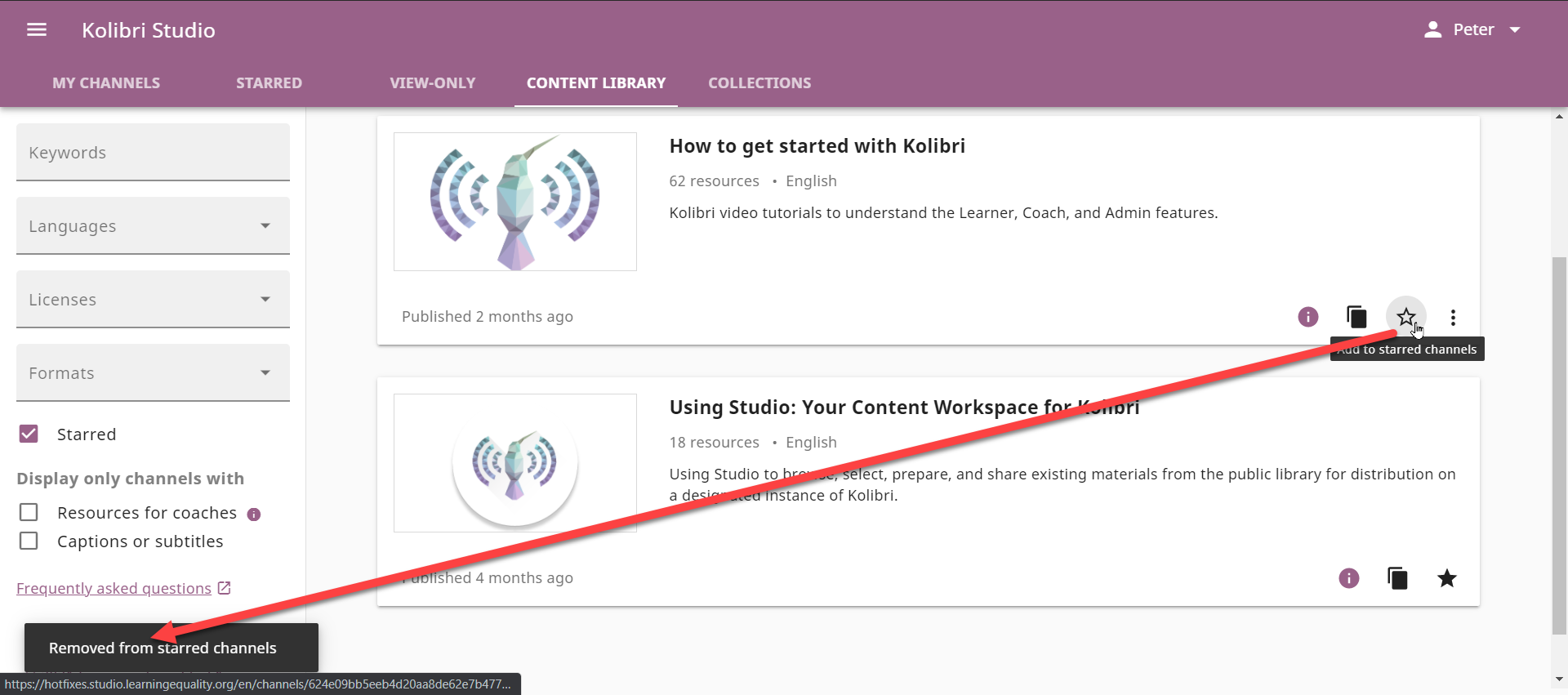
Steps to reproduce the issue
- Sign in to Kolibri Studio and go to Channels/Content Library
- Click on the star icon of a published channel to add it to the list with starred channels
- Click on the "Starred" filter checkbox on the left-hand side to filter all starred channels
- Unstar a channel by clicking on the star icon on the card
See also: https://github.com/learningequality/studio/pull/3070
Usage Details
- OS: Windows 10
- Browser: Chrome
- URL: https://hotfixes.studio.learningequality.org/en/channels/#/public?bookmark=true&page=1
- Other information that may be relevant:
Contributor guide
First steps
- Read the whole issue, then the project's contributing guide.
- Comment on the issue to say you are picking it up — it saves two people doing the same work.
- Fork the repository and make your change on a branch.
- Open a pull request that references the issue number.
Research direction
Reproduce the issue in Kolibri Studio's Content Library with the Starred filter enabled, then trace the channel card star-toggle behavior from that view. Done means unstarred channels are removed immediately from the filtered list; verify by repeating the listed steps.
Written by the indexing model from the issue text.
Assessment
- Domain
- frontend
- Issue type
- Bug
- Difficulty
- 3/5
- Estimated time
- 1-2 days
- Activity status
- Stale
- Clarity
- Mostly clear
- Newbie friendliness
- 42/100