Fails to create file correctly via file explorer UI, lapce on Windows host with WSL project
Nobody has claimed this yet.
- Dominant language
- Rust
- Stars
- 38.9k
- Forks
- 1.3k
- Avg merge
- 19m
- Merged PRs (30d)
- 1
Description
      Host OS:  Windows 10
       WSL OS:  Ubuntu
Lapce Version:  v0.1.3
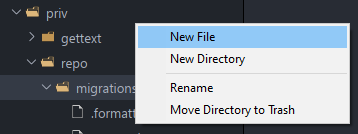
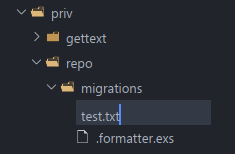
Just installed Lapce to give it a try and have encountered a problem when creating files via the file exlorer on the left hand side. When clicking on a folder a few levels deep of root and selecting New File - I fill in the name of the file but it creates a file with the parent folder name, escaped backslash and the name of the file I wanted to create.
This then fails to show in the explorer once created but can be seen via the terminal as below.
I am using lapce installed on windows, connected to WSL (ubuntu) with a WSL root workspace and suspect there is an issue with file creation via the UI, maybe it is trying to do some windows filesystem path escaping that doesn't work well with linux filesystem.
Images
Creating the file
Seeing the file via the terminal

Contributor guide
First steps
- Read the whole issue, then the project's contributing guide.
- Comment on the issue to say you are picking it up — it saves two people doing the same work.
- Fork the repository and make your change on a branch.
- Open a pull request that references the issue number.
Research direction
Reproduce the file-creation flow in the file explorer UI with a Windows host, Ubuntu WSL project, and a workspace rooted in WSL. Compare the created path with the terminal output and trace how the explorer handles nested paths; done means a new file uses the requested name and appears in the explorer.
Written by the indexing model from the issue text.
Assessment
- Tech stack
- linux, rust, ubuntu
- Domain
- desktop, devtools, operating-systems
- Issue type
- Bug
- Difficulty
- 4/5
- Estimated time
- 3-5 days
- Activity status
- Stale
- Clarity
- Mostly clear
- Newbie friendliness
- 35/100